
Opus Clip alternatives: what each one takes away
Every cheaper OpusClip alternative costs you something. I ran four tools on one 35-minute file — Vizard did it for $0.85 against $2.03 — and priced two more.
Contents
The short answer
Cheapest like-for-like: Vizard — 30 clips against the 32 OpusClip produced on its Pro trial, same file, 85 cents a job on its Creator annual rate against $2.03 on OpusClip’s Pro annual, default models both sides. On my run its free plan released ten of the thirty it found.
Free, if chapters are useful: CapCut on its default setting — a 1080p free export with no watermark, which no other tool I ran gave me, though on my file it divided the recording into eight long sections rather than picking short highlights.
Flat fee that beats OpusClip past about 26 source minutes: Submagic — 8 credits at 35 minutes and 8 quoted again at 46, so length stops driving the bill. Its trial cannot export a file.
Billed on output rather than input: Klap — the only per-generated-clip meter here, right for long sources that yield few clips. Its trial paywalls the generate step, so I never saw its clips.
The name splits the search. The product writes itself OpusClip and sells from opus.pro, so Opus Clip, OpusClip and Opus Pro all get typed in looking for the same thing, and these Opus Clip alternatives answer all three.
The other thing to register: when I pulled this search on 17 September 2026, seven of the eight organic results were a competitor’s own page telling you it is the answer. The only result that was not a vendor selling itself was a two-year-old Reddit thread.
What does Google’s AI Overview get wrong here?
Google’s AI Overview sits above those results and names four alternatives: Vizard, Klap, Submagic and CapCut. Each description is footnoted to a vendor’s own website. I have run three of the four to completion — everything except Klap, whose trial never reached a clip — and the summary is checkably wrong about two of them, with a third I can rebut from Klap’s own pricing page.
On CapCut it says, verbatim, that it is the “Best completely free option, though it requires manual clip selection and trimming without AI highlight detection.” That is not what CapCut does. Its Long video to shorts feature is automatic detection, promoted on its own logged-in homepage, and when I fed it the 35-minute panel on the free plan it returned eight finished clips unattended. No manual selection, no trimming. I am confident about this one because I had the same thing wrong myself in an earlier draft of another post, and testing it is what corrected me.
On Submagic it says magic clipping “may require an add-on fee depending on your tier.” On the trial I ran, Magic Clips cost a flat 8 credits a job, and 8 again quoted on a 46-minute source. No add-on was presented at any point. I tested one trial rather than every tier, so I cannot tell you no tier anywhere has such a fee — only that the claim did not match what I was charged.
| What the AI Overview says | What I found |
|---|---|
| CapCut “requires manual clip selection and trimming without AI highlight detection” | Wrong. 8 clips returned unattended on the free plan, 1:26–3:58, no manual step |
| Submagic “magic clipping may require an add-on fee depending on your tier” | Not on the trial I ran. Flat 8 credits a job, 8 again quoted at 46 minutes, no add-on shown |
| Vizard “Best for teams and collaborative workspaces” | I ran Vizard solo, so the teams claim is untestable here. What I can tell you is its free plan released 10 of the 30 clips it found |
| Klap “Best value per minute for TikTok-first creators” | Wrong meter. Klap does not bill per minute at all; it charges per generated clip |
The Klap row is the one I would flag to anyone reading that summary as a shortlist. Google describes Klap as the “Best value per minute”, and Klap’s whole commercial argument is that it does not charge by the minute at all, which its own pricing page frames as “Only pay for clips you generate.” The summary describes it with the metric it was built to avoid.
The pattern matters more than any single error. A summary assembled from pages that are each selling one of the alternatives will reproduce what those pages claim.
Who is telling you to leave Opus Clip?
Worth looking at the results themselves before taking any of their advice, because the list is unusually lopsided.
| # | Result | What it is |
|---|---|---|
| 1 | reddit.com/r/podcasting | a thread from two years ago |
| 2 | vizard.ai/alternatives/opus | Vizard, on Vizard |
| 3 | ssemble.com/blog | Ssemble’s blog, ranking Ssemble first |
| 4 | ngram.com/blog | ngram’s blog, ranking ngram first |
| 5 | pixo.video/alternatives/opus-clip | Pixo, on Pixo |
| 6 | klap.app/alternatives/opus-clip | Klap, on Klap |
| 7 | wayin.ai/blog | WayinVideo, on WayinVideo |
| 8 | aivideocut.com | AI Video Cut, on AI Video Cut |
Seven of the eight are a company explaining why its own product is the alternative you want. Two of those are blog posts shaped like independent listicles that happen to rank their own tool at number one. The single non-commercial result is a Reddit thread badged two years old.
I have never run Ssemble, ngram, Pixo, WayinVideo or AI Video Cut, and this post makes no claim about any of them. They are here as evidence of what the page looks like, not as candidates.
The Reddit thread is worth a moment precisely because it is the only result on the page with nothing to sell. I have not opened it; what I have is the snippet Google surfaces, which reads: “If you want AI to auto-pick clips for you, Descript has gotten better at this, Vizard is solid for auto-clipping, and Podsqueeze works well …” Two of the three names in that fragment match where I ended up, which is a reasonable showing for a thread with no test behind it. I have never run Podsqueeze and am reporting only that the snippet mentions it.
That thread is also badged two years old, and the pricing has moved under it — Vizard’s current rates carry a promotional badge, and OpusClip’s moved twice on 10 September, mid-test. A dated thread is better evidence than an undated sales page, and it is still not a substitute for feeding the same file to each tool and counting what comes back. That is the gap this post is filling, and it is a strange gap for a search term with this much commercial intent behind it.
How did I test these Opus Clip alternatives?
Four tools, the same recording into each (OpusClip took it by YouTube link, the rest as a file), nothing reconfigured, between 10 and 15 September 2026. Where a tool let me download what it made, I judged the file: all eight of CapCut’s went through ffprobe, and I pulled one clip from Vizard and eight from OpusClip. Submagic’s trial paywalls export entirely, so everything I say about its 31 clips is read off the results page and I make no claim about delivered quality.
Submagic also took two attempts — its first run, fed a YouTube URL, returned nothing at all and still took 8 credits, and the 31 came from a second account fed the file from disk. The footage was a World Economic Forum panel from its 2026 annual meeting, “An Honest Conversation on AI and Humanity”, running 35 minutes and 27 seconds with several speakers. It carries a Creative Commons Attribution licence, so the output can be shown here rather than summarised.
One caveat sits over everything I say about OpusClip itself. My run went through an account badged “Free Trial (Pro Plan)”, so the 32 clips and the feature set are trial-tier output. Anything here about the free plan comes off OpusClip’s published pricing page rather than out of that run. The OpusClip review is where those 32 clips, their scores and the feature set are set out in full.
Two things I deliberately did not do. I did not re-test OpusClip on its actual free plan, because the question this page answers is what a paying user gives up by moving, and the free tier has neither the score nor the editing that make the comparison interesting. And I did not try to rank the five tools on this results page that I have never run, because a ranking assembled from marketing copy is the thing this post exists to argue with.
Klap, Descript and Captions appear here because a leaver’s shortlist is not the same as a tested set. I priced Klap and Descript and read Captions’ documentation, and later put two files through Klap’s trial without ever reaching a clip. None of the three went through this file, and each section says so rather than letting the comparison imply otherwise.
| Tool | Cost for one 35-minute job | Against OpusClip | The plan it ran on |
|---|---|---|---|
| OpusClip | $2.03 (Pro annual) | the baseline everything else is measured against | ”Free Trial (Pro Plan)“ |
| Submagic | $1.53 (Pro annual) | 25% cheaper than OpusClip, same dates | 15-credit trial |
| Vizard | $0.85 (Creator annual) | OpusClip cost 2.4 times as much, rates read 10–15 Sep 2026 | Free |
| CapCut | $0 | costs nothing at all | Free |
Clip counts are deliberately not in that table. Three of the four landed within a couple of clips of each other; CapCut is the outlier, and the best AI clipping tool has the full count comparison; what this page is weighing is the price against what disappears.
CapCut aside, every figure in the cost column is the Pro annual rate, or Creator in Vizard’s case. Submagic’s is not its own floor: it runs the same job at $1.09 on Business and $2.13 on Starter, so its cheaper-looking tier is the dearer one per job. Vizard’s Creator rate and OpusClip’s Pro annual are each the cheapest paid rate that tool offers for this job. The Submagic pricing breakdown has that ladder in full.
1. Vizard — the same job for 42% of the price

Vizard is the direct answer to a bill you think is too high. Fed the same panel, it found 30 clips against the 32 OpusClip returned on its Pro trial, and the ten Vizard handed over were the tightest of anything I ran at 0:32 to 0:56 — useful, because a highlight that runs long stops being a highlight.
| Vizard, measured | Result |
|---|---|
| Clips found | 30 |
| Clips delivered on the free plan | 10 |
| Clip length | 0:32–0:56 across the ten it delivered, the tightest of the four I ran; the other 20 were never seen |
| Cost per job | $0.85 at the Creator annual rate |
| Against OpusClip | OpusClip cost 2.4 times what Vizard did at the rates I read between 10 and 15 September 2026; strip both promotions and it is 2 times |
On their default models the two meters are identical, which is what makes this comparison unusually clean: one credit buys one minute of submitted footage at either tool. The list prices match too, at $29 a month before either tool’s discount. Step off the default and it drifts — Vizard’s second model quoted 44 credits for the same file, and OpusClip rounds partial minutes down while charging a full one for anything shorter. For $29 a month Vizard’s Creator tier hands you 600 of those credits; OpusClip’s Pro gives half as many for the same outlay.
Priced against the actual job, the panel came to 85 cents at Vizard and $2.03 at OpusClip. Hold both promotions in mind, though: Vizard’s annual rate wore a 50% badge the day I read it and OpusClip’s was cut from a $29 list, so whichever discounts happen to be live move the multiple around. Strip them both and the gap narrows to double rather than 2.4 times.
And the catch, which is a serious one. Vizard’s processing screen counted thirty. The results page showed ten, and a banner at the foot of the list offered to “Remove watermark and unlock 20 more clips”. The credits had already bought the analysis on all thirty, so the upgrade is charging for the handover rather than for the analysis. No other tool in my test found clips and then kept them off the results page.

What you give up moving here is the surrounding toolkit rather than the clipping. There is no XML export and no four-axis breakdown. Vizard is not a narrower product — its workspace carries its own row of AI apps and a full editor — but it does not hand the cut onward the way OpusClip does. What you get instead is a number out of 10, a written rationale, and clips that are tighter than the ones you were getting.
Everything from that run, including the ten clips it let go of, is in the Vizard review.
2. CapCut — on Auto, it costs you highlight-picking

Of the four I ran, CapCut is the one whose free output needs no cleaning up before it goes out. Its eight clips all came down to my machine and all eight went through ffprobe: 1080×1920, 30fps, and not a CapCut mark on any frame I checked.
| CapCut, measured | Result |
|---|---|
| Clips returned | 8, running 1:26–3:58 |
| Share of source covered | 73.6%, sequential and non-overlapping |
| Export | 1080×1920, 30fps, no watermark |
| Cost | $0 |
| The real ceiling | 512MB of cloud storage |
Then look at the shape of what came back. Eight clips totalling 26 minutes 5 seconds, running in sequence and never overlapping — nearly three quarters of the panel. A setting that returns that proportion of its input is not selecting from it, it is dividing it. What Auto gives you is the recording broken into chapters, which is exactly right for a webinar you want split into sections and not the same product as a shortlist of postable moments.
That is Auto’s behaviour rather than the tool’s. Switch to its under-60s preset, which I ran head to head against Auto on a shorter 12-minute excerpt of this recording, and coverage falls to 27.4% from 88.3%, with separate picks rather than a sequence. It overshoots its own label doing it, at 1:04, 1:05 and 1:08, so what the preset really trades is the chaptering rather than the length; the CapCut walkthrough has that comparison. But Auto is where the screen opens, so it is the result most people will see.
This is the claim Google’s AI Overview gets backwards. The eight clips arrived unattended; what CapCut does not do is score them; it tagged four of the eight and left the rest unlabelled.
The ceiling here is disk space, not branding. Finished renders queue into a 512MB cloud allowance until you fetch them, and four exports of two-to-four-minute clips at 1080p filled mine. Two other jobs failed with no notice at all and the seventh was turned away. Clear the ones you have already saved and the allowance frees up on the spot.
Full export testing sits in the CapCut review; CapCut pricing explains why its paid number changes with where you buy.
3. Submagic — costs you the export until you pay

Submagic is the alternative that changes the shape of the bill rather than its size. Where OpusClip and Vizard count the minutes you submit, Submagic charges 8 credits and stops counting: 8 for the 35-minute panel, and 8 quoted again when I put a 46-minute file in front of it, the longest I tried.
| Submagic, measured | Result |
|---|---|
| Clips returned | 31, one every 69 seconds of source |
| Exportable on the trial | none |
| Score range | 97–90, mean 93.0 |
| Cost per job | $1.53 at the Pro annual rate |
| Meter | flat per job, not per minute |
At 35 minutes that lands at $1.53, which is dearer than Vizard. The advantage flips at about 26 source minutes against OpusClip and about 63 against Vizard — $1.53 divided by 5.8 cents and 2.42 cents a minute respectively — because Submagic’s charge is fixed while the per-minute tools carry on adding. That is arithmetic on published rates, not a test; the longest file I actually put through Submagic was 46 minutes.
It also explains itself better than anything else I ran. All 31 clips came with a written case for why that moment had been picked, which turns triage from guesswork into reading. The catch is that all 31 scores landed between 90 and 97 — a seven-point band on a hundred-point scale — so the reasoning reads like analysis and functions like advocacy for its own output.
The wall is the trial itself. There is no free plan at all, and the 15 credits do not buy a file. On a separate captions job I took as far as the export panel, pressing export raised a paywall and closing that raised a referral offer behind it. The 31 clips were never taken that far — they sat on screen, and nothing from that run left the building.
The Submagic review covers the run in full.
4. Klap — costs you the ability to try before buying

Klap earns a place on this page for its meter rather than for anything I have measured, and I want to be plain about that: I have since signed in and tried. The trial took a full upload and then paywalled the generate step, so I can still tell you nothing about the clips it produces — the Klap review has that run in full.
What makes it worth naming is the billing shape, which is unique among the tools here. Every tool I ran bills what you put in — Submagic at a flat rate per job, the other three by the source minute. Klap bills the clips coming out: billed yearly, $14 a month covers 100 of them, $39 covers 300 and $94 covers 1,000, which works out near 14, 13 and 9.4 cents apiece as volume rises. Month to month the same plans are $29, $79 and $189, so every per-clip figure here roughly doubles. Its pricing page states the principle plainly: “Only pay for clips you generate.”
| Tool | What it charges for | One 35-minute job, at the rates I read 10–15 Sep 2026 |
|---|---|---|
| OpusClip | minutes in | $2.03 at the Pro annual rate; my run was on a Free Trial (Pro Plan) account |
| Submagic | the job, flat | $1.53 at the Pro annual rate; my run was on the 15-credit trial |
| Vizard | minutes in | $0.85 at the Creator annual rate; my run was on the free plan |
| CapCut | minutes in | $0, inside 60 free minutes a month |
| Klap | clips out | no clip ever generated; ≈14¢ a clip at 100 a month billed yearly, ≈29¢ monthly |
Hold that against the problem this page exists to solve. A three-hour recording costs 180 credits at a per-minute tool before you have watched a second of what came back. My own hit rate on OpusClip’s run was five keepers out of 32. That is one judgement about one tool on one file, and a per-clip meter does not rescue a rate like that, because the clips you bin were still generated. What it changes is what the bill tracks: how many clips come back, not how long the source runs.
Run the arithmetic against my own job and the shape gets clearer. OpusClip charged 35 credits for the 35-minute panel and returned 32 clips, five of which I would have published — on my judgement, on that one file — which works out at about $0.41 per clip I actually wanted, at the Pro annual rate.
Klap’s middle tier works out at roughly 13 cents a generated clip billed yearly if you use all 300, or 26 cents month to month, so it wins or loses on how many clips a source produces. Had it returned as many as OpusClip did from this file, 32 at that rate would come to about $4.16, roughly twice OpusClip’s $2.03 for the job; a source that yields five would cost about 65 cents. Klap’s trial never generated a clip for me, so I cannot tell you which of those it would be, which is why the meter matters more than the sticker price.
Klap has no free plan, and the trial account it does offer stops at the generate step, so there is still no way to see what it produces without paying. Its own comparison page asserts that its entry tier undercuts OpusClip’s at $14 a month billed yearly against $15; our own reading has OpusClip’s entry tier at $15 monthly-only. That comparison is the vendor’s framing, not mine.
5. Descript — costs you clip-first working entirely

Descript I priced here rather than ran, and it earns a place on a leaver’s shortlist for a reason that applies to none of the others: clipping is not what it is. The product is a transcript-driven editor that happens to cut clips too, which makes it right for one particular person — whoever was already going to be editing, with the clips arriving as a by-product.
Delete a word from the transcript and the cut follows it. That is a different relationship with the footage than any tool above, and it is why the price comparison that governs the rest of this page does not really apply. Two budgets run rather than one: media minutes on one side, AI credits on the other, and the free tier refills only the former. That is 60 media minutes each month against a single grant of 100 credits, with a watermark on anything you export. Paid opens at $16 a month on annual billing.
| Descript, priced not run | Value |
|---|---|
| Free plan | 60 media minutes a month, plus 100 AI credits granted once |
| Free export | watermarked |
| Paid from | $16 a month billed annually |
| Meters | two — on the free plan, media minutes refill and AI credits do not |
| What it really is | a transcript editor that also clips |
That two-budget shape is worth understanding before you switch, because it is one of the meters here that can strand you mid-project. Media minutes cover the footage you bring in; AI credits cover the generative work on top. Exhaust the credits with media minutes still on the clock and only half the product keeps working. CapCut can strand you too — its 512MB ceiling stopped my run with clipping minutes to spare — but Descript is the only one of the tools I looked at closely where the free plan’s two budgets refill on different schedules.
Descript was priced here, not run, so its clip selection stays unrated against the four I measured. What I will say is that if the reason you are leaving OpusClip is that every clip ends up in an editor regardless, then a tool that removes the second step is worth more to you than saving $1.18 on the first. It also answers the XML-export question from the other end: rather than handing a cut to Premiere, it tries to be the place the cut gets finished.
Judge it on the editor, which is what the Descript review actually examines.
6. Captions — costs you a predictable bill

Captions went untested here, so what follows concerns its published figures rather than its output — and those figures disagree with each other.
The comparison table on its pricing page puts None in the free plan’s AI usage credits row. Its help documentation, hosted on the same domain, credits that plan with 60 to 200 and adds that they never refresh. Both were live on 16 September 2026. The same documentation lists a $9.99 Basic tier that the pricing page does not show at all, so a buyer looking at the published plans sees an entry price two and a half times the cheaper of the two figures.
None of that tells you whether the product is good. It does mean the published figures are no basis for a budget until your own dashboard shows you a number, which goes for any product whose pages argue with one another.
| What Captions publishes, by source | What it says |
|---|---|
| Pricing page, AI usage credits | None |
| Help documentation | 60 to 200, and they do not refresh |
| Google’s AI Overview for the Captions brand | there is no free plan |
| Entry paid tier on the pricing page | $24.99 a month |
| Entry paid tier in the help docs | $9.99, absent from the pricing page |
It is also the reason Captions sits last here rather than being left off. For a leaver, the thing that matters about a candidate is whether you can predict the bill, and a tool whose entry price is either $9.99 or $24.99 depending which of its pages you read is hard to plan around. Google’s summary of the brand asserts there is no free plan whatsoever, which agrees with neither of the company’s own pages. Three answers, and Captions wrote two of them.
Our Captions review works through the full ladder.
Why does OpusClip’s price keep changing?
The number you are comparing against may not be the number you pay. Over two days inside that test window I read OpusClip’s pricing page four times and saw the annual figure sit at $208.80 on some visits and $174 on others. I watched the annual figure change twice inside a single day.
That has two consequences for this decision. The first is practical: look at the page on the day you intend to buy, because a comparison written a week ago — including this one — may be measuring against a promotion that has since lapsed or started. The second is that the gap between OpusClip and Vizard is itself a moving target. At the rates I read, one job cost $2.03 against 85 cents. Strip both promotions and the same comparison is 2 times rather than 2.4.
The OpusClip pricing breakdown tracks those readings and what each tier buys. None of that changes the ranking on this page, because the cheaper tools were cheaper at every reading I took. It does mean the multiple is a range rather than a fact, and anyone quoting you a precise figure for how much you will save by switching is quoting a snapshot.
What do you give up by leaving OpusClip?
At the per-job rates in the cost table above, every alternative I ran is cheaper than OpusClip. That is the easy half of the decision. The harder half is that OpusClip carried more around the clipping than anything else I ran, and the sections above each take a piece of it away.
| What OpusClip carried | Found in the alternatives I ran? |
|---|---|
| Export XML to Premiere Pro and DaVinci Resolve (option seen, not exercised) | No, in none of the other three export panels |
| Four graded axes under the score: Hook, Flow, Value, Trend | No; Submagic writes prose, Vizard prints one number with a written rationale |
| Source timestamp and transcript segment per clip | Partly — Vizard shows timecoded transcript excerpts, CapCut shows source ranges |
| Twelve clipping-adjacent modes in one start screen | No equivalent, though CapCut and Vizard both carry their own feature rows |
| Highest clip count of the four, 32 from 35:27 | Close — Submagic 31, Vizard 30 found |
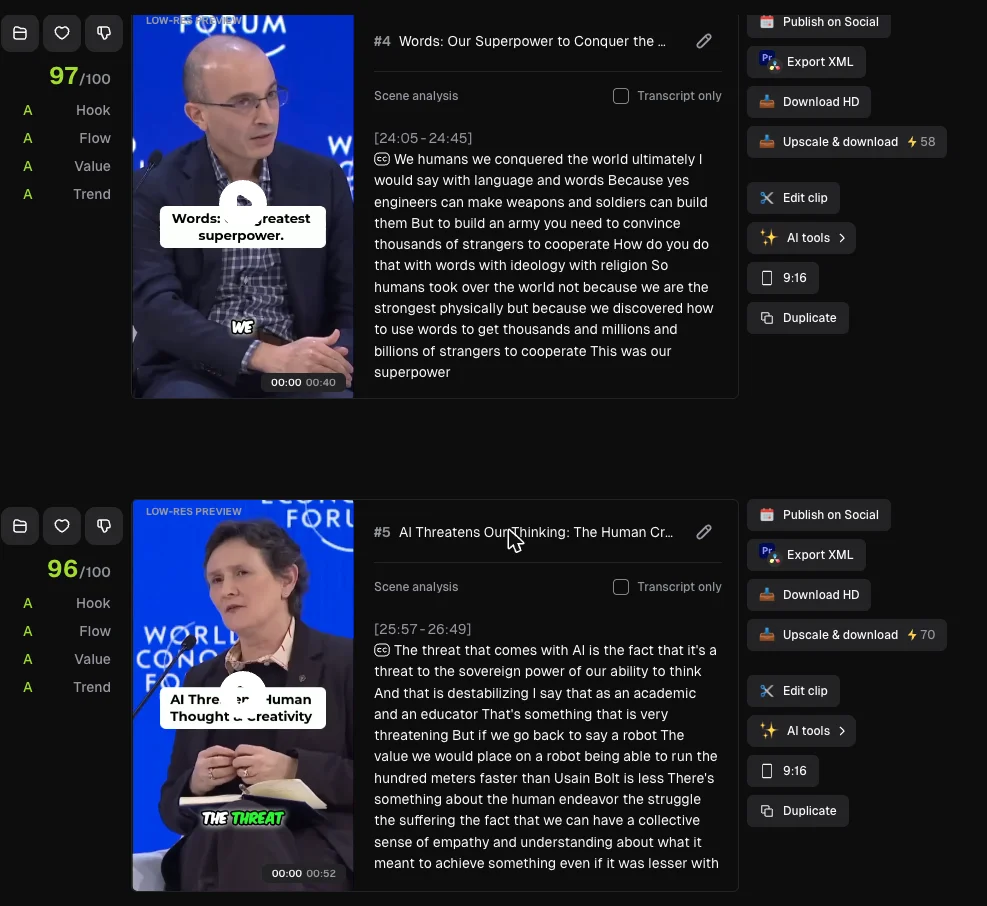
That is the thing this section is about, in one screen: the four graded axes down the left, the source timestamp and transcript in the middle, and Export XML sitting in the action row on the right. It is also where the upscale price is visible.
One cost worth its own line, because it is the sharpest pricing surprise in my whole run: every preview I saw in list view carries a low-res label, and an upscale option sits in each clip’s panel. On the clips I looked at that upscale was priced between 35 and 128 credits for a single clip, against 35 credits for the entire 35-minute job. Buying one upscale can cost more than the run that produced it. I did not purchase one, so I cannot tell you what it delivers — only what it costs to find out.
One thing the table does not capture, and it cuts against OpusClip: the trial I ran burned Created with and the OpusClip mark into the top-left of all six clips whose frames I inspected, and removing the watermark is listed as a $15 Starter feature. I did not establish whether that mark is a trial default you can switch off. So the toolkit above is real, but none of the clips I inspected was publishable as it stood. The OpusClip review has the frames.
Two honest qualifications on that table. The four graded axes I saw on the six clips I opened rather than across all 32, so treat it as a feature I confirmed rather than a survey. And the whole picture is a paid-tier one: OpusClip’s own compare-all-plans table shows the free plan with no virality score at all, no editing, and clips that stop being exportable after three days.
Which means the real question is not whether OpusClip does more. It does. The question is whether you open any of it. If the XML export is load-bearing in your workflow, nothing on this page replaces it and the price difference is the wrong thing to be looking at. If you have never clicked it, you are paying 2.4 times Vizard’s rate for a clip count that came out two clips ahead.
Is there a free Opus Clip alternative?
CapCut. Of the four tools I ran, it is the one whose free export came back with nothing stamped on it. That matters here because three of Google’s eight related searches for this term ask about free rather than about cheaper, which is a different question with a different winner, and free AI clip generator is where I worked through it — the free tiers in this category against a single file, with the ones I could only read labelled as reads.
The short version: the word covers several different arrangements there, and exactly one of them ends with something publishable. If you would rather see the same field organised by how each tool bills you, the Submagic alternatives roundup sorts them by meter, and the best AI clipping tool ranks all four on what they actually returned.
Which OpusClip alternative should you pick?
- The bill is the whole problem → Vizard. Same meter on defaults, 42% of the price, two clips behind on the same file. On my run its free plan released ten of the thirty it found.
- You want to spend nothing and chapters are useful → CapCut. No other tool I ran gave me a clean free export, and on Auto, the setting it opens on, it is the only one that returns sections rather than highlights.
- Your recordings run long → Submagic. A flat fee that was quoted the same at 35 minutes and at 46, so the arithmetic improves the longer your episodes get.
- Your long sources often yield only a few clips → Klap, alone among these in charging for the clips it generates rather than for what goes in. There is no free tier, and its trial will not generate a clip, so my knowledge of its output stops at the price list.
- An editor was always going to be involved → Descript. Two budgets run in parallel and, on the free plan, only the media one refills.
- Stay where you are if you use the XML export or the four-axis breakdown. None of the alternatives I ran offers either, and switching to save $1.18 a job is a bad trade against a workflow that works.
The final word
| Tool | Cost for one 35-minute job, rates read 10–15 Sep 2026 | What it takes away |
|---|---|---|
| OpusClip | $2.03, Pro annual rate; run on a Free Trial (Pro Plan) account | nothing; this is the baseline |
| Vizard | $0.85, Creator annual rate; run on the free plan | XML export, the four axes |
| CapCut | $0, free plan | all of that, plus highlight-picking as long as you leave it on Auto |
| Submagic | $1.53, Pro annual rate; run on the 15-credit trial | the same list, plus any export at all on the trial |
| Klap | no clip generated; ≈14¢ a clip billed yearly, ≈29¢ monthly | unknown; the meter is the argument |
Three of these cost less than OpusClip at the rates I read, and none of the three I ran hands the cut onward the way it does. That is the trade this page exists to make legible, and it is the part the summary above Google’s results does not attempt — partly because the pages it is built from are each selling one of the columns.
One disclosure worth stating plainly rather than burying: OpusClip pays us a commission, and so do Vizard, the tool I have put at the top of this page, and Submagic. Every other tool named here — CapCut, Klap, Descript and Captions — pays us nothing, and CapCut is the one I would send anyone with no budget at all.
For a ranking built on output instead of on what switching costs, the measured four-tool comparison puts them on the same upload.
Frequently asked questions
What is the best OpusClip alternative?
Vizard, on the one test I can point you at. Both tools got the same 35-minute conference panel, and Vizard found 30 clips against the 32 OpusClip produced on its Pro trial, close enough to call level. Its free plan released ten of those thirty and offered to sell me the rest, so the fair price comparison is paid against paid: 85 cents a job on Vizard's Creator annual rate against $2.03 on OpusClip's Pro annual, the same per-source-minute meter, default models both sides.
If your objection to OpusClip is the bill, Vizard answers it at 42% of the price. If your objection is something OpusClip does that you have come to depend on, the honest answer is further down this page, because what the cheaper tools I ran drop is the editorial handoff rather than breadth, and the section on what you give up names the pieces.
Is OpusClip worth 2.4 times what Vizard costs?
It depends entirely on whether you use the parts you are paying for. On raw clip-finding it is not worth 2.4 times Vizard: 32 clips against 30 from the same file is a rounding error, and OpusClip's job cost $2.03 on Pro annual against Vizard's $0.85 on Creator annual, Vizard having no Pro tier.
What the money buys is everything around the clipping. OpusClip carried twelve modes on its start screen when I ran it, offers XML export aimed at Premiere Pro and DaVinci Resolve, an option I confirmed without exercising, breaks its score into four graded axes on the clips I opened, and shows a source timestamp and transcript segment on clips I opened. None of the other three tools I measured offers the XML export or the graded axes, though Vizard shows transcript excerpts and both Vizard and Submagic explain their picks. If you never open any of that, you are paying a premium for a clip count you could have had for 85 cents.
What does OpusClip do that cheaper clipping tools do not?
Three things, all seen on the Pro trial I ran rather than on the free plan. It offers XML export for Premiere Pro and DaVinci Resolve, so a cut can keep moving instead of arriving as a flat file; I confirmed the option in the action row without taking an XML into a timeline. It breaks the score into four graded axes — Hook, Flow, Value and Trend — rather than printing one number, though I opened that panel on six clips, not all 32.
And its start screen gathered twelve modes in one place, from captions and reframing to B-roll and dubbing. CapCut and Vizard are not one-trick products either, but neither collects that much of the workflow behind a single screen. Whether the breadth earns 2.4 times Vizard's price depends on how much of it you open; if clipping is the whole job, Vizard does that job two clips behind for 42% of the price.
Does OpusClip charge for clips you never publish?
Yes, and so does every tool I ran. OpusClip meters the video you feed in, not the clips you keep, so a 35-minute upload costs 35 credits whether you publish ten of the results or none. Vizard and CapCut work the same way, and Vizard debits at upload rather than at generation — the balance showed 60 going in and 25 as soon as the upload was accepted.
Klap uses a different meter. It counts the clips it generates, not source minutes: billed yearly, 100 clips run $14 a month, 300 run $39 and 1,000 run $94. That does not spare you the bin, because the clips you discard were still generated, but a long source that yields little costs little. I signed into Klap's trial and it paywalled the generate step, so read this as a point about billing and not a judgement on its output — I cannot tell you whether the clips it charges for are any good.
Can you move OpusClip clips into Premiere Pro or DaVinci Resolve?
The option is there, and it is the feature most likely to keep you where you are. Export XML sits in the per-clip action row beside Publish on Social and Download HD, and is meant to hand the cut to a timeline rather than a finished MP4. I confirmed the option on the clips I opened but never took an XML into a timeline, so the destination is the vendor's claim, not my test.
None of the other three tools I ran offered anything equivalent in their export panels. If your clips are a first pass that an editor finishes, that turns OpusClip from an expensive clipper into the cheap end of a post-production workflow, and the price comparison on this page stops being the relevant one. Descript answers that shape of work differently again: editing is the product and the clips fall out of it. Descript did not go through this test, so that is a structural observation rather than a result from this file.
Does leaving OpusClip mean giving up the virality score?
Only if you were paying for it. OpusClip's free plan does not include the virality score at all — its own compare-all-plans table shows that column empty — so anyone on the free tier is already living without the feature the product is known for.
On a paid plan you would be giving up something real but not unique. Submagic scores every clip and writes a paragraph arguing for it. Vizard prints a number out of 10 with a written rationale. CapCut prints no number at all — it tagged four of its eight qualitatively and stayed silent on the other four. The more useful question is whether any of these scores earn their keep: across all four tools, on every clip any of them showed me, not one was ever marked as weak. Read them as a running order rather than a judgement, and set aside viewing time whichever tool you end up on.
Keep reading
The best AI video clipping tool, measured on one file
Four AI video clipping tools, one identical 35-minute file. OpusClip found 32 clips, Submagic 31, Vizard 30 but delivered 10, CapCut 8. What that means.
Klap AI review: the free trial that will not make a clip
A Klap AI review from two runs on its free trial. It took a 354MB upload, then asked for money at the generate step. What Klap pricing costs and what it claims.
OpusClip review: 32 clips from one video, 5 worth posting
OpusClip review from a measured run: one 35-minute video in, 32 clips out, and a virality score that never went below 80 on a scale of 100.
OpusClip pricing: the annual discount is 40%, not 60%
OpusClip pricing read live from a signed-in account: Pro is $208.80 a year, not the $174 everyone quotes, and the annual discount is 40%, not 60%.