
Open source AI video generator: only 2 of 6 really are
Six models get called open source AI video generators. Two are Apache 2.0. One is not licensed in the EU or UK, another is free only under $10M revenue.

Contents
What counts as an open source AI video generator?
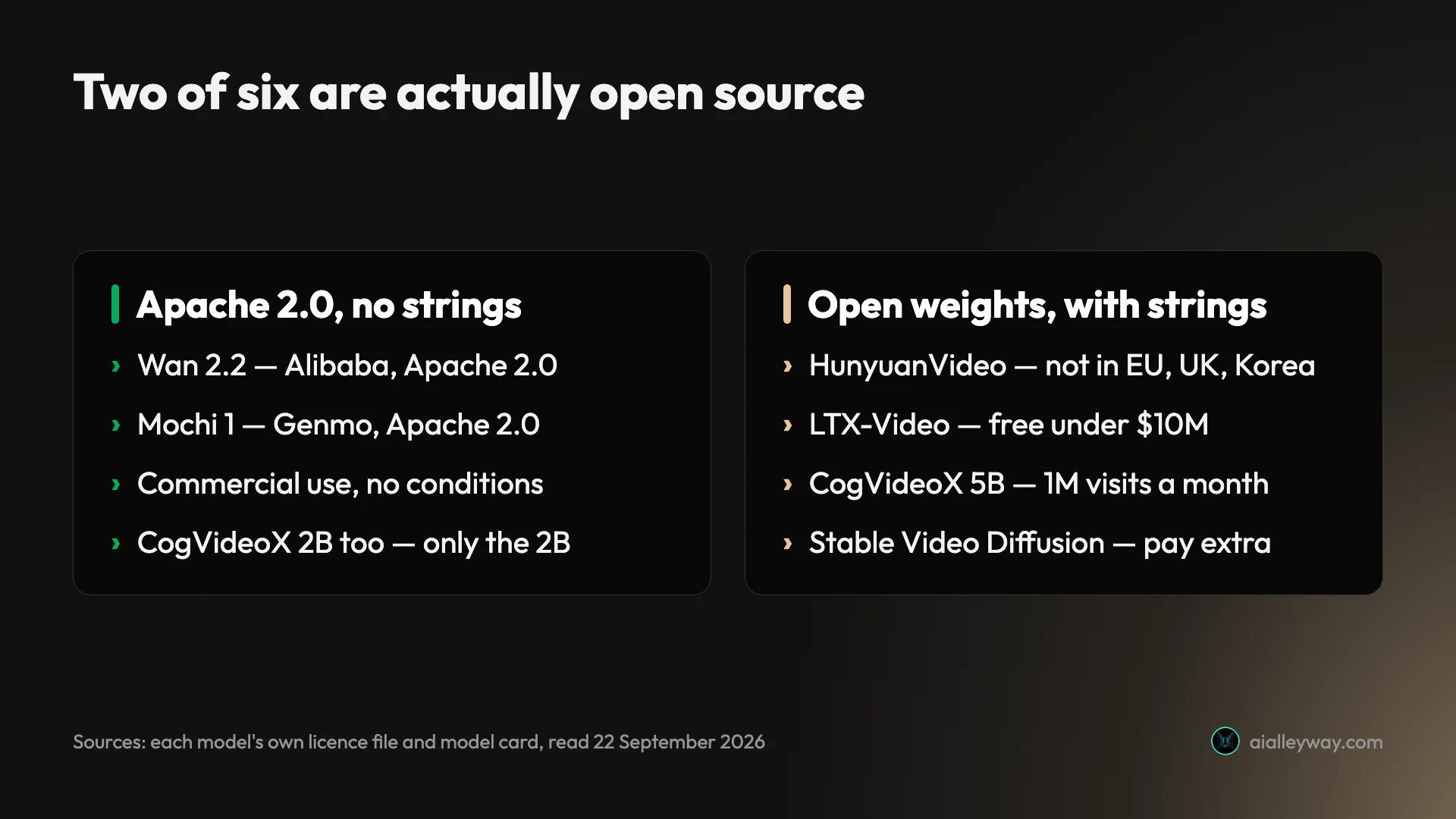
Two of the six models sold to you as an open source AI video generator are open source in the way you probably mean: Wan 2.2 and Mochi 1, both Apache 2.0, both with weights published for anyone to download and both usable commercially with no conditions worth reading. The other four have open weights and a licence with strings, and HunyuanVideo is not licensed in the European Union or the United Kingdom at all.
That distinction is the whole point of this guide, because it is the one nearly every roundup skips. It is worth knowing why: the most prominent “best open source video models” list you will come across is published by a closed, paid hosted product that ranks itself above the actual open models. We have nothing in this category, open or closed, so there is no entry of our own to place. Open weights and open source are not the same thing, and the gap between them is where a licence can bite you after you have already shipped a client’s video.
We have not generated video on any of these models, and nothing in this guide is a quality ranking. What follows is licences and hardware, both of which are checkable facts rather than opinions. For output we have actually tested, the best AI video generator roundup covers the hosted models.
How “open” breaks down in practice
There are three tiers hiding under the phrase open source AI video generator, and knowing which one you are in decides whether you can bill for the result.
Genuinely open source. Apache 2.0 means you can download, modify, run, redistribute and sell the output, with no revenue ceiling and no geographic carve-out. Wan 2.2 and Mochi 1 sit here. Mochi went further than most by shipping an official fine-tuning trainer, not only the weights.
Open weights, conditional licence. The weights are free to download, but the licence attaches conditions — a revenue threshold, a user cap, a region exclusion, or a ban on using output to train a rival model. HunyuanVideo, LTX-Video and Stable Video Diffusion all sit here, in different ways.
Split by variant. CogVideoX is the awkward case: its 2B build is Apache 2.0 while its 5B build runs on a bespoke licence. So “CogVideoX is open source” is half true, and which half depends on the size you downloaded.
| Model | Licence | Commercial use | Licence restriction |
|---|---|---|---|
| Wan 2.2 | Apache 2.0 | Yes, unconditional | None |
| Mochi 1 | Apache 2.0 | Yes, unconditional | None |
| CogVideoX 2B | Apache 2.0 | Yes, unconditional | Only the 2B build |
| CogVideoX 5B | Bespoke CogVideoX licence | Permitted after registering | Commercial use capped at 1M visits a month |
| LTX-Video | LTX License | Free under $10M revenue | Paid licence above it |
| Stable Video Diffusion | Community licence | Separate commercial terms | Must consult Stability’s licence |
| HunyuanVideo | Tencent Hunyuan Community | Yes, outside three regions | Not licensed in the EU, UK or South Korea; 100M MAU cap; no training competing models |
Every row there came from the model’s own licence file or card, read on 22 September 2026. Licences on these models change with releases, so check the file in the repo you actually download rather than trusting a table — including this one.
The six open source AI video models, one by one
Wan 2.2, Alibaba: the one to start with
Wan is the model most people should try first, and the only one here that is both unconditionally licensed and reachable from a mid-range card. Alibaba published it under Apache 2.0, with weights on Hugging Face at huggingface.co/Wan-AI and code at github.com/Wan-Video/Wan2.2.
| Wan 2.2 | At a glance |
|---|---|
| Licence | Apache 2.0, unconditional |
| Weights | Hugging Face, Wan-AI |
| VRAM, Alibaba’s own path | 24GB (5B) / 80GB (14B) |
| VRAM, ComfyUI offloading | ~8GB (5B) |
It supports text-to-video, image-to-video and hybrid prompting, and it brought a mixture-of-experts architecture to video diffusion, splitting denoising across specialised expert models to raise capacity without raising compute.
Hardware is where the published numbers and the community’s numbers part company, and it matters which you read. Alibaba’s own README says the 5-billion-parameter build runs “on a GPU with at least 24GB VRAM” — and that is with its offload flags already switched on. The 14B build asks for at least 80GB.
The 8GB figure you will see quoted everywhere is not Alibaba’s. It is ComfyUI’s, whose Wan 2.2 guide says the 5B “should fit well on 8GB vram with the ComfyUI native offloading”. That is a real route onto a normal gaming GPU, but it is somebody else’s optimisation work rather than the vendor’s promise, and you get it by running their stack rather than Alibaba’s scripts.
It is also the model whose name you may already be paying for without noticing, though not this version of it. Higgsfield charges about 8.75 credits for five seconds of Wan 3.0 at 720p, roughly 34 cents on its Plus plan — and Wan 3.0 is a closed API-only model with no published weights and no Hugging Face repo, not the open 2.2 build this section is about.
Mochi 1, Genmo: the one with an official fine-tuning trainer
| Mochi 1 | At a glance |
|---|---|
| Licence | Apache 2.0, unconditional |
| Weights | Hugging Face, genmo/mochi-1-preview |
| VRAM, Genmo’s own path | ~60GB, one H100 recommended |
VRAM, diffusers | 42GB full precision, 22GB bfloat16 |
Mochi is the other genuinely open option, Apache 2.0 like Wan, and Genmo did something unusual with it: a few weeks after the weights landed it published an official LoRA fine-tuning trainer, so the repo supports building your own fine-tune rather than only running inference. That makes it the pick if you intend to train on your own footage.
Independent write-ups credit it with fluid, high-fidelity motion, and it was among the first video models released with no commercial conditions at all. We have not generated on it, so treat those quality claims as other people’s rather than ours.
The trade is hardware, and it is steeper than its billing as a co-equal open option suggests. Genmo’s own model card puts single-GPU operation at “approximately 60GB VRAM” and recommends at least one H100 — heavier on the vendor path than anything else here except Wan’s 14B. The diffusers route brings that to 42GB at full precision and 22GB in bfloat16, and ComfyUI gets it under 20GB. So Mochi is licence-clean and hardware-hungry, and it is an earlier release than Wan 2.2 with thinner community tooling besides.
LTX-Video, Lightricks: free until you are big
LTX is the lightest thing here. Lightricks publishes the codebase, weights and training tools, and Hugging Face’s diffusers documentation puts the model at “~10GB of VRAM” — the lowest floor of the six, and the second realistic consumer-hardware route alongside Wan’s 5B under ComfyUI.
| LTX-Video | At a glance |
|---|---|
| Licence | LTX-2.x Community License |
| Weights | Published with training tools |
| VRAM | ~10GB via diffusers |
The licence is the thing to read. The LTX-2.x Community License is free for commercial use below $10 million in annual revenue; entities at or above that threshold are required to obtain a paid licence. For most individuals that ceiling is theoretical, but it is a materially different obligation from Apache 2.0: a permission that scales with your success rather than one you get once.
Lightricks also open-sourced LTX-2 in January 2026 with synchronised audio and video generation under open weights, which is a genuine differentiator among open models — the release is documented, though we have not tested the audio. Worth knowing that the current flagship line is LTX-2 and LTX-2.5 rather than the original LTX-Video, so check which build a tutorial is describing.
HunyuanVideo, Tencent: not licensed in the EU or the UK
This is the trap almost no list mentions, and it is the reason this guide exists. Tencent’s community licence states its terms do not apply in the European Union, the United Kingdom or South Korea. Users in those regions need separate licensing rather than simply accepting the published terms.
| HunyuanVideo | At a glance |
|---|---|
| Licence | Tencent Hunyuan Community |
| Weights | Open download |
| VRAM | 45GB at 544p, 60GB at 720p, 80GB recommended |
Two further conditions apply everywhere else. Above 100 million monthly active users you need a separate licence from Tencent, granted at its discretion. And you may not use its output to train a competing model.
Our reading is that the restrictions respond to regional AI regulation rather than to anything about the model. None of it makes HunyuanVideo weak; it is well regarded on output quality, and we have not tested it. It does mean a London or Berlin studio shipping client work on it is operating outside the licence it believes it has.
It is also among the heaviest here. Tencent’s README lists 45GB as the minimum for 544x960 output and 60GB for 720x1280, and recommends 80GB for better quality. There is no consumer-hardware route to this one.
CogVideoX, THUDM: it depends which build
CogVideoX is the awkward one, because “CogVideoX is open source” is only half true. The 2-billion-parameter build is Apache 2.0. The 5B build runs on a bespoke CogVideoX licence from THUDM, the Tsinghua lab behind the model, which permits commercial use but requires you to register for a commercial licence first and caps commercial activity at one million visits a month.
| CogVideoX | 2B | 5B |
|---|---|---|
| Licence | Apache 2.0 | Bespoke CogVideoX licence |
| Commercial use | Unconditional | Register first |
| Ceiling | None | 1 million visits a month |
So whether you can use it commercially depends entirely on which file you downloaded. That is an easy mistake to make and an expensive one to discover late. Note the asymmetry too: HunyuanVideo’s 100-million monthly-active-user ceiling gets quoted everywhere, while CogVideoX 5B’s one-million-visits cap is a hundred times tighter and almost never mentioned. If you want the unconditional version, take the 2B and accept the smaller model.
Stable Video Diffusion, Stability: commercial use is a separate deal
Stability’s model card puts the weights under a stable-video-diffusion-community licence and, for commercial use, points you to Stability’s separate terms. The download is open; the commercial path is a negotiation.
| Stable Video Diffusion | At a glance |
|---|---|
| Licence | stable-video-diffusion-community |
| Weights | Hugging Face |
| VRAM | Documented on an 80GB A100 |
Its documentation is the most candid about compute in this group. The card quotes timings on an 80GB A100, around 100 seconds for SVD and 180 for SVD-XT, while noting that optimisations can trade quality and speed for lower VRAM. An 80GB reference card tells you what the model was built for.
One more name turns up on competing lists: Open-Sora from HPC-AI Tech, which is Apache 2.0. It is named here rather than covered, so the count of six is a scope choice and not an oversight.
What running an open source video model locally involves
We have not stood this pipeline up ourselves — what follows is assembled from ComfyUI’s and Hugging Face’s own documentation and from the community workflow repos, not from an install we ran. Downloading weights is the easy part. There are two routes from there, and which you pick decides how much of your weekend this takes.
ComfyUI, the node-based graphical workflow tool, is how most people run these models without writing code. You install it, drop the model files into the right folder, and load a workflow someone else has already built for that model. The community publishes workflows for each major release, and as the hardware section below shows, that support is often the only thing standing between a model and the card you own.
The diffusers library is the code route. Hugging Face maintains video-generation support in diffusers, which is the cleaner path if you are wiring generation into something else rather than sitting in front of it. It is also where quantised and memory-optimised variants tend to surface first.
| Route | What it is | Best when |
|---|---|---|
| ComfyUI | Node-based graphical workflows | You want the lowest VRAM floor and someone else’s workflow |
diffusers | A Python library from Hugging Face | You are wiring generation into other software |
Either way, expect the real work to be in the middle. Model files for these are large, the folder conventions differ between tools, and community threads report workflows breaking across releases. The models are free and the licences on two of them are unconditional, but “free” here buys you a parts bin rather than a product.
That is the honest counterweight to every “run it locally for nothing” video. The generation is free. The afternoon is not.
What the hardware for local AI video actually costs
The licences are free. The compute is the bill, and the bill is larger than almost any roundup admits, because the numbers everyone quotes are not the numbers the makers publish.
Start with what the vendors themselves ask for. Alibaba wants at least 24GB of VRAM for Wan 2.2’s 5B build and at least 80GB for the 14B. Genmo puts Mochi 1 at roughly 60GB on a single GPU and recommends an H100. Tencent lists 45GB as HunyuanVideo’s minimum at 544x960 and 60GB at 720x1280, with 80GB recommended for quality. Stability benchmarks Stable Video Diffusion on an 80GB A100. By its own documentation, every model here is a datacentre card.
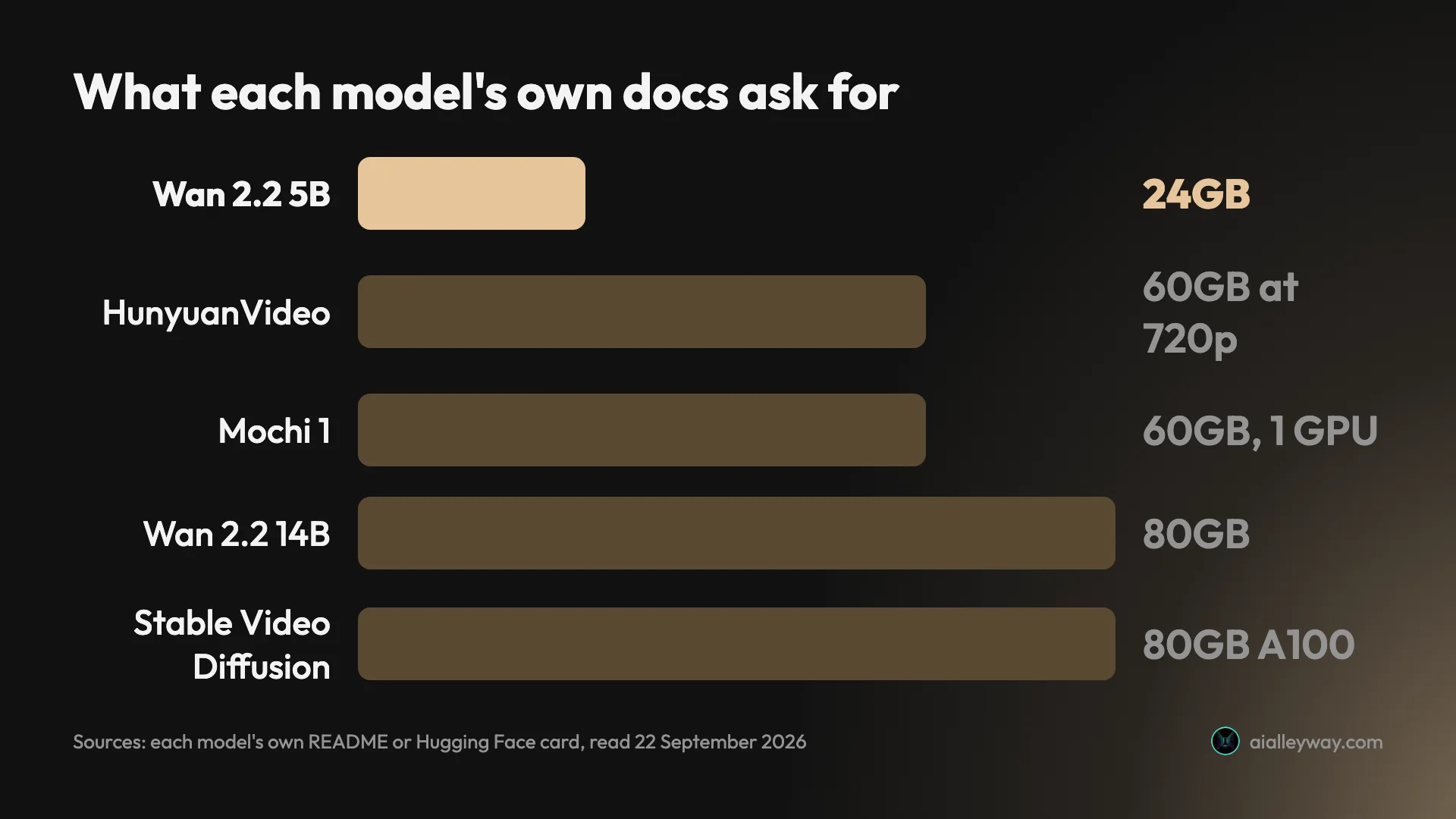
What puts any of this on hardware a person actually owns is other people’s optimisation work. ComfyUI’s Wan 2.2 guide says the 5B build “should fit well on 8GB vram with the ComfyUI native offloading”. Hugging Face’s diffusers docs put LTX-Video at about 10GB and Mochi 1 at 22GB in bfloat16, and ComfyUI gets Mochi under 20GB. None of those figures come from the model’s publisher.
| Model | Its own docs ask for | Community-optimised route |
|---|---|---|
| Wan 2.2, 5B | 24GB, Alibaba | ~8GB, ComfyUI offloading |
| LTX-Video | Not published | ~10GB, diffusers |
| Mochi 1 | ~60GB and an H100, Genmo | 22GB bfloat16, under 20GB in ComfyUI |
| Wan 2.2, 14B | 80GB, Alibaba | None documented |
| HunyuanVideo | 45GB at 544p, 60GB at 720p | None documented |
| Stable Video Diffusion | 80GB A100, documented | None documented |
That table is the real answer to “can I run this on my card”, and it reframes the question. Two routes reach consumer hardware — Wan’s 5B through ComfyUI, LTX-Video through diffusers — and both are community achievements rather than vendor promises. Which is why a model’s ComfyUI support is not a nice-to-have: for four of these six, there is no published path onto a card you own at all.
Treat every floor in that table as the optimistic case. Quantised builds move the numbers down further and trade quality and fiddliness for it.
Self-hosting against a subscription: the number that decides it
Here is the comparison that actually matters, and it is not model against model. It is self-hosting against a subscription.
| Route | What you pay | Best when |
|---|---|---|
| Own a 12GB+ GPU already | Electricity | You generate constantly, on Wan 5B or LTX |
| Rent an 80GB cloud GPU | Hourly, whenever it runs | The heavy models, bursty projects |
| Managed plan | A fixed monthly fee | Low or irregular volume |
If you already own the card, the marginal cost of a clip really is close to nothing, and that is a genuinely different economics from any subscription. If you do not, the honest maths usually favours paying someone else. Our Seedance pricing breakdown puts a five-second clip on fal.ai at about 27 cents at 720p and 12 cents at 480p, and Kling opens at $6.99 a month on a first-subscription promo that renews nearer $8.80 — numbers that take a lot of clips to beat once a GPU rental meter is running.
Self-hosting wins on volume, privacy and the absence of a content filter. It loses on setup time and on the first month.
Three things tip it toward local that have nothing to do with price. Your prompts and footage never leave your machine, which matters for anything under NDA. There is no moderation layer deciding what you may generate, and no prompt rejected for a reason nobody will explain. And nothing can be discontinued from under you, which is not a hypothetical: Sora’s API shuts down on 24 September 2026, and anyone who built on it is rebuilding.
Three tip it the other way. You are maintaining an install rather than using a product. Nobody ships you the next model automatically. And the cheapest hosted clip we have priced comes in around 12 cents, which is a great many clips before a rented 80GB card pays for itself.
Two of the six are not licensed where you live
Worth pulling out because it is the least obvious thing here. Licence terms on these models are not uniform across the world, and two of the six treat your location as material.
HunyuanVideo is the sharp case: its published terms simply do not extend to the European Union, the United Kingdom or South Korea, so a studio in Dublin, Manchester or Seoul cannot rely on them the way one in Toronto can. That is not a technical block, and nothing stops the weights downloading. It is a contractual gap, which is worse, because it only surfaces if someone asks.
Whatever sits behind the carve-out, the practical effect for a European or British reader is that one of the better-regarded models here is the one they should be most careful with.
Wan 2.2 and Mochi 1 carry no geographic conditions at all, and no registration step either, which is a quiet argument for both beyond the licence text itself. If you operate in more than one jurisdiction, or you have no appetite for reading a licence per project, Apache 2.0 is the whole point.
Which open source AI video generator should you run?
Verify each licence yourself before you act on any of this — terms change with releases, so read the file in the repo you actually download.
- You want zero licence risk on client work: Wan 2.2 or Mochi 1. Apache 2.0, no region bars, no revenue ceiling, nothing to re-read before you invoice — though Mochi asks for about 60GB on Genmo’s own path, so Wan is the one that also runs on hardware you own.
- You have a mid-range GPU: Wan 2.2’s 5B build through ComfyUI at around 8GB, or LTX-Video through
diffusersat around 10GB. Those are the only two documented routes onto a card you own. Start here before buying anything. - You are in the EU or the UK: avoid HunyuanVideo unless you have taken separate licensing. Its published terms do not cover you.
- You are over $10 million in revenue: LTX-Video needs a commercial licence, so price that in rather than assuming the free tier.
- You want to fine-tune, not just infer: Mochi 1 has an official LoRA fine-tuning trainer, which is rarer than open weights alone. Budget for the hardware.
- You are chasing a self-hostable Sora: there isn’t one and there never was. Wan 2.2 is the closest thing in spirit.
- Skip self-hosting entirely if your volume is low and irregular. The models are free; the GPU is not, and a managed plan will cost less until you are generating a lot.
If the GPU maths does not work: hosted routes to the same models
Renting the compute is the middle path, and several hosted platforms run models from this family so you can generate without owning a card. Higgsfield is one — it sells Wan alongside a dozen commercial models on one credit balance, at about 34 cents for five seconds of Wan 3.0 at 720p on its Plus plan. Read that carefully, though: Higgsfield’s Wan is the closed 3.0, which has no published weights, rather than the open 2.2 build in this guide. You are buying the convenience and the lineage, not the same model.
That is the trade in one line: you pay a margin to skip the setup. Our Higgsfield pricing breakdown has the credit maths, and the alternatives roundup covers the cheaper hosted routes to the same models.
The bottom line
“Open source AI video generator” is doing a lot of work as a phrase, and most of the models it covers are open weights with a licence you need to read. Only Wan 2.2 and Mochi 1 are Apache 2.0 and genuinely unconditional. HunyuanVideo has open weights and is not licensed in the EU or the UK. LTX-Video is free until you are big. CogVideoX depends which build you pulled.
Start with Wan 2.2 at 5B through ComfyUI if you have a mid-range card and want to find out whether local generation suits you. Move to a rented 80GB card if it does, because that is what Alibaba’s own path for the 14B asks for. And if your volume is low, accept that free models on hardware you do not own is the most expensive way to make a handful of clips.
Frequently asked questions
Is there a 100% free AI video generator?
Free of licence fees, yes. Free of cost, not really. Wan 2.2 and Mochi 1 are both Apache 2.0 with weights published openly, so nobody charges you to use them or to sell what they produce. What you pay instead is hardware, and more of it than most roundups admit. Alibaba's own Wan 2.2 documentation asks for at least 24GB of VRAM to run the 5-billion-parameter build and at least 80GB for the 14B. ComfyUI's memory-optimised path is what brings the 5B down to about 8GB.
So the honest framing is that open-source video moves the cost rather than removing it. If you already own a capable GPU, the marginal cost of a clip really is electricity. If you do not, renting a 24GB card by the hour or buying one is a real expense, and for low volumes it is usually more than a managed subscription would have cost. The models are free. The compute is the bill.
Is Sora 2 open source?
No. Sora was never open source: OpenAI released no weights and published no licence permitting self-hosting. It ran as a hosted product only, and by late September 2026 even that was almost gone.
OpenAI discontinued the Sora app and website on 26 April 2026, and its own discontinuation notice puts the API sunset at 24 September 2026.
A handful of aggregators still list Sora 2 on their model menus, and those entries stop working with the sunset. If you came looking for a self-hostable Sora, there has never been one, and the closest thing in spirit is Wan 2.2 or Mochi 1 — genuinely open weights you can download and run.
How much VRAM do I need to run AI video locally?
About 8GB, but only on the community-optimised path. The models' own documentation asks for far more: Alibaba wants 24GB for Wan 2.2's 5B build and 80GB for the 14B, Genmo asks for roughly 60GB and an H100 for Mochi 1, Tencent lists 45GB as HunyuanVideo's minimum at 544x960 and 60GB at 720x1280, and Stability benchmarks Stable Video Diffusion on an 80GB A100.
What gets these onto a card you own is other people's optimisation work. ComfyUI's own Wan 2.2 guide says the 5B build should fit well on 8GB with its native offloading, and Hugging Face's diffusers docs put LTX-Video at around 10GB and Mochi 1 at 22GB in bfloat16.
So the practical floor is 8GB if you are willing to use ComfyUI, 10 to 12GB for a comfortable time, and a rented 80GB card for anything at the top of this list. Whether a model runs on your hardware is mostly a question of whether somebody has done the memory work for it.
Can I use open-source AI video models commercially?
Two of the six can be used commercially with no conditions worth reading: Wan 2.2 and Mochi 1 are Apache 2.0. Everything else carries a string, and the strings are not small.
HunyuanVideo ships under Tencent's community licence, which does not apply in the European Union, the United Kingdom or South Korea at all, caps you at 100 million monthly active users, and forbids using its output to train a competing model.
LTX-Video's licence is free commercially only below $10 million in revenue. CogVideoX splits by size: the 2B build is Apache 2.0, while the 5B requires you to register for a commercial licence and caps commercial use at one million visits a month. Stable Video Diffusion ships under a community licence that points commercial users to Stability's separate terms. Read the licence file before you bill a client.
Keep reading
Higgsfield alternatives: 7 picks, and the two real choices
Seven Higgsfield alternatives we tested. The same Seedance clip costs $1.76 through Higgsfield and about $0.40 direct — when to leave, and where to go.

The Best AI Video Generator for Every Kind of Video
The best AI video generator depends on the job. We tested 10 hands-on: Google Veo for generation, Synthesia for avatars, Fliki for script-to-video, and more.

Higgsfield pricing: what a credit actually costs you
Higgsfield pricing read off the live page: $15 to $270 a month solo, $65 a seat for teams, and the plan that looks cheapest is the worst value per credit.
Seedance Review: The Best Video Model You Can't Easily Use
Seedance makes some of the best AI video anywhere for about $0.62 a clip, but its own app gates it behind a paywall. My hands-on take on quality and price.