
InVideo AI pricing: what a video actually costs
InVideo AI now starts at $9/mo, but Basic's 190 credits buy about one 30-second all-AI clip, or 8 seconds of Veo. The new plans, the credit math, the catch.
Contents
How much does InVideo AI cost?

InVideo AI costs $9 a month for Basic, $30 for Pro and $80 for Ultra, per seat, billed monthly. Annual billing is a 50% promotion right now: $54 a year for Basic, $15 a month for Pro, $40 a month for Ultra. That is a big cut from the $20 entry plan InVideo sold through the summer. But the catch is sharper than before: credits buy short AI clips of 5 seconds (4 on Veo), so Basic’s 190 credits cover about one 30-second all-AI sequence a month, or about 8 seconds of Veo.
| Plan | Monthly | Annual (promo) | Credits/mo | Best for |
|---|---|---|---|---|
| Free | $0 | n/a | 0 (can’t generate) | looking around the app |
| Basic | $9 | $54 a year | 190 | trying Agent Two Lite on cheap models |
| Pro | $30 | $15/mo ($180 a year) | 1,000 (2,000 option) | solo creators who generate weekly |
| Ultra | $80 | $40/mo ($480 a year) | 3,000 (6,000 and 9,000 options) | heavy generative use |
| Team | $79/seat | $65/seat | 1,600 per seat | small teams (5-seat minimum shown) |
| Scale | $215/seat | $150/seat | 4,000 per seat | studios and agencies |
From invideo.io/pricing and the in-app plan screen, 13 November 2026. Enterprise is custom. Free is not on the pricing page; the app still shows it with 0 credits.
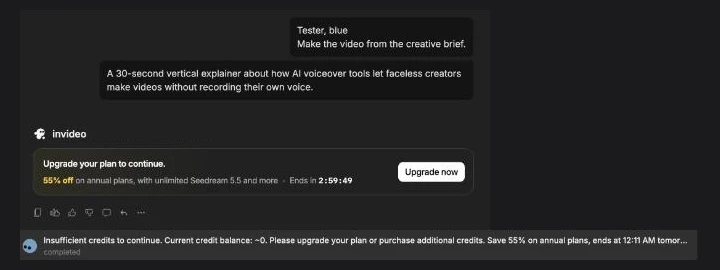
The free tier is still in the app, but it cannot make anything. On 13 November 2026 we sent our 30-second test brief to Agent Two Lite on a free account, and InVideo refused it outright.
That table is the answer to the search. The rest of this guide is about the number it hides: how many seconds of AI video your plan’s credits really buy.
What changed in InVideo’s pricing?
InVideo has changed its lineup three times since we first tested it, so a lot of what you will read elsewhere is out of date.
| When | Lineup | Entry plan |
|---|---|---|
| June to September 2026 (our review’s test) | Free / Plus / Max / Generative / Elite | Plus $20, 75 credits |
| 29 September to 3 November 2026 | Starter / Plus / Max | Starter $20 |
| Early November 2026 to now | Basic / Pro / Ultra, plus Team and Scale | Basic $9, 190 credits |
The product changed with the prices. The old Agent One (v4) and its Generate button, where you picked stock, efficient generative or premium footage, are gone. In their place is Agent Two: you type a brief and the agent plans and builds the video, at one of three intelligence levels (Lite, Pro, Ultra). Our June credit test priced that old Generate button, at about 2 credits for a 30-second stock video, 15 for efficient generative and 40 for premium. Those numbers no longer apply, so we have taken them out of this guide.
How does InVideo AI’s pricing work now?
You pay a flat fee per seat, and generation is metered against a monthly credit pool. Editing is not. InVideo’s pricing calculator says “40 hours of editing costs nothing”, and every paid plan gets the timeline editor, multiplayer editing and the colour, audio and 3D tools.
| What you’re paying for | How InVideo meters it |
|---|---|
| Access, seats and the editor | a flat monthly (or annual) fee per seat |
| AI video and images | a monthly credit pool, spent per generation |
| Which model you use | each model has its own per-clip cost |
| Your own footage | unlimited export, up to 4K, on every paid plan |
| Premium stock clips | a separate count: 45 on Basic, 150 on Pro, 180 on Ultra |
The help center says the credit cost “depends on the model, the output length, and the resolution”, and you see the cost before you confirm each generation. Two rules matter for budgeting. Plan credits do not roll over: they reset every month on your subscription day, even on an annual plan. And top-up credits can be bought, are spent after your plan credits run out and last 12 months, but InVideo does not publish what they cost.
The plans also gate which models you can reach. Basic gets only Agent Two Lite and only the two cheapest Seedance options, 2.0 Fast and 2.0 Mini. Seedance 2.5, Seedance 2.0 at 1080p or 4K, and the Pro and Ultra agent levels start at the $30 Pro plan. So the $9 price buys you in, but not into the models InVideo leads with.
What does a clip actually cost in credits?
This is the part of the pricing page that decides your bill, and it is easy to misread. A “video” on InVideo’s plan cards is one short clip, 5 seconds long (4 on Veo), not a finished video. Here are InVideo’s published costs per clip, and how many clips each plan’s monthly credits buy.
| Model | Credits per clip | Basic (190) | Pro (1,000) | Ultra (3,000) |
|---|---|---|---|---|
| Seedance 2.0 Mini 720p | ~20 per 5s | 9 | 50 | 150 |
| Kling 3.0 1080p | ~22.4 per 5s | 8 | 44 | 133 |
| Seedance 2.0 Fast 720p | ~30 per 5s | 6 | 33 | 100 |
| MiniMax H3 Max 1080p | ~38.4 per 5s | 4 | 26 | 78 |
| Seedance 2.5 720p | ~56 per 5s | not included | 17 | 53 |
| Veo 3.1 1080p | ~64 per 4s | 2 | 15 | 46 |
| Seedance 2.0 1080p | ~72 per 5s | not included | 13 | 41 |
| Seedance 2.5 1080p | ~96 per 5s | not included | 10 | 31 |
| Seedance 2.0 4K | ~176 per 5s | not included | 5 | 17 |
| Nano Banana Pro image | ~2.5 | 76 | 400 | 1,200 |
| GPT Image 2.5 Sunburst image | ~0.4 | 475 | 2,500 | 7,500 |
InVideo’s published costs, not our test. Read from invideo.io/pricing, 13 November 2026. InVideo says it can change credit costs at any time. Sora appears in the model list but is not priced on the plan table.
Images are cheap. Video is not. On Basic, a single Veo 3.1 clip costs about a third of the month’s credits, and two of them, 8 seconds of footage in total, use up most of the pool. Even the cheapest video model, Seedance 2.0 Mini, gives Basic 9 clips, which is 45 seconds of AI video a month.
How much does a 30-second video cost on each plan?
Here is our own arithmetic from those published rates. A 30-second sequence is six 5-second clips, or 7.5 four-second clips on Veo. These figures assume every second is AI-generated.
| Model | Credits for 30s (our arithmetic) | Basic (190) | Pro (1,000) | Ultra (3,000) |
|---|---|---|---|---|
| Seedance 2.0 Mini 720p | ~120 | 1 | about 8 | about 25 |
| Kling 3.0 1080p | ~134 | 1 | about 7 | about 22 |
| Seedance 2.0 Fast 720p | ~180 | 1 | about 5 | about 16 |
| Veo 3.1 1080p | ~480 | none (about 8 seconds) | about 2 | about 6 |
| Seedance 2.5 1080p | ~576 | not included | 1 | about 5 |
Our arithmetic from InVideo’s published per-clip costs, rounded down to whole 30-second sequences. Not a test.
So the honest reading of each plan, if your video is all AI footage:
- Basic ($9): about one 30-second sequence a month on Kling or Seedance 2.0, or about 8 seconds of Veo. Kling’s ~134 credits alone use about 70% of the 190.
- Pro ($30): about seven 30-second Kling sequences, or about two on Veo. This is the first plan with Seedance 2.5.
- Ultra ($80): about 22 on Kling or about six on Veo. InVideo calls it the “lowest cost per credit”.
Per credit, the tiers work out (by our arithmetic) to about 4.7 cents on Basic, 3 cents on Pro and about 2.7 cents on Ultra. That is the real logic of the lineup: the $9 plan has the lowest sticker and the most expensive credits.
There is a big caveat we cannot close. Agent Two plans the video for you, and it can mix stock footage with generated clips, which would stretch your credits further. But InVideo does not publish what Agent Two itself costs per brief, or how it decides between stock and generated footage, and our free account could not run a brief to find out. So treat the table above as the ceiling on how much all-AI video each plan buys, not as a quote for a typical Agent Two video.
Monthly versus annual billing
Annual billing is currently 50% off every tier, and InVideo marks it as a promotion. Inside the app it pushes harder: when our free account hit the credit wall, the upgrade card offered “55% off on annual plans” with a countdown timer (“Ends in 2:59:55” on one screen).
| Plan | Monthly | Annual (promo, per month) | Annual total |
|---|---|---|---|
| Basic | $9 | ~$4.50 (the card shows $4, the table $5) | $54 |
| Pro | $30 | $15 | $180 |
| Ultra | $80 | $40 | $480 |
| Team (per seat) | $79 | $65 | n/a |
| Scale (per seat) | $215 | $150 | n/a |
That discount is deeper than the standing annual discounts on rival tools. Fliki’s yearly toggle takes 25% off, and Pictory’s Professional plan is $35 a month annually against $59 monthly. The banner also says annual plans get unlimited Seedream 5.5, Nano Banana 2.1 and some other image models “for 30 days”.
Two details cut against locking in a year. First, annual plans still get credits monthly, with no rollover, so the year does not give you a bigger pool to draw on in a busy month. Second, InVideo’s terms (dated 6 November 2026) give a 24-hour refund window that any use voids. Pay for a year, generate one clip, and the money is committed. A countdown timer on a one-way decision is a reason to slow down, not speed up. Run a monthly plan first and watch how fast your credits go.
What to watch before you pay
InVideo’s marketing leads with the $9 price and the long model list. These are the details that decide whether that price holds up for you.
The free plan cannot make anything
The free plan has 0 credits, and we checked what that means in practice. On 13 November 2026 our 30-second brief to Agent Two Lite got “Upgrade your plan to continue.” and nothing else. That is a step down from the old free tier, which at least let you generate something before the watermark and export cap got in the way. A rival like Fliki still exports a watermarked 720p video for free, so you can judge its output before paying. With InVideo you cannot see a single generated frame without a paid plan.
A “video” on the plan card is one clip
The plan cards count clips, and a clip is 5 seconds, or 4 on Veo. Read “2 Veo videos” on Basic as 8 seconds of footage, not two finished videos. Every number on those cards needs multiplying by the clip length before it means anything.
| Plan | Clips a month | Seconds of footage (our arithmetic) |
|---|---|---|
| Basic | 2 Veo 3.1 / 8 Kling 3.0 | 8s / 40s |
| Pro | 15 Veo 3.1 / 44 Kling 3.0 | 60s / 220s |
| Ultra | 46 Veo 3.1 / 133 Kling 3.0 | 184s / 665s |
Clip counts from InVideo’s published costs; seconds are clips multiplied by 4 (Veo) or 5 (Kling).
Basic locks out the models InVideo sells hardest
Basic is Agent Two Lite only, and on Seedance it gets only 2.0 Fast and 2.0 Mini, at 720p. No Seedance 2.5, no Seedance 2.0 at 1080p or 4K. If what drew you to InVideo is the newest Seedance or the smarter agent levels, Basic is not a cheap version of that; it is a different, smaller product, and Pro at $30 is the real starting point.
Every generation is charged
The help center prices each generation and shows you the cost before you confirm it. A retry is another generation, so a Veo clip that misses and gets regenerated costs about 64 credits again. Budget for the attempts, not only the clips you keep. On Basic, one failed Veo attempt and one keeper is the whole Veo allowance for the month.
Credit costs can move
The FAQ says InVideo “reserve[s] the right to update credit costs at any time”. Combined with three plan lineups in five months, that is a reason to recheck the per-clip rates before any annual commitment.
Which InVideo AI plan should you pick?
Decide how much of your video needs to be AI-generated, then match that to the pool. The sticker prices are close together; the credit pools are not.
- Just looking → Free ($0). Only for clicking around the editor and the agent. It has 0 credits and will not generate.
- Testing the agent on a budget → Basic ($9/mo). 190 credits, Agent Two Lite and the cheap Seedance models. Enough to see what InVideo does, about one all-AI 30-second sequence a month, not enough to run a channel.
- Solo creator generating weekly → Pro ($30/mo). The plan most people should start on. 1,000 credits, all three agent levels, Seedance 2.5, and about seven all-Kling 30-second sequences a month.
- Heavy generative use → Ultra ($80/mo). 3,000 credits at the cheapest per-credit rate, about 22 Kling or six Veo 30-second sequences a month, and up to 20 seats with 20 free guest seats.
- Studio or agency → Team ($79/seat) or Scale ($215/seat). 1,600 or 4,000 credits per seat, with a five-seat minimum shown. Only once a single Ultra plan is clearly too small.
For most people, the honest pick is Pro on monthly billing. Basic’s credits run out after about one sequence, and the per-credit price is the worst in the lineup. Pro has the models InVideo is known for and a pool you can actually work with. Watch your burn for a month, then decide whether the annual promo or Ultra is worth it.
If InVideo AI’s price doesn’t fit
If clip-based credits or a free plan that cannot generate put you off, two tools in the same lane price more predictably.
| Tool | Entry price | The trade |
|---|---|---|
| Fliki | $28/mo Standard (about $21 yearly) | a free tier that exports watermarked 720p video, strong AI voices, but basic visuals below Premium |
| Pictory | $25/mo Starter (annual), $29 monthly | clean blog-to-video repurposing and a deep stock library, but a robotic default voice and mostly stock visuals |
- Fliki is the voice pick: paid plans start at Standard, $28 a month or about $21 billed yearly. The old $8 Basic plan is no longer on its pricing page. Its free tier still exports a watermarked 720p video, which InVideo’s cannot. You give up InVideo’s generative range, but you can judge Fliki before you pay. See our Fliki review, or the head-to-head in Fliki vs InVideo.
- Pictory is the pick if your job is turning existing articles into video rather than generating from a prompt. Starter is $25 a month on an annual plan ($29 monthly), and its plans state their credits as minutes of finished video rather than seconds of AI footage. See our Pictory review, or Pictory vs InVideo.
Next to those two, InVideo is the generative one: the only tool here built around Veo, Kling and Seedance clips. That is its appeal and its cost, because generative seconds are exactly what its credits meter.
The bottom line on InVideo AI pricing
InVideo’s new pricing looks cheaper and buys less than it seems. The $9 Basic plan is the lowest sticker InVideo has had, but 190 credits cover about one 30-second all-AI sequence a month, Basic has the most expensive credits in the lineup, and it is locked out of Seedance 2.5 and the better agent levels. The free plan cannot generate anything at all.
So budget InVideo in seconds of AI footage, not in plans. If you want the generative models it is known for, start on Pro at $30 a month, billed monthly, and only take the 50% annual promo once you know your burn rate, because the refund window closes the moment you use it.
InVideo is one of the picks in our best script-to-video AI tools roundup, and if credits are what worry you, Fliki pricing meters far more gently for voice-led video. Our InVideo alternatives guide covers the rest of the field.
Frequently asked questions
How much does InVideo AI cost?
Billed monthly, InVideo AI costs $9 for Basic, $30 for Pro and $80 for Ultra, per seat. Annual billing is currently a 50% promotion: $54 a year for Basic, $15 a month for Pro and $40 a month for Ultra. Business plans start at Team ($79 a seat a month, $65 annual) and Scale ($215, $150 annual), with a five-seat minimum shown, and Enterprise is custom. This lineup replaced the old Plus, Max, Generative and Elite plans in early November 2026.
The price is not the number that decides what you get. Each plan comes with a monthly credit pool (190 on Basic, 1,000 on Pro, 3,000 on Ultra), and credits buy short AI clips of 5 seconds, or 4 seconds on Veo. By our arithmetic from InVideo's published costs, Basic's 190 credits cover roughly one 30-second all-AI sequence on Kling or Seedance 2.0, or about 8 seconds of Veo. So InVideo starts at $9, but what you can actually make is set by the credit pool and the model you pick.
Is InVideo AI free?
Not in any useful sense. The pricing page no longer lists a free plan, and while the app still labels a logged-in account 'Free Plan', it shows 0 credits. On 13 November 2026 we sent our 30-second test brief to Agent Two Lite on a free account. It replied 'Upgrade your plan to continue.' and the status bar said 'Insufficient credits to continue. Current credit balance: ~0.' Nothing was generated.
So the free tier cannot make anything at all, not even a watermarked draft. A rival like Fliki is different here: its free tier still exports a watermarked 720p video. With InVideo the real entry price is the $9 Basic plan, and even that comes with only 190 credits a month, so treat your first paid month as the trial.
How do InVideo AI credits work?
Credits pay for AI generation; editing is free. InVideo's help center says the cost depends on the model, the output length and the resolution, and you see the credit cost before you confirm each generation. The published rates are per short clip: about 22.4 credits for a 5-second Kling 3.0 clip at 1080p, about 20 for Seedance 2.0 Mini at 720p, about 96 for Seedance 2.5 at 1080p, and about 64 for a 4-second Veo 3.1 clip. Images are cheap by comparison, at about 2.5 credits for Nano Banana Pro.
Plan credits do not roll over: they reset monthly on your subscription day, annual plans included. Extra credits can be bought, are spent after plan credits run out and last 12 months, but InVideo publishes no add-on prices. InVideo also says it reserves the right to update credit costs at any time, so the per-clip rates are worth rechecking before you commit to a plan.
How many videos can you make with InVideo AI?
Fewer than the plan cards suggest, because a 'video' on those cards is one short clip (5 seconds, or 4 on Veo), not a finished video. By our arithmetic from InVideo's published costs, a 30-second sequence is six 5-second clips: about 134 credits on Kling 3.0, about 120 on Seedance 2.0 Mini, about 180 on Seedance 2.0 Fast and about 576 on Seedance 2.5 at 1080p. Veo 3.1 needs 7.5 four-second clips, about 480 credits.
So Basic's 190 credits cover roughly one 30-second all-AI sequence a month, Pro's 1,000 cover about seven on Kling or about two on Veo, and Ultra's 3,000 cover about 22 on Kling or about six on Veo. These figures assume every second is AI-generated. How much Agent Two itself spends per brief, and how much stock footage it mixes in, is not published, and we could not test it.
Is InVideo AI's annual plan worth it?
The annual discount is currently 50%, which is large, but it is labelled as a promotion. Basic drops from $9 a month to $54 a year, Pro from $30 to $15 a month ($180 a year) and Ultra from $80 to $40 a month ($480 a year). Inside the app, when our free account ran out of credits, InVideo pushed '55% off on annual plans' with a countdown timer, so the exact figure moves.
Two things to weigh before you take it. Annual plans still reset credits monthly, so you cannot bank a quiet month's credits for a busy one. And InVideo's terms give a 24-hour refund window that any use voids, so a year paid up front is effectively locked in once you generate anything. Take the annual promo only after a monthly plan has shown you how fast you burn credits.
Do InVideo AI credits roll over?
No. Unused plan credits reset every month on your subscription day, and that applies to annual plans too, so an annual subscriber gets a monthly allowance rather than the year's credits up front. A month where you generate little does not leave you with extra credits for the next one.
The exception is purchased top-up credits. They are spent only after your plan credits run out, and they last 12 months. InVideo does not publish what top-ups cost, so you will only see the price inside the app. If your usage is lumpy, a smaller plan plus occasional top-ups may suit you better than paying every month for a pool you only drain some months.
Keep reading
InVideo AI review: the fastest prompt-to-video, at a price
Our hands-on InVideo AI test (4.2/5), updated for November 2026: Agent Two, new $9/$30/$80 plans, and a Free plan with 0 credits that refused our brief.
The 5 best InVideo AI alternatives, ranked by job
InVideo alternatives ranked: Fliki for voice and a working free tier, Runway for generative footage, Pictory for blog-to-video, plus avatar and editor picks.
The Best Free AI Video Generator (No Trial Traps)
Most free AI video generators are watermarked or trials in disguise. Google Veo's free tier gives a real clip with sound, refilled daily, for $0.
The Best AI Video Generator for Every Kind of Video
The best AI video generator depends on the job. We tested 10 hands-on: Google Veo for generation, Synthesia for avatars, Fliki for script-to-video, and more.