
InVideo AI review: the fastest prompt-to-video, at a price
Our hands-on InVideo AI test (4.2/5), updated for November 2026: Agent Two, new $9/$30/$80 plans, and a Free plan with 0 credits that refused our brief.
Contents
Is InVideo AI worth it?

Yes, if you want the fastest possible path from a one-line idea to a finished video and you can be disciplined about credits. When I tested it in June 2026, I typed a single sentence into InVideo’s Agent One, and a few minutes later it handed back a captioned, narrated 9:16 video with footage, voiceover, and music already assembled. No other tool I had tested in its price range turned a prompt into a complete draft that fast, or reached as many top video models from one place. I score it 4.2 out of 5, a Power Tool.
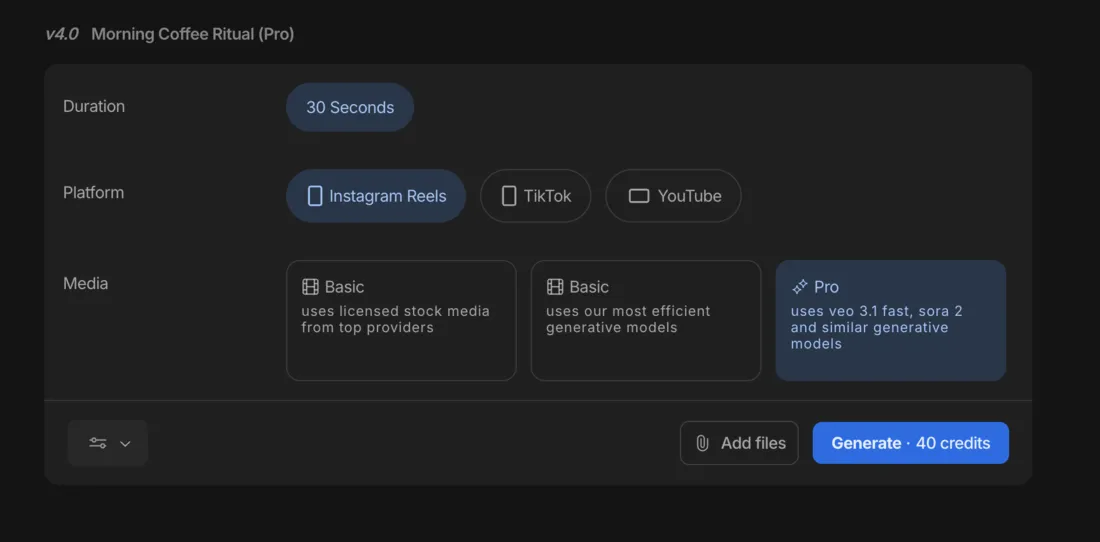
The reason it is not higher is the same reason it is impressive: it does a lot, and it charges for all of it. In June, a video built from stock footage cost me about 2 credits; the same brief built with premium Veo and Sora footage cost 40, more than half of the old $20 Plus plan’s monthly allowance for one 30-second clip. InVideo has since rebuilt both the product and the plans (see below), but the core trade has not changed: the AI footage is where the money goes, and the Free plan cannot make anything.
What changed in November 2026
InVideo replaced its whole product flow and plan lineup in early November 2026, after the hands-on test this review is built on. Here is what is different as of 13 November 2026, from InVideo’s pricing page, its help centre, and the plan screen in our own account.
- Agent Two replaced Agent One. You still type a brief and an agent plans and builds the video, but the agent now comes in three intelligence levels: Lite, Pro and Ultra. The Agent One (v4) Generate button I tested, with its stock, efficient generative and premium footage settings, is gone.
- A new plan lineup. Basic is $9 a month with 190 credits, Pro is $30 with 1,000, and Ultra is $80 with 3,000. Basic gets only Agent Two Lite; Pro and Ultra get all three levels. Team ($79 per seat) and Scale ($215 per seat) sit above them for businesses.
- Annual billing is a 50% promotion. Basic is $54 a year, Pro $15 a month and Ultra $40 a month on annual billing, under “50% off” badges. Inside the app, the out-of-credits message pushed “55% off on annual plans” with a countdown timer, so the discount you see may depend on where you look.
- Free still exists, with 0 credits. The pricing page no longer lists a Free plan, but the app labels an unpaid account “Free Plan” with 0 credits left. On 13 November we sent our June test brief to Agent Two Lite on that account. It replied “Upgrade your plan to continue.” and generated nothing.
- Credits now buy 5-second clips. A “video” on the plan cards is one short AI clip (4 seconds for Veo), not a finished video, and each model has a published price. Kling 3.0 at 1080p costs about 22.4 credits per clip, Seedance 2.0 Mini at 720p about 20, Veo 3.1 at 1080p about 64 per 4 seconds, and Seedance 2.5 at 1080p about 96, which Basic cannot use.
- What Basic’s 190 credits buy. A 30-second sequence is six 5-second clips, so by our arithmetic it costs about 134 credits on Kling 3.0, about 120 on Seedance 2.0 Mini, and about 480 on Veo 3.1. That makes Basic roughly one 30-second all-AI sequence a month on a cheaper model, or about 8 seconds of Veo.
- The refund window is 24 hours, and any use voids it. That is from InVideo’s terms dated 6 November 2026.
What we have not done yet: we have not re-tested output quality on Agent Two, and we have not measured what Agent Two actually spends on a real brief. InVideo does not publish that, and it does not say how the agent mixes stock footage with generated clips. The numbers above assume every second is AI-generated, so a brief that leans on stock may cost less. Everything in the sections below that describes output, speed or credit cost per video comes from the June test on the previous product.
What does InVideo AI do?
InVideo turns a written brief into a finished video. When I tested it in June 2026, its flagship was Agent One (the v4 generation of what InVideo then called its Autopilot agent), and the pitch was blunt: give it a topic, a point of view, and some instructions, and it writes a script, picks footage, generates an AI voiceover, lays in captions and music, and assembles the whole thing into a video. You skip the recording booth, the stock search, and the timeline, and start from a draft instead of a blank canvas. Agent Two, the November 2026 replacement, makes the same promise.
What sets InVideo apart from Pictory and Fliki, its closest script-to-video rivals, is breadth. Where Pictory leans on stock B-roll and Fliki leads with its voice library, InVideo works as a hub. Its current model menu includes Seedance 2.5 and 2.0, Kling 3.0, Veo 3.1, MiniMax H3, Nano Banana Pro and GPT Image 2.5, all from the same workflow. Instead of subscribing to several AI tools, you reach many of them in one.
Here is the actual output from June. I gave Agent One a single brief (a 30-second vertical explainer about how AI voiceover tools let faceless creators make videos without recording their own voice), kept its smart defaults, and this is what came back on the stock-footage setting.
The speed was the headline. From one sentence, InVideo wrote a tight script, matched each line to a stock clip, generated a clean AI voiceover, and timed bold captions to the narration, all without a single manual step from me. The voiceover is clear and well-paced, the captions are readable, and for a faceless social clip it is most of the way to publishable.
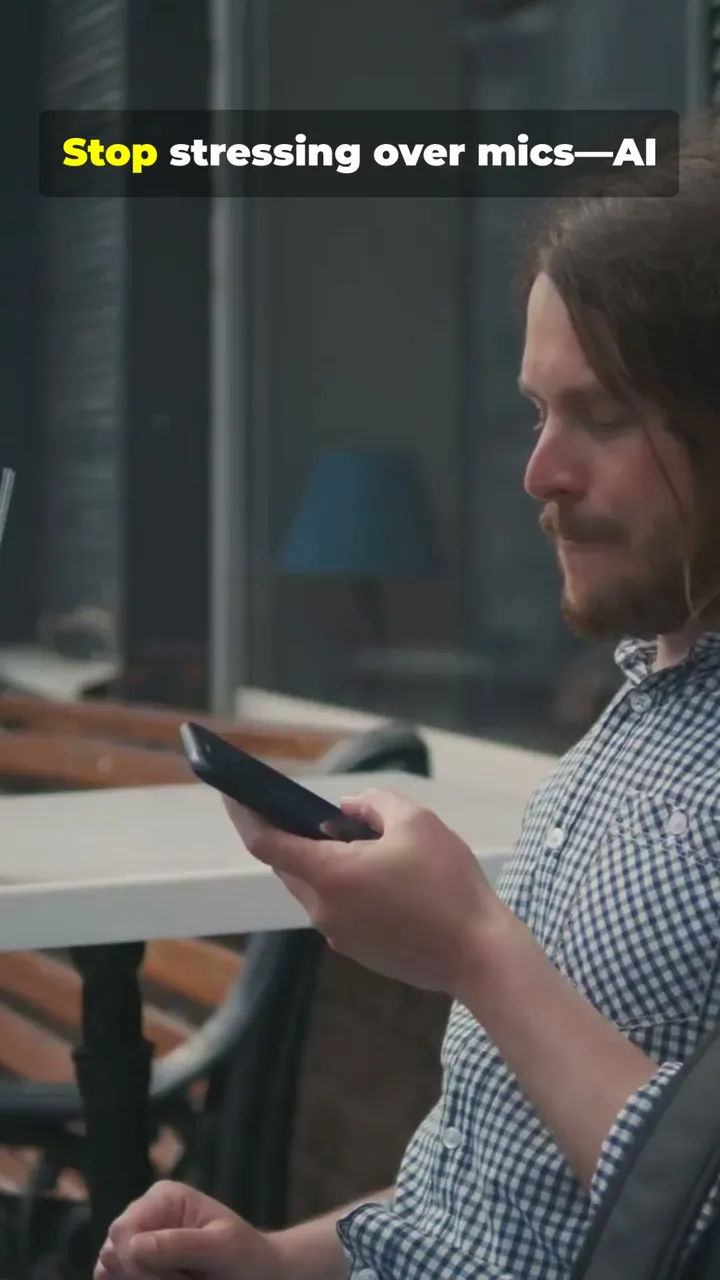
The visuals are where the stock setting showed its seams. The footage is competent but generic: a man checking his phone, a glowing “AI” logo, an abstract clip that captioned itself “Drop in upbeat music.” It is the kind of recognizable stock that other channels are also using. That was the trade on the cheap setting, and it is exactly why InVideo offers the generative models as a step up.
Once the draft exists, you are not stuck with it. In June you could revise the whole video with natural-language commands (type an instruction and Agent One rebuilt the relevant part) or edit any scene by hand: swap the clip, change the voice, restyle the captions, adjust the music. The November version adds a full timeline editor with multiplayer editing and colour, audio and 3D tools, which we have not tested yet.
How much does InVideo AI cost?
InVideo’s real price is credits, not the monthly sticker. Since November 2026 the plans are Basic $9, Pro $30 and Ultra $80 a month, and every AI clip spends credits at a published per-model rate. The monthly fee is the number you see; the credits decide whether InVideo is for you.
| Plan | Monthly | Annual (50% promo) | Credits/mo | Agent Two levels |
|---|---|---|---|---|
| Free (in-app only) | $0 | n/a | 0 (can’t generate) | none in practice |
| Basic | $9 | $54 a year | 190 | Lite only |
| Pro | $30 | $15/mo | 1,000 (2,000 option) | Lite, Pro, Ultra |
| Ultra | $80 | $40/mo | 3,000 (6,000 and 9,000 options) | Lite, Pro, Ultra |
Prices are per seat. Basic allows up to 5 seats, Pro up to 10 and Ultra up to 20, and Pro and Ultra add free guest seats. Basic is also limited to Seedance 2.0 Fast and Mini among the Seedance models, with no Seedance 2.5 and no 1080p or 4K Seedance 2.0. For businesses, Team is $79 a month per seat ($65 annual) with 1,600 credits per seat, and Scale is $215 ($150 annual) with 4,000.
The credit cost depends on the model, the clip length and the resolution, and InVideo shows it before you confirm each generation. A few published examples, none of which we have tested:
| Model (one clip) | Credits | Clips on Basic (190) | Clips on Pro (1,000) |
|---|---|---|---|
| Seedance 2.0 Mini 720p, 5s | ~20 | 9 | 50 |
| Kling 3.0 1080p, 5s | ~22.4 | 8 | 44 |
| Veo 3.1 1080p, 4s | ~64 | 2 | 15 |
| Seedance 2.5 1080p, 5s | ~96 | not included | 10 |
Put that against a 30-second video and the picture sharpens. Six 5-second clips on Kling 3.0 come to about 134 credits, so Basic’s 190 covers roughly one all-AI 30-second sequence a month. The same length on Veo 3.1 is about 480 credits, which means Pro rather than Basic. Editing does not spend credits; InVideo’s pricing calculator says “40 hours of editing costs nothing.” Unused plan credits do not roll over, even on annual plans, extra credits can be bought but have no published price, and InVideo says it can change credit costs at any time.
What our June test cost on the old plans
The test in this review ran on the previous lineup: Free $0, Plus $20 (75 credits a month), Max $100 (390), Generative $200 (800) and Elite $1,000 (4,250), with about 15% off annually. On that system, generating the same 30-second brief, InVideo quoted me three very different prices depending on the media setting:
- Stock footage (Basic): ~2 credits. Licensed clips from top providers, the setting my first demo used.
- Efficient generative (Basic): ~15 credits. AI-generated footage from InVideo’s most cost-efficient models.
- Premium generative (Pro): 40 credits. Google’s Veo 3.1 and OpenAI’s Sora 2.
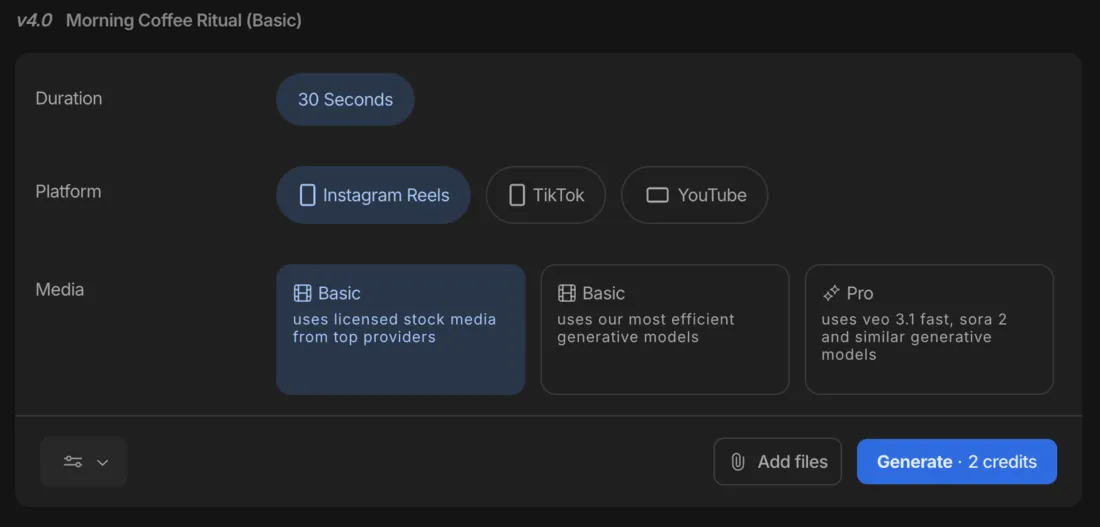
On the old Plus plan’s 75 credits, that meant roughly 37 stock videos a month, about five efficient-generative ones, or fewer than two premium Veo/Sora clips. Regenerating charged the full rate again. The old and new credits are not comparable units, so do not read the June numbers as today’s prices. The lesson carries over, though: stock-style output was cheap, and premium AI footage was priced like a luxury, which is the complaint that runs through InVideo’s user reviews.
Who is InVideo AI for?
InVideo suits creators who value speed and breadth over predictable cost. A few profiles fit it especially well.
- Fast social creators who want a finished faceless video from one prompt. In our June test, stock-footage videos cost almost nothing in credits. We have not yet measured how Agent Two prices a stock-heavy brief on Basic.
- Creators who want many top models without juggling tools. If you occasionally need Veo, Kling or Seedance footage, reaching them inside InVideo, alongside the script, voiceover and editing, beats subscribing to several separate generators. Treat premium clips as an occasional splurge: one 4-second Veo clip is about a third of Basic’s month.
- Marketers and agencies on the bigger plans. Pro, Ultra, Team and Scale exist for people who generate constantly; Ultra is pitched as the lowest cost per credit.
- Not for you if you need a usable free tier (InVideo’s has 0 credits; Fliki still exports a free watermarked video), predictable cost at volume on generative footage, or distinctive non-stock visuals without spending heavily.
What InVideo does well
It was the fastest one-prompt video tool I tested
This is InVideo’s real edge, as I found it in June 2026. From a single sentence, Agent One produced a complete, captioned, narrated video in a few minutes with zero manual steps. It read my brief, wrote a sensible script, matched footage, generated a voiceover, and timed captions: the entire assembly that usually stalls non-editors, done automatically. Agent Two makes the same promise; we have not timed it yet.
The premium models are a real step up
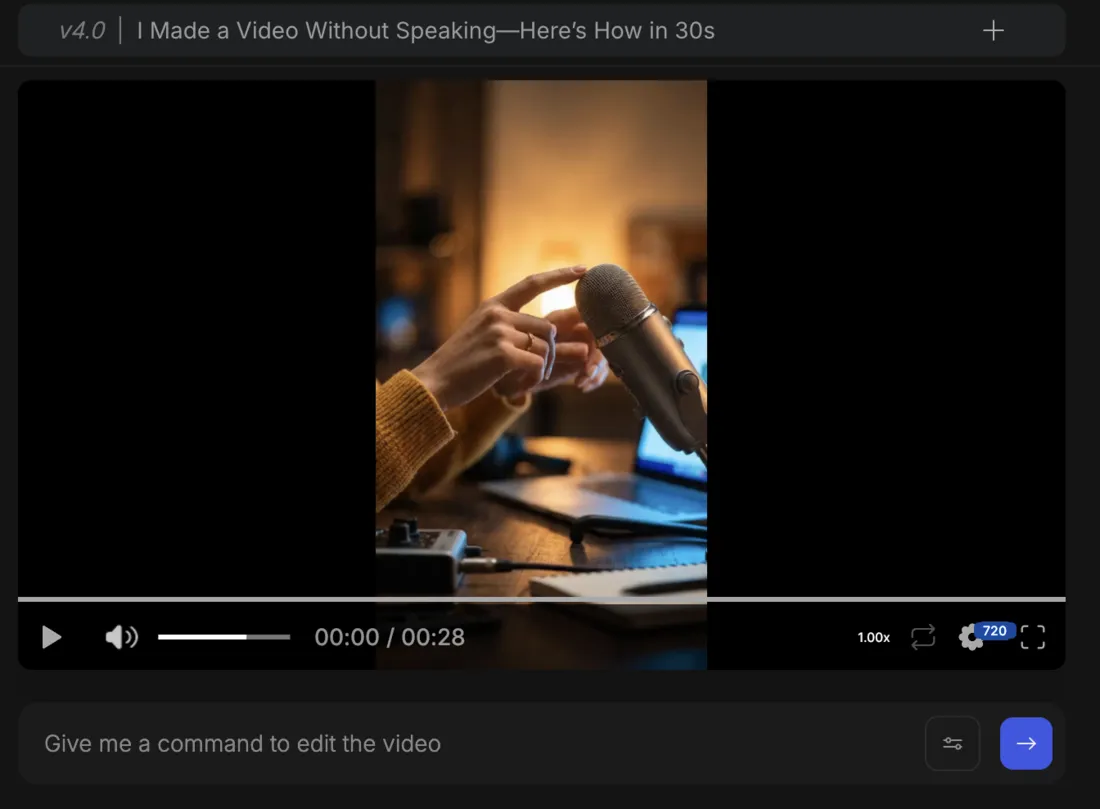
InVideo’s pitch as a hub is not marketing fluff. Reaching Veo 3.1, Kling 3.0 and the Seedance family from one workflow is something none of its direct script-to-video rivals offer. To see the difference in June, I ran the exact same brief again on what was then the Pro generative setting (Veo 3.1 / Sora 2), and the footage came back genuinely cinematic: warm, shallow-focus shots of a glowing laptop and a studio microphone, original and atmospheric rather than recognizable stock.

The jump in quality was obvious next to the stock version. Look closely and the AI tells are still there, like the garbled keycaps on that laptop, but for fast b-roll it is impressive. The catch, as ever, is the meter: this clip cost 40 credits against the stock version’s 2 on the old system, and under the new pricing a single 4-second Veo 3.1 clip is about 64 credits. The premium look is a luxury you ration, not a default you reach for.
Natural-language editing makes revisions fast
In June you could refine the draft by typing instructions in plain English, and Agent One rebuilt the relevant part, or open its media, music, and script panels for manual control over footage, voice, captions, and music. When the model read the request correctly, the loop was quick and beginner-friendly. InVideo consistently earns praise for its low learning curve, and the November editor adds a timeline and multiplayer editing on every paid plan, with editing itself free of credits.
Clean exports on the paid plans
In June, InVideo gave watermark-free 1080p output, with the option to remove its branding entirely, on the entry-level paid plan, then the $20 Plus. Under the November lineup every paid plan, $9 Basic included, lists 4K export and unlimited export of your own footage. We have not exported on the new plans yet, but on paper a clean, high-resolution export no longer needs a mid-tier plan.
The template and stock library is deep
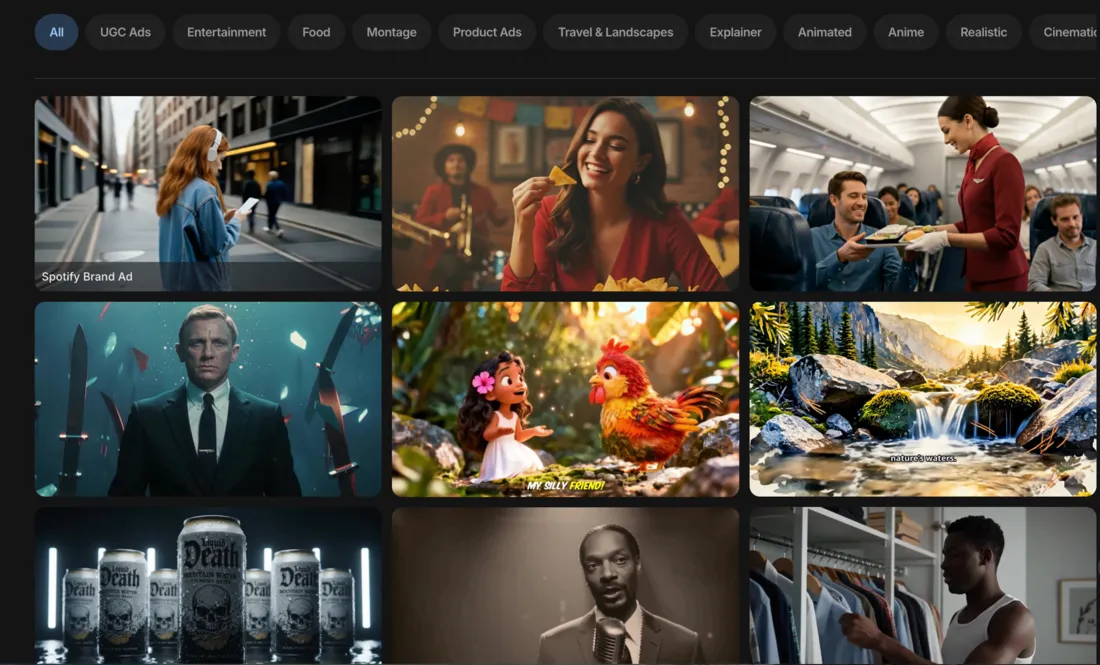
Beyond the AI generation, InVideo ships a large template library and licensed stock access; every paid plan now includes a monthly quota of premium stock clips (45 on Basic, 150 on Pro, 180 on Ultra). The Explore gallery also showed finished example videos with the exact prompts that produced them when I tested it, which is a smart way to learn what the agent can do.
Where does InVideo fall short?
The credit economics are the real price
This is the defining knock, and my June test made it concrete. Generating the same 30-second brief three ways on the old system, InVideo quoted me wildly different credit costs, and on the old $20 Plus plan’s 75 credits that meant very different output ceilings.
| June 2026, old $20 Plus plan (75 credits/mo) | Credits per 30s video | Videos per month |
|---|---|---|
| Stock footage | 2 | ~37 |
| Efficient generative | ~15 | ~5 |
| Premium (Veo 3.1 / Sora 2) | 40 | fewer than 2 |
The November pricing makes the cost of AI footage more visible rather than smaller. Each 5-second clip has a listed price, and an all-AI 30-second sequence runs from about 120 credits on Seedance 2.0 Mini to about 576 on Seedance 2.5 at 1080p, against Basic’s 190 a month. In June, regenerating charged the full rate again, and across user reviews the dominant complaint is paying for videos people never completed because each attempt burned more credits. Whether Agent Two’s stock-heavy briefs bring the cost back down is the thing we still need to measure.
The free plan cannot make anything
In June, InVideo’s free tier watermarked every export, capped weekly export time, and gave a credit pool a single generation could exhaust. In November it got worse: the Free plan now shows 0 credits, and when we sent it our test brief on 13 November, Agent Two replied “Upgrade your plan to continue.” and made nothing. A rival like Fliki lets you build and export a watermarked 720p video for free; InVideo makes you pay before you can produce anything, which is a poor first run for anyone trying to evaluate before they commit.
On the cheap setting, the visuals looked generic
The stock-footage setting that kept June costs low also produced the most forgettable output. My demo’s footage was competent but recognizable, the same kind of stock other channels lean on, and one clip literally captioned itself “Drop in upbeat music.” The fix was the generative tier, but that is where the credits drain, so you were choosing between cheap-and-generic or distinctive-and-expensive, with little middle ground on a budget.
The AI does not always get it right
When Agent One misread an instruction or ignored an uploaded asset, both documented in user reviews and visible in my own test, the options were coarse, and every correction spent more credits. The natural-language editing is a strength when it works and a cost multiplier when it does not.
Support and refunds draw complaints
InVideo’s softer Trustpilot score, about 4.0 across some 800 reviews against a stronger 4.5 on Capterra, tracks a recurring theme: slow or unhelpful support, and friction getting refunds on failed generations that still deducted credits. The current terms (dated 6 November 2026) set a 24-hour refund window that any use voids, so if you generate even one clip to try a plan, you have likely given up the refund. Test on Basic before buying a bigger plan or an annual one.
If InVideo AI isn’t for you
If the economics or the visuals are not the right fit, three tools cover the gaps depending on what you need instead.
| Tool | Best for | The trade |
|---|---|---|
| Fliki | voice-first, multilingual, budget video | better voices and a real free tier, weaker generative visuals |
| Pictory | turning blog posts into video | cleaner article-to-video, narrower feature set |
| Synthesia | avatar / talking-head video | polished presenters, but a different category and pricier |
- Fliki is the better pick if voice quality, multilingual reach, and a free tier matter most. Its free plan actually exports a video, its paid plans start at $28 a month (about $21 billed yearly), and its 2,000+ voices outclass InVideo’s narration, at the cost of InVideo’s breadth and premium models. See our Fliki review.
- Pictory is the cleaner choice if your real job is turning written articles into video; its URL-to-video repurposing is more focused, though it lacks InVideo’s generative range. See our Pictory review.
- Synthesia is the move if you want a polished AI presenter talking to camera rather than a stock-and-generative montage. It is a different category, avatar video rather than prompt-to-video, but for training and explainer content with a human face it is the stronger tool.
The verdict
InVideo AI is a Power Tool at 4.2 out of 5, and it earned that on speed and breadth in our June 2026 test. It was the fastest tool I had tested at turning a one-line brief into a finished video, and it still reaches more top video models (Veo 3.1, Kling 3.0, the Seedance family and more) from one workflow than any script-to-video rival.
Go in understanding the economics, because they are the whole story, and they changed in November. The entry price fell to $9, but Basic’s 190 credits buy roughly one 30-second all-AI sequence a month, the Free plan has 0 credits, and the refund window closes the moment you use the product. We have not yet re-tested Agent Two’s output or measured what it spends per brief, so the score reflects the product we tested, not the new one. Buy it for fast drafts with premium models on tap, start on Basic, and keep one eye on the credit meter.
InVideo is one of the picks in our best script-to-video AI tools roundup. To see how it stacks up head-to-head, read Fliki vs InVideo and Pictory vs InVideo. For the full cost breakdown see our InVideo pricing guide, and if the credits put you off, our InVideo alternatives guide covers where to go.
Frequently asked questions
Is InVideo AI worth it?
For creators who want the fastest path from a one-line brief to a finished video, probably yes, but the case rests on a June 2026 test of a product InVideo has since replaced. In that test its Agent One built a captioned, narrated 9:16 video from one sentence in a few minutes, and a stock-footage version cost about 2 credits against 40 for premium Veo or Sora footage.
In November 2026 InVideo switched to Agent Two and new plans: Basic $9, Pro $30 and Ultra $80 a month. Credits now buy 5-second AI clips at published rates, and Basic's 190 credits cover roughly one 30-second all-AI sequence on Kling 3.0. We have not re-tested output quality or measured what Agent Two spends per video, so treat the 4.2 out of 5 as our June verdict on speed and model breadth, with the new cost picture still to be measured.
Is InVideo AI free?
Not in any useful sense. The pricing page no longer lists a Free plan, and the app labels an unpaid account 'Free Plan' with 0 credits. On 13 November 2026 we sent our usual 30-second test brief to Agent Two Lite on a free account. It replied 'Upgrade your plan to continue' and generated nothing.
The cheapest way to make anything is Basic at $9 a month, or $54 a year while the 50% annual promotion runs. Basic includes 190 credits a month, which is roughly one 30-second sequence if every clip is AI-generated on a cheaper model such as Kling 3.0 or Seedance 2.0 Mini. If you want a free tier that exports a video, Fliki's free plan still produces a watermarked 720p clip.
How much does InVideo AI cost?
Since November 2026 the plans are Basic $9, Pro $30 and Ultra $80 a month per seat, with 190, 1,000 and 3,000 credits a month. Annual billing is half price as a promotion: $54 a year for Basic, $15 a month for Pro and $40 a month for Ultra. Team ($79 a month per seat) and Scale ($215) sit above them, and Enterprise is custom.
Credits are the real price. Each AI clip is 5 seconds (4 for Veo), and InVideo publishes the cost per model: about 22.4 credits for Kling 3.0 at 1080p, about 20 for Seedance 2.0 Mini at 720p, about 64 for a 4-second Veo 3.1 clip, and about 96 for Seedance 2.5 at 1080p, which Basic cannot use. Editing does not spend credits, unused credits do not roll over, and InVideo says it can change credit costs at any time. The old Plus $20 / Max $100 plans we tested in June are gone.
Is InVideo AI better than Fliki or Pictory?
It depends on what you weigh. InVideo is the more powerful all-rounder: in our June test it was faster from a one-line prompt, and it reaches more top video models (Veo 3.1, Kling 3.0, Seedance) than either rival. Fliki wins on voice quality and a working free tier, and Pictory is cleaner specifically for turning blog posts into video.
Where InVideo loses is predictability. Fliki's free plan still exports a watermarked 720p video and its paid plans start at $28 a month (about $21 billed yearly); Pictory starts at $25 a month billed annually. InVideo's entry price is now lower at $9, but its Free plan has 0 credits and AI footage is priced per 5-second clip. Pick InVideo for speed and model breadth, Fliki if voice and a free tier matter most, or Pictory for article-to-video. In our testing Fliki scored 4.3 and Pictory 4.1 against InVideo's 4.2.
What AI models does InVideo use?
InVideo works as a hub rather than a single model. As of November 2026 its model menu includes Seedance 2.5 and 2.0, Kling 3.0, Veo 3.1, MiniMax H3, Nano Banana Pro and GPT Image 2.5, and the footer lists more, including Sora, Wan 3.0 and Gemini Omni Flash. Each has a published credit cost per clip, from about 20 credits for a 5-second Seedance 2.0 Mini clip to about 176 for Seedance 2.0 in 4K.
Plan matters: Basic gets only Seedance 2.0 Fast and Mini among the Seedance models, while Pro and Ultra get all of them. In our June test, on the older product, the premium tier that tapped Veo 3.1 and Sora 2 cost 40 credits for a 30-second video against 2 for stock, so model choice and cost were already the same decision.
Can InVideo AI edit a video after it generates one?
Yes. In our June 2026 test, after Agent One built the first draft we could revise it with typed instructions, like change the third scene or swap the voice, or edit any scene by hand: replace footage, adjust captions, change the voiceover. When the model understood the request it felt genuinely fast, but it did not always read edits correctly, and regenerating charged full credits again.
The November 2026 version adds a full editor with a timeline, multiplayer editing, and colour, audio and 3D tools on every paid plan. InVideo's pricing calculator says editing does not use credits, and the help centre says you see the credit cost before you confirm each generation. We have not yet tested the new editor ourselves.
Does InVideo AI put a watermark on videos?
In our June 2026 test, the free plan watermarked every export, and the $20 Plus plan gave separate switches to remove the watermark, strip InVideo's branding and export at up to 1080p. That plan no longer exists.
Under the November 2026 lineup the question mostly moves to the paid plans, because the Free plan has 0 credits and cannot generate anything to export. Every paid plan, Basic included, lists 4K export and unlimited export of your own footage. We have not yet exported a video on the new plans, so we cannot confirm how the download screen handles branding today.
Keep reading
InVideo AI pricing: what a video actually costs
InVideo AI now starts at $9/mo, but Basic's 190 credits buy about one 30-second all-AI clip, or 8 seconds of Veo. The new plans, the credit math, the catch.
The 5 best InVideo AI alternatives, ranked by job
InVideo alternatives ranked: Fliki for voice and a working free tier, Runway for generative footage, Pictory for blog-to-video, plus avatar and editor picks.
The Best Free AI Video Generator (No Trial Traps)
Most free AI video generators are watermarked or trials in disguise. Google Veo's free tier gives a real clip with sound, refilled daily, for $0.
The Best AI Video Generator for Every Kind of Video
The best AI video generator depends on the job. We tested 10 hands-on: Google Veo for generation, Synthesia for avatars, Fliki for script-to-video, and more.