
Pika Labs review: the AI video tool for fun, not fidelity
Pika Labs review: the playful AI video tool that owns one-tap effects. Cheap at $8/mo, but the free tier is 480p and watermarked, and commercial use needs Pro.
Contents
Is Pika worth it?

Pika is the AI video tool that chose fun over photorealism, and for the right person that is the right call: its signature Pikaffects turn one image into a melt, an inflate, or a “cake-ify” with a single tap, and in testing the current Pika 2.5 model beat its stylized reputation with a genuinely photorealistic barista clip. What holds it back is operational: a slow free queue, a watermark-and-commercial catch on the cheap tiers, and a poor 1.8/5 Trustpilot record. Reach for it for short, shareable, effect-driven clips; if you need cinematic fidelity or commercial output, choose Veo or Kling and budget for Pika’s Pro plan.
What Pika actually does
Pika, made by Pika Labs, is a text-to-video and image-to-video generator, currently on its Pika 2.5 model. You type a prompt or drop in an image, pick an aspect ratio, resolution, and clip length, and it generates a short video. So far, so ordinary — every tool in this category does that. What makes Pika Pika is the layer built on top.
The headline act is Pikaffects: a menu of pre-built, one-tap transformations you apply to an image or clip. Instead of describing “the cake is sliced to reveal it is actually made of foam” in a prompt and praying, you upload a picture and tap “Cake-ify.” Melt, inflate, crush, explode, squish — each is a physics-flavored effect that turns a single still into a satisfying, shareable transformation. This is the feature that made Pika go viral, and it remains the clearest reason to choose it over a more literal-minded model. No other major tool makes this class of playful effect as effortless.
Around that sits a whole Pika-* suite, and it is worth knowing what each piece does because the names are deliberately opaque.
| Feature | What it does |
|---|---|
| Pikaffects | One-tap transformations (melt, inflate, crush, explode, squish, cake-ify) |
| Pikaframes | Start-and-end keyframe control for longer, more directed clips |
| Pikascenes | Composes a shot from multiple elements |
| Pikadditions | Drops a new object or character into existing footage |
| Pikaswaps | Replaces an object or region in a clip |
| Pikatwists | Transforms an element mid-clip |
| Pikaformance | Audio-driven lip-sync and performance from a portrait + audio track |
Most of these are variations on control and editing, but Pikaformance is the one to note: it is the closest thing Pika has to sound, and it is a separate, bolt-on feature rather than native, in-clip audio the way Google Veo generates it.
Pika has also, like several rivals, started moving toward agents and automation. Pika Agent is a chat-based creative partner that generates for you conversationally, and Pika MCP lets external agents — the homepage shows Claude and OpenAI — drive Pika generation programmatically. There is an AI Trendmaker that drops your face into trending video templates, and a mobile app pushing the same one-tap effects. It is a genuine expansion, though it is about interoperability and reach rather than the multi-vendor model marketplace that Luma and Hailuo have built.
The through-line is consistent: Pika is optimizing for fast, fun, social-shaped output. It is not trying to be the tool you grade on photorealism, and reading its feature list with that in mind explains almost every design choice it makes.
How much does Pika cost?
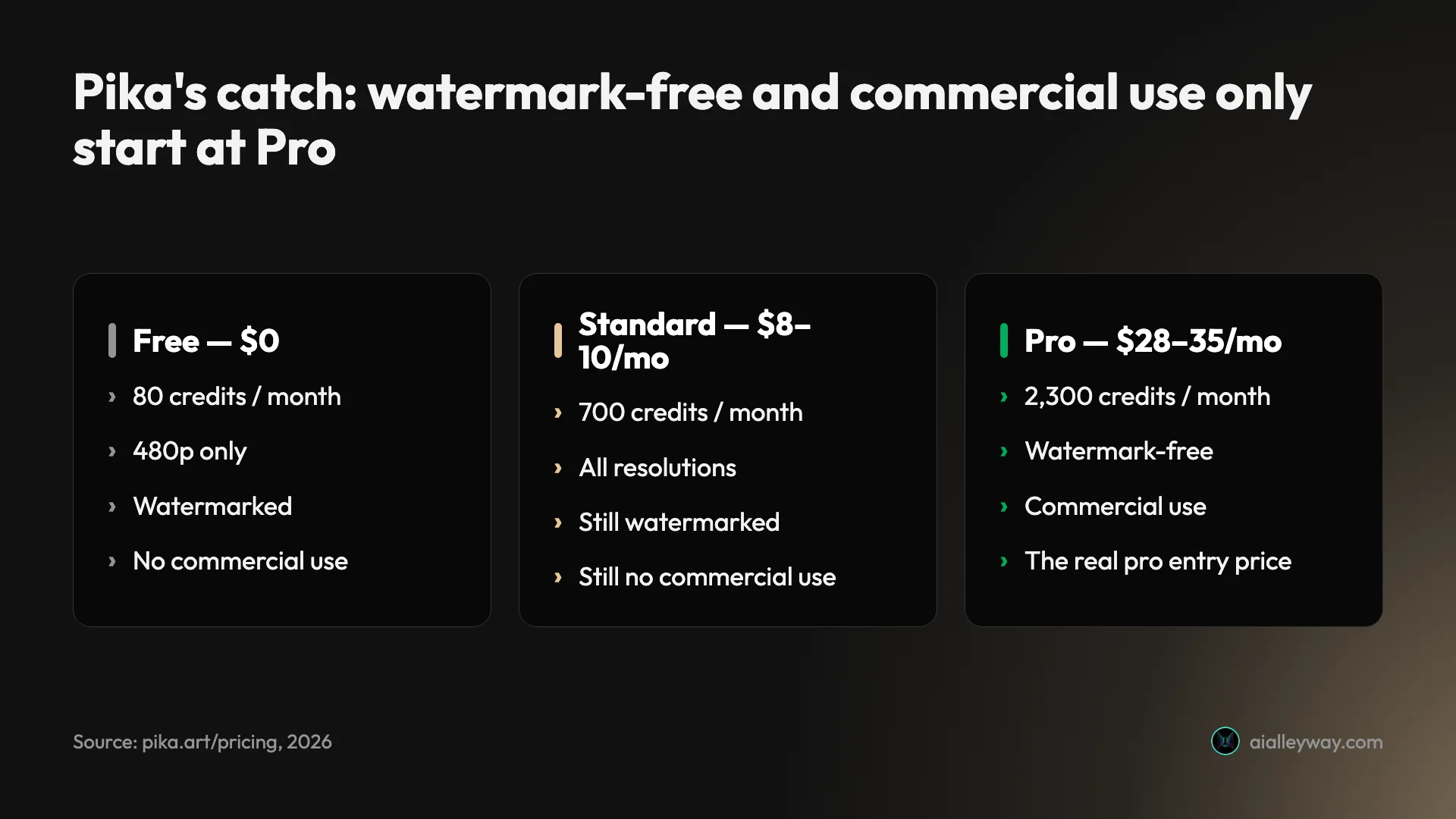
Pika has a free plan and three paid tiers, and the pricing looks friendlier than it is until you read the fine print on watermarks and commercial rights. Yearly billing is 20% cheaper than monthly.
| Plan | Yearly (per mo) | Monthly | Credits / mo | No watermark | Commercial use |
|---|---|---|---|---|---|
| Basic (Free) | $0 | $0 | 80 (refills) | ✗ | ✗ |
| Standard | $8 ($96/yr) | $10 | 700 | ✗ | ✗ |
| Pro (best value) | $28 ($336/yr) | $35 | 2,300 | ✓ | ✓ |
| Fancy | $76 ($912/yr) | $95 | 6,000 | ✓ | ✓ |
The free Basic plan is a real, refilling tier — 80 credits a month, not a one-time trial — but it is boxed in: 480p only, watermarked, and no commercial use (base text-to-video works, but Pikaffects are limited to image-to-video). It is for playing, not producing.
Here is the part the pricing page makes easy to miss, and the single most important thing to understand before you subscribe: watermark-free downloads and commercial rights do not start until Pro. The entry Standard plan, at $8–10 a month, opens up all resolutions and the full feature suite, but it still stamps a watermark on your videos and still forbids commercial use — on both monthly and yearly billing. If your clips are going into anything that earns money, the real entry price is Pro at $28–35 a month, not the headline $8. Fancy ($76–95) mostly buys more credits and the fastest render queue.
Everything runs on credits, and effects or longer clips draw down more of them, so what a tier really buys you is its monthly credit pile — read that number before the price. Paid plans roll unused credits over and let you buy more on top. Budget by credits, and assume Pro is your floor for professional use.
Who Pika is for
- Social and meme creators who live on TikTok, Reels, and Shorts and want fast, eye-catching, effect-driven clips. Pikaffects and Trendmaker are built for exactly this, and the output is feed-ready without any editing skill.
- Hobbyists and the AI-curious who want the lowest-friction, most fun way to try AI video. The one-tap effects mean you make something satisfying in your first five minutes, with no prompt craft required.
- Marketers making playful short-form on a tight budget, who can live within Pro’s commercial license and want a cheaper tool than Runway or Kling for lightweight, stylized clips.
- Mobile-first creators who want to generate and share from a phone, using the app and Trendmaker rather than a desktop timeline.
- Not for you if you need photoreal fidelity, 4K, native in-clip audio, long-form or multi-shot narrative, or reliable frame-to-frame consistency. For any of those, a more serious model like Google Veo, Kling, or Runway is the right tool, and Pika will frustrate you.
The good
Pikaffects are genuinely unique — and genuinely fun
The one-tap effects are the reason to pick Pika, and nothing else in the category matches them for ease. Melt, inflate, crush, explode, squish, cake-ify: each turns a single image into a shareable transformation with zero prompt engineering, which is precisely why they went viral. If your goal is a scroll-stopping clip for a feed rather than a cinematic shot, this is a feature no rival makes as effortless.
It is the easiest on-ramp to AI video
Pika is the tool you hand someone who has never made an AI video. The interface is uncluttered, the effects are point-and-tap, and you get a satisfying result in your first session without learning prompt craft or a node graph. For a category that often feels intimidating, that low friction is a real, repeatable advantage.
The entry price is low, and the free tier actually refills
At $8 a month on annual billing, Standard is one of the cheaper paid entries in AI video, and the free plan’s 80 credits refill every month rather than expiring as a one-time trial — so you can keep dabbling indefinitely for nothing. Just hold the caveat from the pricing section in mind: cheap does not yet mean commercial.
Credits roll over, and you can top up
On paid plans, unused credits carry into the next month instead of evaporating, and you can buy more without upgrading your whole tier. For bursty creators who generate in spurts, rollover is a genuinely useful bit of pricing design that several rivals lack.
It is expanding toward agents and automation
Pika 2.5 ships alongside Pika Agent (a conversational creative partner) and Pika MCP, which lets external agents like Claude and OpenAI drive generation programmatically. Whether or not you use them today, they signal a tool investing in workflow reach rather than standing still — and MCP support in particular is a forward-looking move few competitors have made.
Pika 2.5 is a real quality jump
Pika’s reputation is for stylized, slightly plastic output — but the current model has closed a lot of that gap. In hands-on testing, a plain “a barista steaming milk for a latte, close-up, cinematic” prompt returned a photorealistic clip: condensation flecking the metal jug, believable crema on the foam, and, the part that matters, steam that genuinely billowed and shifted across the five-second clip rather than sitting frozen. A frame-difference check confirmed the motion was real, not a still with a moving watermark. It is well beyond the novelty-effect quality Pika built its name on, and it means the model is now worth using for real shots, not just Pikaffects.

The bad
The free tier is 480p, watermarked, and non-commercial
The free plan looks generous at 80 refilling credits a month, but the output is capped at 480p (our downloaded test clip came back at exactly 784×470), carries a Pika watermark, and cannot be used commercially — confirmed on Pika’s pricing page. That is fine for play, but it means the free tier can never produce a finished, publishable clip, which is a meaningful limit if you were hoping to actually use what you make.
Commercial rights start at Pro, not Standard — an easy, expensive mistake
This is the pricing trap. The $8–10 Standard plan removes neither the watermark nor the commercial-use restriction; both only lift at Pro ($28–35/month). Nothing on the plan cards flags this loudly, so it is genuinely easy to subscribe to Standard, publish a client clip, and be out of license. The real entry price for professional work is roughly 3.5× the headline number.
The free render queue is slow
In hands-on testing, a single 480p, 5-second clip sat in the free-tier queue for more than twelve minutes, with an “Upgrade for faster generations” prompt on the loading card the entire time. The slow queue is clearly a deliberate lever to push you toward a paid plan, but it makes the free tier tedious for anything beyond occasional experiments.
It trails the leaders on fidelity and resolution
Pika’s own positioning tells the story: it optimizes for stylized fun, not photorealism. Against Google Veo, which generates up to 4K with synchronized native audio, or Kling, which reaches 4K with sound, Pika’s more limited resolution and stylized signature are a clear step down for anyone who needs output that reads as real. It wins its niche by not competing in theirs.
Audio is a separate feature, not native to a clip
A standard Pika generation comes out silent, so the soundtrack is a separate job — our best AI music generator roundup covers where that audio can come from. Sound only arrives through Pikaformance, a distinct lip-sync feature you feed your own audio — there is no equivalent to Veo 3 scoring a clip with dialogue, effects, and ambience in the same pass. Any clip that needs a soundtrack therefore picks up a manual audio pass that Pika’s audio-native rivals increasingly skip.
The Trustpilot record is poor, and the complaints are operational
For all the quality, Pika carries a 1.8-out-of-5 “Poor” rating across 64 Trustpilot reviews, weighted heavily toward one star. Tellingly, the complaints aren’t about how the videos look; they’re about how the service runs. Reviewers describe generations that fail after long waits while still consuming credits (one 1-star review recounts a job that “failed to create anything” over two hours and “took away” the free credits), output that “doesn’t follow your instructions,” and support that “doesn’t offer any proper” help.
The profile is unclaimed and self-selected, so treat it as the unhappy tail rather than the average. But the themes line up with the twelve-minute free render queue I hit firsthand, which makes them hard to wave away.
Alternatives worth considering
If Pika’s playful stylization isn’t what you need, three tools cover the gaps — and each is a better answer to a specific reason you’d leave.
- Google Veo — the pick when fidelity and native audio matter. Veo generates cinematic, watermark-free clips with synchronized sound on any Google account, and it is the category’s quality leader. If Pika’s 480p free tier and silent output are the dealbreakers, Veo is the direct upgrade.
- Kling AI — the pick for maximum raw quality at a low price. Kling reaches native 4K with audio and top-rated motion, and a free sign-up clip lets you judge it. The trade-off is a shaky billing reputation, which our review covers in full.
- Runway — the pick when you need to edit, not just generate. Runway pairs strong generation with a real editing suite and a marketplace that runs other models, so it suits controlled, iterative work in a way Pika’s one-tap approach does not. See Runway vs Pika compared.
Final word
Pika knows exactly what it is: the fun, fast, cheap corner of AI video, where a single tap turns a photo into something worth sharing. Judged on that, it succeeds — Pika is the most enjoyable on-ramp to the medium and the tool I’d hand a total beginner or a social creator first. Judged on fidelity, resolution, or native audio, it trails the serious models by a wide margin, and its cheap tiers hide a real commercial-rights catch that pushes the true professional price to the Pro plan. Match it to the job, playful short-form rather than photoreal production, and it is a Solid Choice. Push it past that, and you’ll wish you’d bought Veo.
For more, see the best free AI video generator and our best AI video generator hub.
Frequently asked questions
Is Pika free?
Yes, Pika has a genuinely free tier, and unlike some rivals it refills — you get 80 video credits a month, not a one-time trial pool. The catch is what those free credits buy: generation is capped at 480p, every clip carries a Pika watermark, and commercial use is not permitted (Pikaffects are also limited to image-to-video on the free plan, though base text-to-video works).
So the free plan is a real way to play with the tool indefinitely, but not a way to produce finished, publishable video. To get higher resolutions, the full feature suite, and faster renders you move to a paid plan, and to get watermark-free, commercially licensed output you specifically need the Pro tier or above.
How much does Pika cost?
Pika has a free plan plus three paid tiers, billed monthly or yearly (yearly is 20% cheaper). On annual billing it is Standard at $8/month (700 credits), Pro at $28/month (2,300 credits), and Fancy at $76/month (6,000 credits); the monthly-billing prices are $10, $35, and $95. Pro is marked as the best value and is the cheapest plan that removes the watermark and grants commercial rights.
Judge a plan by its monthly credit pile rather than its sticker price: every generation burns credits, and effects or longer clips burn more, so the credit count is what actually caps how much video you can make. Unused credits roll over on paid plans, and you can buy more on top. Do not assume the cheap $8 Standard plan is enough for professional work: it is still watermarked and non-commercial.
Does Pika have sound?
Not as native, generated soundtrack the way Google Veo does. A standard Pika text-to-video or image-to-video clip comes out silent. Pika's audio capability lives in a separate feature called Pikaformance, which drives lip-sync and vocal performance from a portrait and an audio input — useful for talking or singing characters, but it is not the same as a model that scores your clip with synced dialogue, effects, and ambience in one pass.
If your clip is headed for a feed where a trending track or captions carry it, the missing audio barely registers. If it needs its own dialogue or ambience, plan on scoring it yourself afterwards, or reach for a model like Veo that bakes the sound in.
What are Pikaffects?
Pikaffects are Pika's signature one-tap video effects: you take an image or clip and apply a pre-built transformation — melt it, inflate it, crush it, explode it, squish it, or 'cake-ify' it (slice the subject open like a cake). They are the feature that made Pika go viral, because they turn a single still into a satisfying, shareable transformation without any prompt engineering.
They are the strongest reason to pick Pika over a more serious model: no other major tool makes this class of playful physics effect as easy. They are available on the free tier for image-to-video, with the full set unlocked on paid plans.
Is Pika better than Runway or Kling?
It depends entirely on what you are making. For raw fidelity, resolution, and cinematic motion, Runway and Kling are ahead — Kling generates up to 4K with native audio, and Runway pairs strong generation with a real editing suite. Pika does not try to win that fight. Where Pika wins is fun, speed, ease, and price: its Pikaffects and Trendmaker templates are built for social and meme content, and it is cheaper to start with than most rivals.
So if you are producing client work, product shots, or anything that needs to look photoreal, choose Runway or Kling. If you are making short, playful, effect-driven clips for a feed, Pika is the more enjoyable and more affordable tool. They are aimed at different jobs.
Can I use Pika videos commercially?
Only on the Pro tier or above. This is the single most important thing to get right about Pika's pricing: the free plan and even the entry Standard plan ($8–10/month) both explicitly exclude commercial use and keep the watermark, on both monthly and yearly billing. Commercial rights and watermark-free downloads begin at Pro ($28/month yearly, $35 monthly).
So if your Pika clips are going into anything that makes money — client work, ads, monetized social — budget for Pro, not Standard. Paying $8 a month and assuming you can publish the output commercially is the mistake the pricing page makes easy to make.
Keep reading
Higgsfield alternatives: 7 picks, and the two real choices
Seven Higgsfield alternatives we tested. The same Seedance clip costs $1.76 through Higgsfield and about $0.40 direct — when to leave, and where to go.
Runway vs Pika: The Studio vs the Effects Toy
Runway vs Pika, tested hands-on. They barely compete: Runway is a pro editing studio, Pika a playful one-tap effects tool. Which AI video tool you need.
The Best Luma AI Alternatives, Tested Hands-On
Luma AI is a multi-model aggregator you pay a margin for. The 6 best Luma alternatives — go direct to one model, or switch aggregators — each tested hands-on.

The Best Free AI Video Generator (No Trial Traps)
Most free AI video generators are watermarked or trials in disguise. Google Veo's free tier gives a watermark-free clip with sound for $0 — the honest ranking.