
Claude Artifacts tested: a working app in 2 minutes, private at first
I built a tip calculator, a five-slide deck and an AI reply tool as Claude artifacts. What saved, what exported, what asked permission, and what Free gets.
Contents
The short answer on Claude Artifacts
Claude Artifacts are the things Claude builds for you in a panel beside the chat: documents, slide decks, web pages, dashboards and small working tools. You can edit them, keep them, share them and export them. On Claude every plan can make them, including Free, and in November 2026 the Docs, Slides and Design templates are on every plan too.
I built three on a paid account. A tip-split calculator for a fictional coffee shop took 137 seconds, did its sums to the cent, and remembered a saved day after I reloaded the page. A five-slide staff deck was finished inside 72 seconds with every number right. An AI reply tool built fine, then stopped at a permission box, and without that permission it could not draft a single reply.

| What I built | Template or chat | Time | What happened |
|---|---|---|---|
| Tip-split calculator with saved history | Chat | 137 s | Correct to the cent; saved day survived a reload |
| Five-slide staff meeting deck | Slides | Under 72 s | All four figures right; exports to PowerPoint, PDF, Google Slides |
| Complaint reply tool that calls Claude | Chat | About 140 s, plus an approval | Built, then blocked at the “Use Claude” permission box |
How Claude Artifacts work in November 2026
An artifact is, in Anthropic’s own words, “anything Claude makes for you that you’d put in front of someone.” It opens in a panel beside the conversation, and it stays there while you keep talking. Ask for a change and Claude edits the artifact rather than pasting a fresh copy into the chat.
The help centre lists the kinds: documents, code snippets, single-page websites, images, diagrams and flowcharts, dashboards, and small interactive tools.
Claude decides when to make one. The help centre’s rule of thumb is content that is substantial and self-contained, usually more than 15 lines, and likely to be edited or reused. A recipe question gets an answer in the chat. A request for an interactive calculator gets an artifact.
The product changed shape this autumn, which is why older guides now read oddly. Chat artifacts made before 16 September 2026 are now called legacy artifacts, and they keep the old Publish button. Everything newer sits on one Artifacts page with a Share menu, and the page now opens with four templates: Docs, Slides and Design, each marked New, and Dashboard, marked Beta.
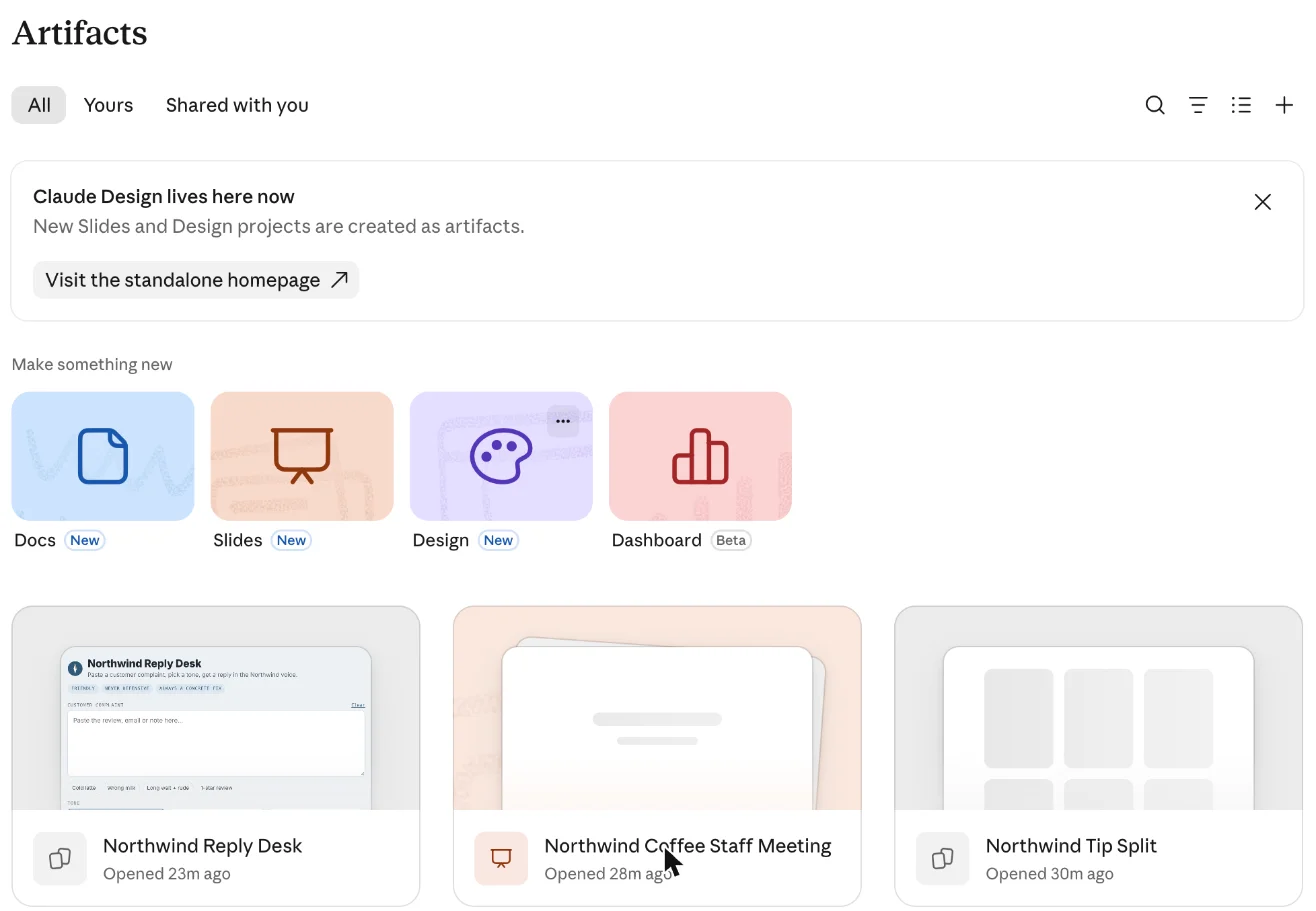
A small banner above them reads “Claude Design lives here now”, and Anthropic’s features page says the standalone Design site stays open until 14 December 2026. If you came to artifacts for code snippets in a side panel, that still works. It is now the smallest thing the feature does.
How to make, edit and fix an artifact
You do not switch artifacts on per chat. They depend on one capability, which the help centre calls “Cloud code execution and file creation” (“Create and edit files” in the updated settings layout), under Settings, then Capabilities, on Free, Pro, Max and Ultra. On Team and Enterprise an owner controls it in organization settings. If Claude keeps answering in the chat when you expected a panel, check that switch first.
From there the workflow is short:
- Ask for the thing, not the code. “Build me a tip-split calculator” got me a working tool. Say what it should remember and who will use it, because that decides whether Claude reaches for storage.
- Change it by talking. Ask for edits in the chat and Claude updates the same artifact. In a document you can also highlight text and choose Edit with Claude, and in the template artifacts you can edit directly.
- Fix errors from the panel. When an artifact breaks, a “Try fixing with Claude” button appears. The help centre is candid that a fix is not guaranteed.
- Find it again later. Everything lands on the Artifacts page, with tabs for All, Yours and Shared with you.
One quirk worth knowing: editing an earlier message in the chat creates a separate branch of the conversation with its own artifacts, so your latest version can seem to vanish. It is still there on the other branch. The help centre does not describe a version history beyond that, so if a version matters, export it before asking for big changes.
Remixing works differently for the two generations. A legacy artifact published from a chat can be copied: open it, click Copy, paste the code into a new chat and describe your changes, and the original is untouched. The help centre warns to do this only with artifacts from people you trust, since you are bringing their code into your chat.
| Where you are | What you can do with artifacts |
|---|---|
| Claude on the web or desktop | Create, edit, share and start from templates |
| iOS and Android apps | Create, view and edit; changing sharing needs the web or desktop |
| Claude Code | Publish session output as a page at a private link, or make designs and docs |
That last row is easy to miss. If you work in Claude Code, a finished report or prototype can go straight to an artifact rather than a local file.
Test 1: a tip-split calculator that remembers
I asked for an interactive tip-split calculator for Northwind Coffee, a fictional shop. You enter the day’s tips and each barista’s hours, it shows each share, and, the hard part, it saves every day so a weekly total builds up.
From pressing Enter to a finished, working artifact took 137 seconds by my watch. Claude’s first line set the plan: it would build the calculator “as a published page that saves each day’s entry”. The card beneath the chat read “Northwind Tip Split · Artifact · Only you”.
The form came pre-filled with example figures, clearly labelled, and the maths was right. A $186.40 pool across 18 hours split as $77.67, $62.13 and $46.60 for 7.5, 6 and 4.5 hours. Those three add up to exactly $186.40, and the $10.36-an-hour rate matches 186.40 divided by 18. Claude’s note said the shares “always add up to the exact total, down to the cent”, and the example bore that out.
Then I tested the claim that mattered. I pressed Save day, and the status changed from “0 days saved” to “1 day saved” while a weekly table filled in below. I reloaded the whole chat page. The saved day and the weekly totals were still there.
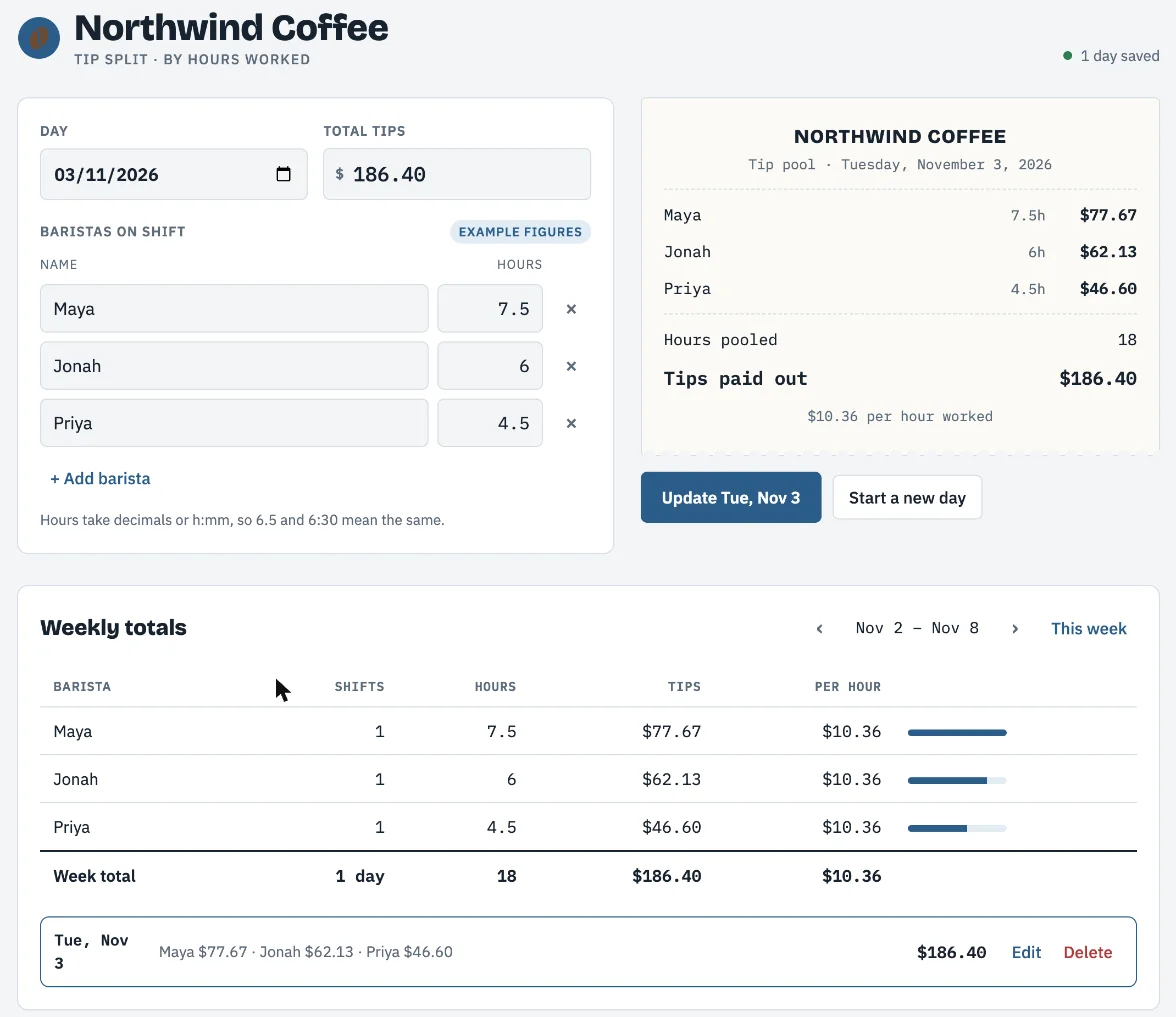
One small flaw: the “Example figures” badge stayed on the form after I had saved those figures as a real day. It is cosmetic, but it is the kind of thing you would ask Claude to fix in a second message.
Claude was also careful about what it had and had not checked. In its words: “I checked that saving, reading back and deleting a day all work, then removed my test entry, so your history starts empty. I didn’t test it in a browser on your device.” That last sentence is honest, and it is the reason to click through your own artifact before you rely on it.
Saved data: what the storage actually is
The persistence I saw is what the help centre calls storage, and it is a paid feature. Pro, Max, Ultra, Team and Enterprise get it on the web and desktop apps. Free does not.
There are two kinds. Personal storage is private to each person who uses the artifact. Shared storage is one pot that everyone sees, and Claude shows a confirmation the first time it is used. Both are limited: “Storage has a 20 MB limit per artifact and accepts text only, no images, files, or binary data.”
That is plenty for a tip log, a habit tracker or a team checklist, and useless for anything that stores photos. The more important line is a warning. “Whoever builds an artifact decides which data uses personal storage and which uses shared.” If a colleague sends you a form, you cannot tell from the outside whether what you type stays private.
Older artifacts carry one more trap. Legacy artifacts only store data after they are published, and unpublishing one “permanently deletes all its stored data.” Anthropic’s sharing article adds that you cannot publish it again afterwards.
Test 2: a five-slide deck from one paragraph
For the second test I used the Slides template from the Artifacts page. It opens on an empty canvas with a chat beside it, the line “Paste your ideas and turn them into slides”, and a design-system menu that I left on its default.
I gave it four facts for a staff meeting: last week’s tip pool, an oat milk cost rise of 40 cents a drink, a new $4.25 cortado, and a 7am opening from next Monday. The deck was done inside 72 seconds. It was already finished the first time I looked after a minute of waiting, so the true time was shorter.
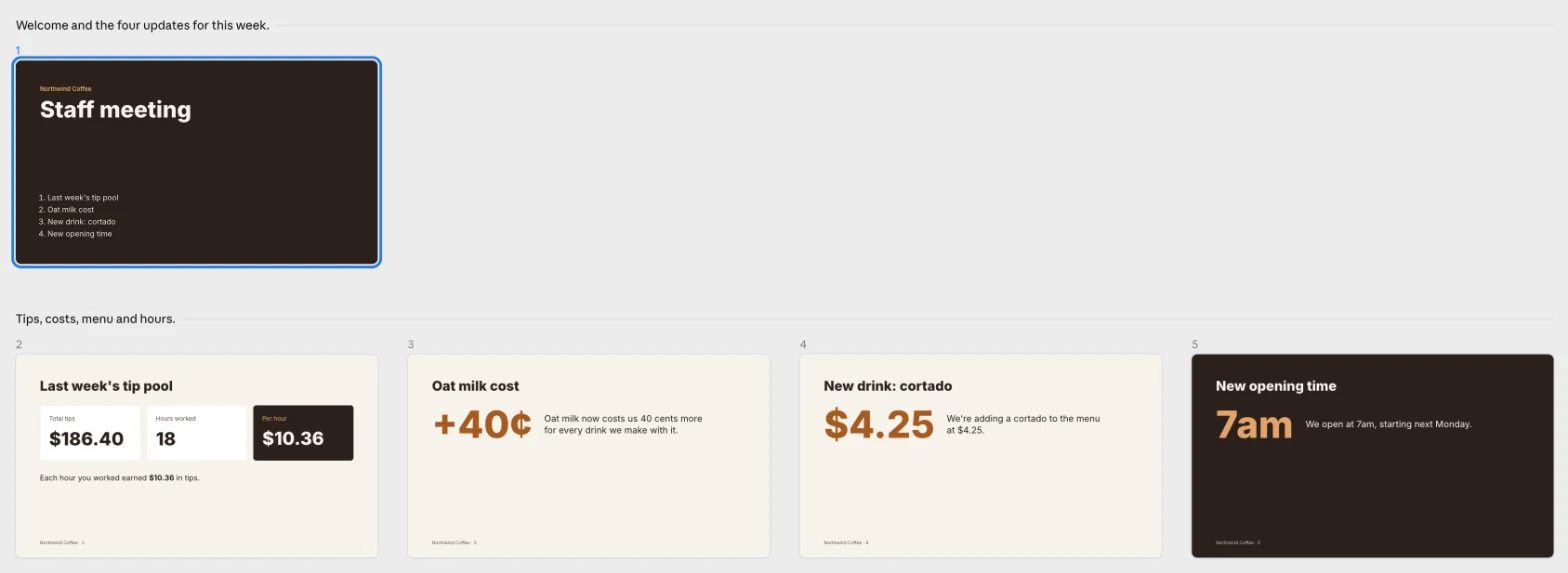
Every figure landed where it should, one big number per slide. Claude also said what it had added beyond my text: “The speaker notes add one extra line, ‘check the rota for your new start time,’ which you can delete if it doesn’t fit.” And it worked out that next Monday was 9 November, which was correct.
The Export menu is where the template earns its place over a plain chat artifact. PDF and PNG download directly. PowerPoint comes in three versions: editable with the deck’s own fonts, editable with basic fonts every computer has, or “Slides as pictures”, where text cannot be edited. There is also a Google Slides option that makes an editable copy in your Drive. My chat-built calculator, by contrast, offered HTML, Markdown and PDF through the browser’s print dialog.
For a weekly update or a quick internal deck, this is faster than any slide tool I have used. For a designed pitch deck, our Gamma review covers a tool built only for that job.
Test 3: an artifact that calls Claude, and the box it stopped at
The third test was the one I was most curious about: a tool that uses Claude itself. A new barista pastes a customer complaint, picks Warm, Brief or Formal, and gets a drafted reply in the shop’s voice.
The build paused at about 140 seconds with a “Needs your input” card that test 1 never showed. It asked to publish the file to claude.ai, said “New artifacts stay private until you share them”, and listed “Page can use: sample”. That line was the only visible difference from test 1. I clicked Publish.
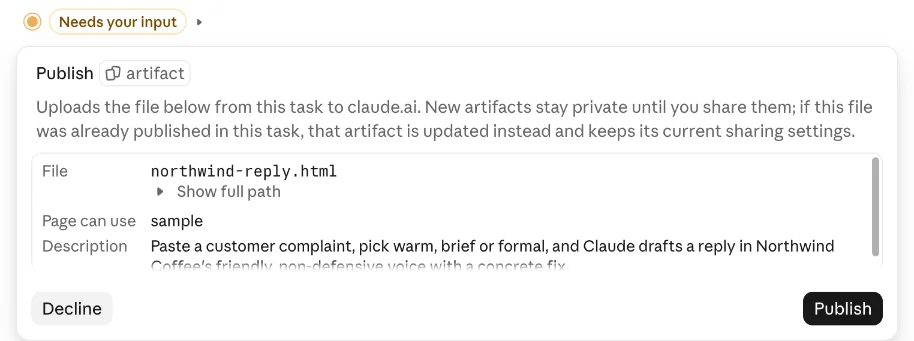
The finished Reply Desk was more thoughtful than I had asked for. It added a picker for the fix to offer, from a remake to a refund, plus four sample complaints. Claude said it would flag any complaint mentioning “an allergy, injury or legal threat” so the barista loops in a manager before sending. It was also upfront about its limit: “I couldn’t run a live draft from here, so the first real one will happen on your end.”
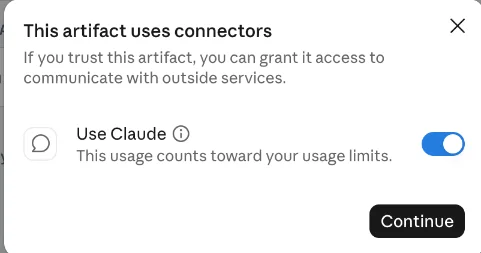
So I tried one. I pasted a complaint about getting regular milk instead of oat, from a customer who is lactose intolerant, and clicked Draft reply. A box appeared: “This artifact uses connectors. If you trust this artifact, you can grant it access to communicate with outside services.” Beneath it was a switch labelled “Use Claude” and the line “This usage counts toward your usage limits.”
My test stopped there. Access was never granted, and the tool showed “Something went wrong reaching Claude. Try again in a moment.” The reply pane kept its built-in example, a note about a lukewarm oat latte. So I cannot tell you whether the drafts were any good, or whether the allergy warning fired.
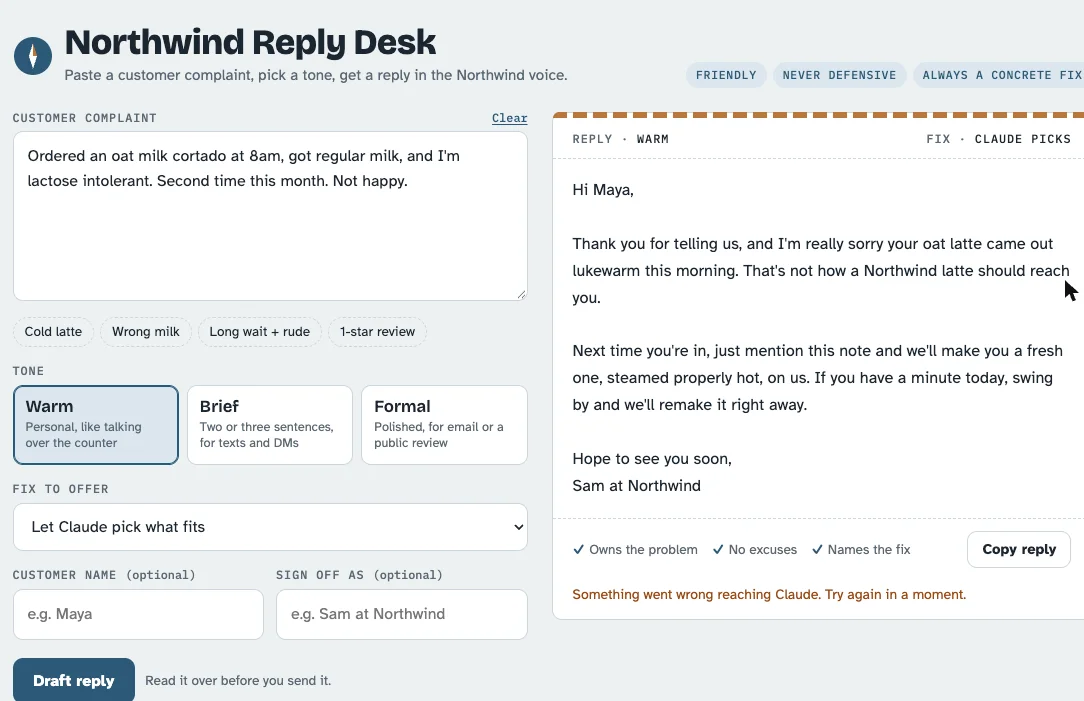
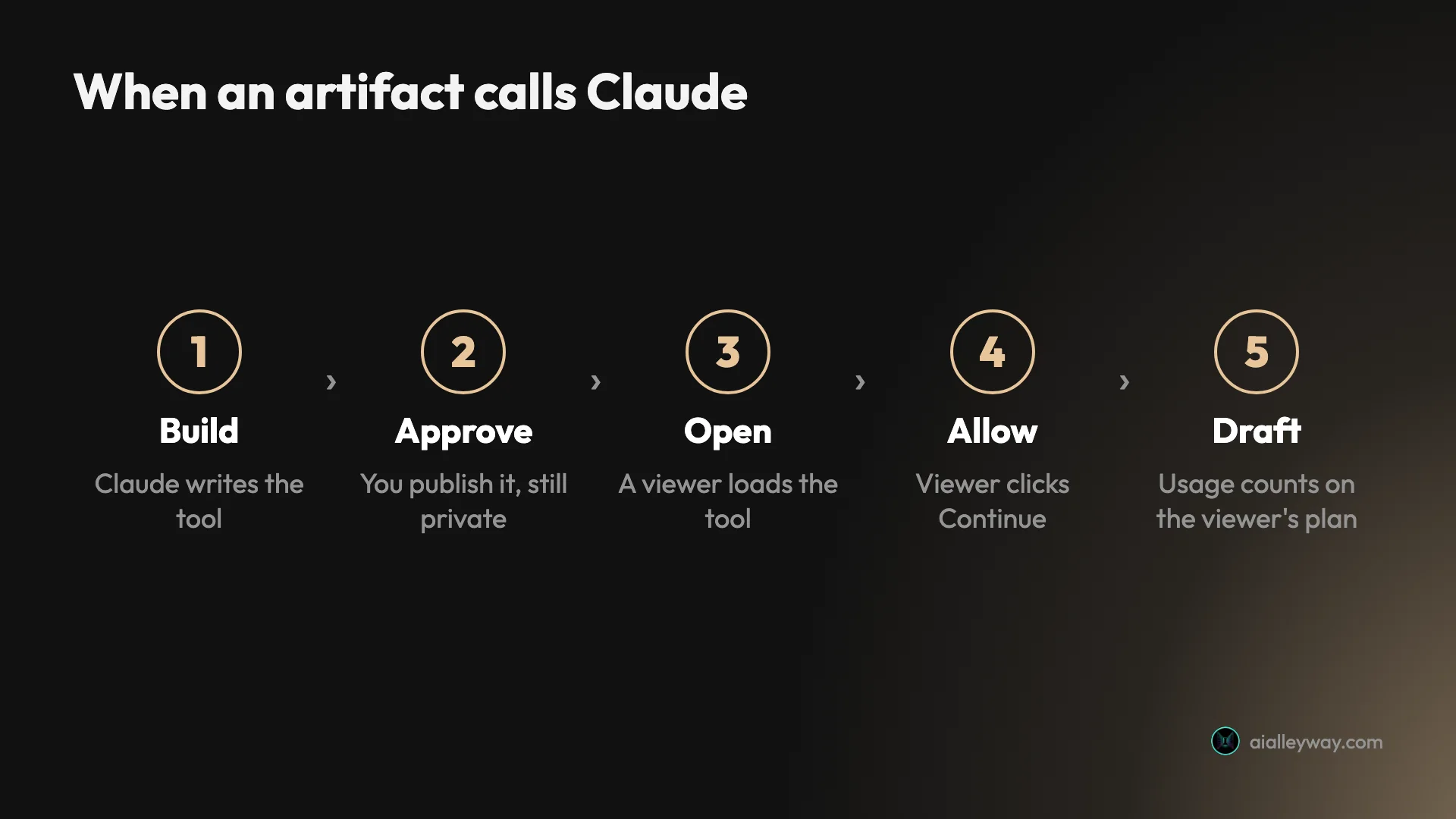
What the test does show is the gate itself. An artifact cannot spend your usage without a click: the first time it wants to call Claude, the viewer has to press Continue, on their own account. It is a light gate, though. The Use Claude switch was already on when the box appeared, so one click grants access.
Who pays when an artifact uses Claude
This is the part of artifacts most people misread. The help centre is clear that when an artifact calls Claude, “usage counts against each person’s own plan limits rather than yours.” Every viewer signs in with their own Claude account, and “No API keys are required, and there’s no cost to you.”
That makes AI artifacts cheap to build and share inside a team that already pays for Claude. It also limits who you can share them with. Per the sharing article, “Artifacts that connect to your apps or use Claude can’t use ‘Anyone with the link.’” On my Reply Desk the Share menu still listed that option. I did not select it, because it would have opened the page to anyone with the link, so I cannot confirm what happens when you try.
Connected apps follow the same logic. Paid plans can let an artifact read from and write to tools such as Asana, Google Calendar or Slack, but “Everyone connects their own apps, even when using a shared or published artifact.” Connector tools that need approval for each action are not available to artifacts at all.
Sharing and export, plan by plan
Every artifact I made started as “Only you”. The Share panel has an email invite field, a list of people with access, and a General access menu with two choices: Only people invited, or Anyone with the link, which the menu describes as “People with the link can view, but not edit.”
| Feature | Free | Pro, Max, Ultra | Team, Enterprise |
|---|---|---|---|
| Make artifacts in a chat | Yes | Yes | Yes |
| Docs, Slides and Design templates | Yes | Yes | Yes |
| Dashboards template (beta) | No | Yes | Yes |
| Motion template (beta) | No | No | Yes |
| Store data in an artifact | No | Yes | Yes |
| Connect apps to an artifact | No | Yes | Yes |
| Share with anyone who has the link | Unclear: features page yes, help centre legacy only | Yes | Only if an owner allows external sharing |
| Invite specific people by email (beta) | No | Yes | Yes |
Source: Anthropic’s help centre articles on artifacts and sharing, read on 3 November 2026.
Viewers need a Claude account to open a shared artifact. The one exception is a legacy artifact published from a chat, which anyone with the link can still use without signing in. Exports depend on the type. Docs go to Word, PDF, Markdown or Google Docs. Decks go to PowerPoint, PDF or Google Slides, and designs to a zip, PDF, PowerPoint or standalone HTML.
Five ways an artifact surprises you
Private means private, until it doesn’t
Every artifact starts as Only you. Claude said so in tests 1 and 2, and the publish card said so in test 3. Switching to Anyone with the link sits one menu away, and I did not try it, so I cannot say whether it asks you to confirm. Check the General access line before you paste the link anywhere.
Unpublishing a legacy artifact deletes its data
For artifacts made before 16 September 2026, unpublishing “permanently deletes any personal and shared storage data the artifact used”, and you cannot publish it again. Export the data first if it matters.
The builder decides what is shared
Shared storage means everyone sees the same data. If someone else built the artifact, you do not choose which fields are private. Treat a colleague’s artifact like a shared spreadsheet until you know otherwise.
Example data can look like real data
My calculator opened with three baristas’ hours already filled in. They were labelled, but the label stayed after I saved them. Clear example rows before you start entering real figures.
Claude has not seen it run on your screen
Claude said it had checked its own work in test 1, while noting it had not run the page in my browser, and in test 3 it said it could not run a live draft at all. Click through anything you plan to rely on. In test 3, my own click on Draft reply is what showed the tool could not draft without permission.
Artifacts, Projects or a dedicated tool?
Artifacts are for things you make. Claude Projects are for context you reuse: files, instructions and memory that every chat in a project can use.
- Use a chat artifact for small tools, calculators, trackers and one-page sites. You get a working tool from one paragraph, and a paid plan lets it keep data.
- Use the Slides template for internal decks and weekly updates that need to go out as PowerPoint or Google Slides.
- Use a dedicated tool for a designed pitch deck or a brand-heavy site, where you want finer control than a chat gives you.
- Compare ChatGPT’s Canvas if you already pay for ChatGPT. It is the closest equivalent there, and our ChatGPT vs Claude comparison covers how the two assistants differ overall.
- Skip AI-powered artifacts for public use. They cannot use Anyone with the link, and every viewer needs a Claude account and spends their own usage.
Our Claude review covers the rest of the product, and the Claude Max guide explains what the higher plan’s limits buy if you build a lot.
Final word
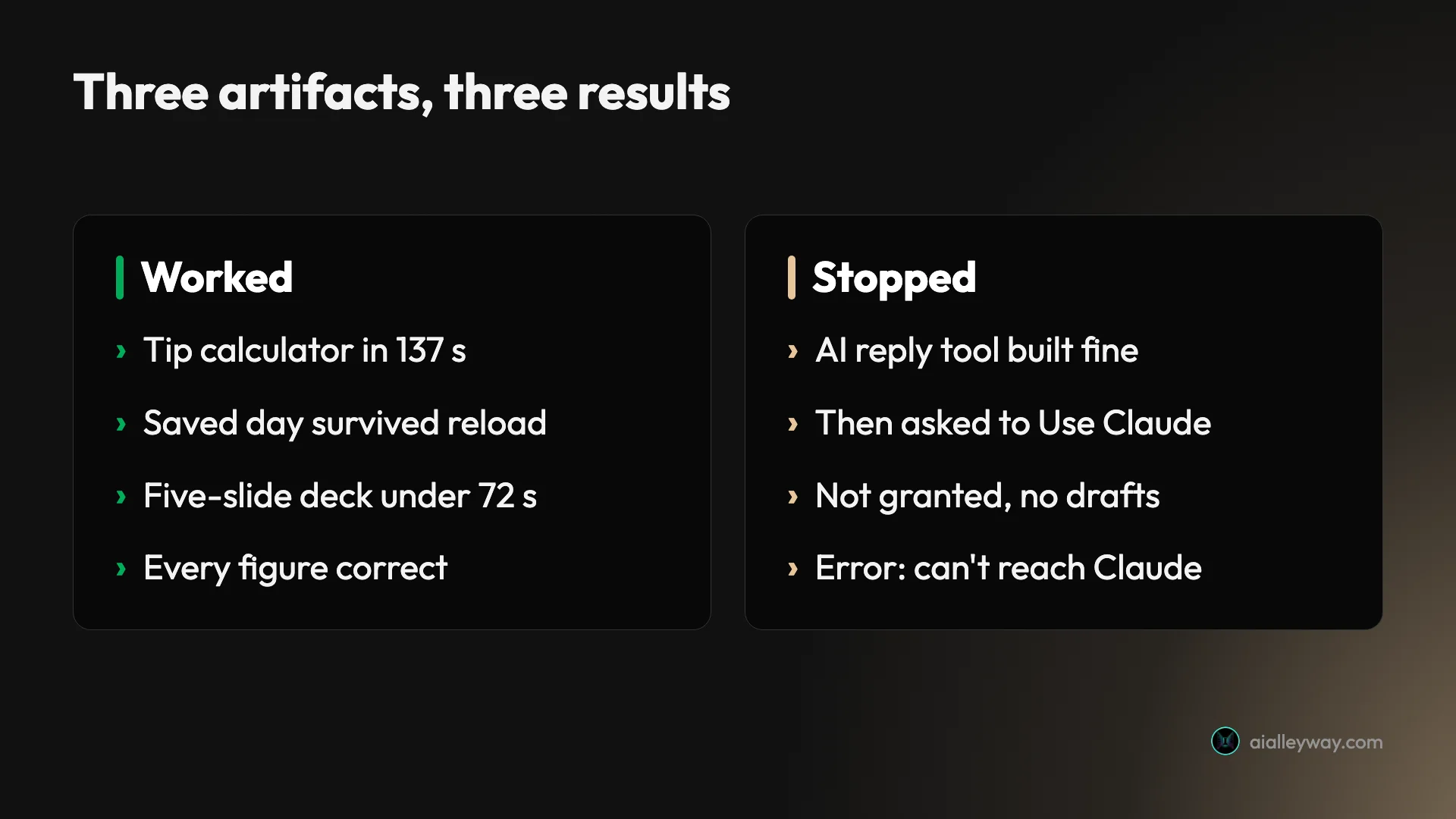
Claude Artifacts have grown from a code panel into a small workshop. In my test it built a calculator that kept its data in a little over two minutes, and a staff deck in under 72 seconds, with no number out of place. The AI-powered tool showed the feature’s real boundary: anything that calls Claude needs each viewer’s own permission and account, which is good for safety and limiting for public sharing. Start with a chat artifact or the Slides template on whatever plan you have. Pay only if you need saved data, dashboards or connected apps.
Frequently asked questions
What are Claude Artifacts?
An artifact is a piece of work Claude makes that opens in its own panel beside the chat: a document, a slide deck, a web page, a diagram, a dashboard or a small interactive tool. You can keep editing it by asking Claude, revisit it later from the Artifacts page, share it and export it.
Anthropic's help centre says Claude creates one when the content is substantial and self-contained, usually more than 15 lines, and likely to be edited or reused. In my test, asking for an interactive tool or a deck produced one every time.
Are Claude Artifacts free?
Yes. Making artifacts in a chat, and the Docs, Slides and Design templates, are available on every plan including Free, according to Anthropic's help centre.
The paid plans add three things: storing data inside an artifact, connecting an artifact to apps such as Google Calendar or Slack, and the Dashboards template, which is in beta. Motion, the animation template, is Team and Enterprise only. Pro starts at $20 a month.
Can Claude Artifacts save data?
Yes, on paid plans. My tip-split calculator saved a day's entries, and they were still there after I reloaded the page. Anthropic's help centre describes personal storage, private to each user, and shared storage, where everyone sees the same data.
The limits are 20 MB per artifact, text only, with no images or files. The person who builds the artifact decides which data is personal and which is shared, so check that before you type anything sensitive into one somebody else made.
How do I share a Claude artifact?
Open the artifact, click Share, and change General access from Only people invited to Anyone with the link. Every artifact starts private, and my three test artifacts all stayed marked Only you. On Free, whether link sharing works for new artifacts is unclear: Anthropic's features page says yes, while the help centre lists it only for legacy chat artifacts.
The help centre adds two catches. Viewers need a Claude account, except for older artifacts published from a chat before the September 2026 change. And artifacts that use Claude or connect to your apps cannot use Anyone with the link at all. The menu still listed that option on my AI tool, but I did not select it, so I cannot say what happens if you try.
Do AI-powered Claude artifacts cost the creator money?
No. When an artifact calls Claude, the help centre says the usage counts against each viewer's own plan limits, not yours, and no API key is needed. Each person signs in with their own Claude account.
The first time an artifact tries to use Claude, a box asks permission and says the usage counts toward your usage limits. My test stopped at that box without granting access, and the tool showed an error instead of a draft.
Keep reading
Claude AI review: brilliant at words, strange about limits
A Claude AI review from a paying Max account. My $100 Max plan invoiced at $111.11, three usage meters run at once, and overflow is billed at API rates.
Claude Projects tested: what it finds, and what it can't read
I built a Claude project with three files and ran six chats. It found one line in a 1.46 MB file, but could not count across it. Setup, limits and plans.
Claude Max plan: 5x now covers your week, and 20x is gone
Claude Max is $100 a month for 5x Pro usage every five hours and every week. The $200 tier is now Ultra: no five-hour cap, 10x Pro weekly. Which one to buy.
ChatGPT vs Claude: one writes, one does everything else
ChatGPT vs Claude, from a paid Claude account and a year on ChatGPT free. Both $20, but the free tiers differ far more — and only one generates images.
Gamma AI review: 8 accurate slides in a minute, then the fixes
A hands-on Gamma AI review: an 8-slide deck in a minute with every number right, a footer bug, a chart that exports as a picture, and what Plus costs.