
Best AI avatar generator 2026: 8 tools, a winner for each job
The best AI avatar generator for each job: Synthesia for training, HeyGen for realism, Tavus for live talk. 8 tools compared, prices checked Nov 4, 2026.
Contents
There is no single best AI avatar generator; the right one depends on the job, so we picked one for each. This roundup covers AI avatar video tools, the kind that turn a script into a talking presenter or a real-time agent you can speak to. If you want a stylized profile picture for social instead, that is a different category (Canva and Fotor live there); this is about video. For AI video beyond talking heads, see our best AI video generator guide.
We tested the top three of these tools hands-on and reviewed each in full, then synthesized the rest from vendor pricing and community reports, which is why some carry our Alley Rating and others are marked “not tested.” We re-read every vendor’s pricing page in November 2026: Synthesia moved to credits, Colossyan made its entry plan free, and ElevenLabs launched avatars. We also added DeepBrain’s AI Studios, an avatar tool buyers often ask about.
What are the best AI avatar generators at a glance?
Here are the eight that earned a spot, each the best at one specific thing.
- Synthesia: best overall and for enterprise training. Built for corporate video at scale, and our top pick.
- HeyGen: best for creators and realism. The most lifelike avatars and fastest renders of the tools we tested, ideal for social and marketing.
- Tavus: best for real-time conversation. A different category: avatars you talk to, not scripts you play back.
- Colossyan: best for interactive training. Builds quizzes and branching scenarios into the video for L&D teams.
- D-ID: best for talking photos. Animates a still portrait into a presenter, with a developer API.
- Vidnoz: best free option. One of the most generous free tiers if budget is the deciding factor.
- ElevenLabs: best for voice-first creators. New avatars that pair with any ElevenLabs voice, including your own clone.
- AI Studios by DeepBrain: best for long videos on a flat plan. Videos up to 30 minutes on a $24 plan with no monthly video cap.
How did we choose the best AI avatar generators?
A “best AI avatar generator” list is only useful if it has an argument, so ours is built on one criterion above all: match the tool to the job. An enterprise standardizing compliance video needs governance and languages; a creator cutting TikToks needs realism and speed; a product team needs an API. No tool tops all three, so ranking them on a single scale would be dishonest.
We tested the three market leaders ourselves in July 2026. On Synthesia and HeyGen we generated a clip from the same short script on the free plan, timed the render and hit the paywalls; on Tavus we held a live conversation with its built-in agent. Each was scored against our Alley Rating rubric. Those hands-on reviews (linked in each section) are the backbone of this guide. For the remaining tools, which serve narrower niches, we synthesized from vendor documentation, aggregate ratings on G2 and Trustpilot, and community testing threads, and we say so rather than pretend we ran every one.
The axes that decided the ranking were avatar realism, render speed, language coverage, governance and security, editor workflow, and honest pricing. Those are the things that actually change which tool is right for you.
| What we weighed | Why it changes the pick | Who leads |
|---|---|---|
| Avatar realism | Viewers forgive a plain set, not a dead face | HeyGen |
| Governance and security | Decides whether IT approves the tool at all | Synthesia |
| Languages and dubbing | One video, many markets, no reshoot | Synthesia, HeyGen |
| Real-time interaction | Playback tools cannot hold a conversation | Tavus |
| Free plan you can keep | Testing is worthless if you cannot download | Vidnoz |
| Voice quality | Weak voices sink a realistic face | ElevenLabs |
Two things decided ties that spec sheets rarely show. The first is lip-sync on a real script, with names, numbers and fast sentences, because that is where avatars slip. The second is what a free plan actually lets you keep, since several “free” tiers let you watch a video but not download it.
We also drew a hard line around scope: only tools that generate avatar video qualified, so the profile-picture and cartoon-avatar apps that clutter the same results did not, and neither did general video generators that bolt on an avatar as an afterthought.
How do the best AI avatar generators compare?
Ratings come from our hands-on reviews. Prices, avatar counts and languages are from each vendor’s own pages, checked on November 4, 2026.
| Tool | Best for | Our rating | Paid from | Stock avatars | Languages | The catch |
|---|---|---|---|---|---|---|
| Synthesia | Enterprise training | 4.6 | $19/mo ($14 yearly) | 125+ on Starter, 240+ on Enterprise | 140+ | Slow renders, credits meter your minutes |
| HeyGen | Creators & realism | 4.3 | $29/mo ($24 yearly) | 700+ on paid plans | 175 | Premium engines burn credits fast |
| Tavus | Real-time conversation | 4.0 | Free plan, then usage-based tiers | Stock and custom replicas | 42+ | Developer-first, priced by the minute |
| Colossyan | Interactive L&D | Not tested | $59/mo Professional (yearly) | 300+ | 120+ | Specialist built for training |
| D-ID | Talking photos | Not tested | N/A (not on pricing page) | Photo-based | N/A | Full-screen watermark on the trial |
| Vidnoz | Free avatar video | Not tested | N/A (not on pricing page) | 1,900+ on paid plans | 135 for translation | Free tier pushes you to paid plans |
| ElevenLabs | Voice-first creators | Not tested | $6/mo Starter | Build your own from photos | N/A | Avatars are paid-only, no API yet |
| AI Studios | Long videos, flat plan | Not tested | $24/mo Personal | 100+ stock, 2,000+ AI-generated | 73 for dubbing | Fewer stock avatars than HeyGen |
Which AI avatar generators have a free plan?
A free plan is only useful if it lets you finish something. Here is what each one gives you today.
| Tool | What the free plan includes | Watermark |
|---|---|---|
| Synthesia | 10 minutes a month, 9 stock avatars | Yes |
| HeyGen | 3 videos a month, up to 1 minute each, 500+ stock avatars, 1 custom avatar | Yes |
| Tavus | Free developer plan with a small monthly allowance of conversation minutes | Yes |
| Colossyan | Starter: 20 minutes a month and 10 interactive videos, 300+ avatars | Removal is a paid feature |
| D-ID | Trial only | Full-screen |
| Vidnoz | Daily free credits, videos up to 3 minutes, 720p, 1,800+ avatars | Yes |
| ElevenLabs | Free plan exists, but avatars need a paid plan | Not applicable |
| AI Studios | 3 videos a month, up to 1 minute each, 40+ stock avatars, 1 custom avatar | Not stated |
The split that matters is between free plans you can ship from and free plans that are previews. Per Vidnoz’s pricing page, its free exports download with a watermark, which would make it a working free tool; we have not tested it. Colossyan’s free Starter and AI Studios’ free plan are newer options we have not tested either. When we tested HeyGen and Synthesia in July 2026, both let us make a clip and then blocked the download, so treat them as a way to judge quality before you pay.
1. Synthesia — best for enterprise training

Synthesia is the tool most companies mean when they say “AI avatar video,” and it is our top pick overall because it does the highest-stakes job, corporate video at scale, better than any tool we tested. In our hands-on test it turned a script into a clean, composed presenter without any fuss, and the whole product is shaped around training, onboarding, and compliance rather than social clips.
What sets it apart is governance. On Enterprise it supports SSO and SCORM export into a learning management system, moderates every clip before release, and offers brand-template controls, which are the boxes an IT or procurement team checks before a tool is approved. It also covers 140+ languages and voices and dubbing into 70+ on the paid plans (140+ on Enterprise), so one video localizes across markets without a reshoot. When we checked on November 4, 2026 it held a 4.6 on G2 across 2,858 reviews, and Synthesia says 90% of the Fortune 100 use it.
Here is the clip Synthesia generated for us on the free plan, so you can see its avatar in motion.
The editor is built for how training teams already work: it is slide-based rather than a video timeline, and it imports a PowerPoint deck directly, so each slide becomes a beat of the lesson. That structure is a poor fit for a punchy social clip but ideal for a multi-scene onboarding module.
The trade-offs are real. Rendering is slow, four to five minutes for a nine-second clip in our test, because of that moderation step.
Pricing now runs on credits that still map to minutes: Starter is $19 a month ($14 billed yearly) for 1,250 credits, which Synthesia puts at about 12 minutes of video on top of the free plan’s 10, and Pro is $89 a month ($59 yearly) for about 60. The free plan watermarks your video, and in our July test it blocked the download, so treat it as a preview rather than a way to ship for free.
But for a company standardizing video across teams and regions, none of that outweighs the governance and the languages. It scores 4.6, a Category Leader, and it is the safe default for anyone whose real question is “which tool will IT actually approve.”
For the full breakdown, see our hands-on Synthesia review, or the Synthesia pricing guide for the minute math.
2. HeyGen — best for creators and realism

If your priority is the most lifelike avatar and the fastest turnaround, HeyGen is the pick. In our test it turned one line of script into a presenter whose lip-sync, blinking, and hand gestures were convincing enough to pass at a glance, and it came back in about a minute, with no moderation queue in the way.
Its Avatar IV and V engines were the most expressive we tested, adding subtle breathing and timing-aware gestures, and it held a 4.8 on G2 across 1,975 reviews when we checked on November 4, 2026. Beyond the talking head, it has a real creator toolkit: photo-to-video that turns a single headshot into a presenter, video translation and dubbing, and a timeline-style editor. That range is why it is the tool creators and marketers reach for.
The everyday work happens in HeyGen’s AI Studio, a familiar timeline-style workspace where you type a script on the left, watch a live avatar preview in the center, and set the avatar, voice, and motion engine on the right. That last setting is the one that matters, because it decides both how realistic the result looks and how fast it drains your credits.
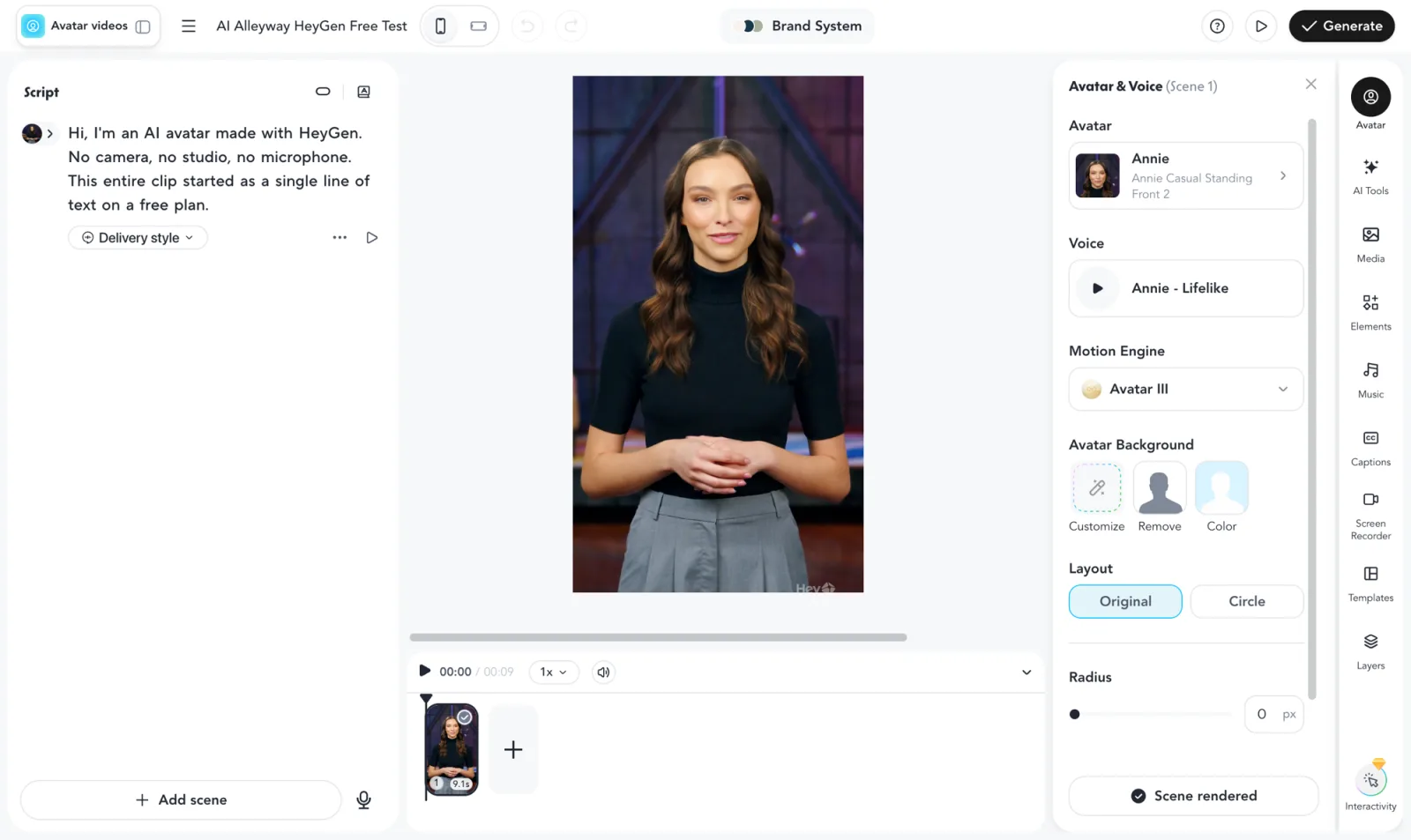
Here is the actual clip we generated on HeyGen’s free plan, so you can judge the avatar for yourself.
The catch is the packaging. The free plan is a funnel, not a tool: it allows three watermarked videos a month of up to a minute each, and in our July test it would not let us download the one we made. Credits are opaque too.
When we tested in July 2026, the premium engines burned 20 credits a minute, so Creator’s 600 credits ($29 a month, or $24 billed yearly) came to about 30 minutes of top-tier video, and the built-in voices are the weak link. Paid plans open up 700+ stock avatars and 175 languages and dialects. But as a paid tool for anyone who needs realistic avatars at volume, HeyGen is excellent. It scores 4.3, a Power Tool.
Read the full HeyGen review, see how it stacks up in our HeyGen vs Synthesia comparison, or decode the credits in our HeyGen pricing guide.
3. Tavus — best for real-time conversation

Tavus is the odd one out, and that is the point. It does not make scripted videos you play back; it builds conversational agents, real-time AI humans you talk to over what feels like a video call. If your project is a support agent, an AI tutor, or a sales rep that answers questions live, few of the other tools here are built for it.
In our test we held an actual conversation with “Charlie,” Tavus’s built-in AI assistant, and the real-time render was convincing, the closest thing to talking to a person that we have tried. It is developer-first, with whitelabeled APIs on every plan including the free one, and organized around the pieces a builder needs: replicas, a knowledge base, tools, and guardrails.
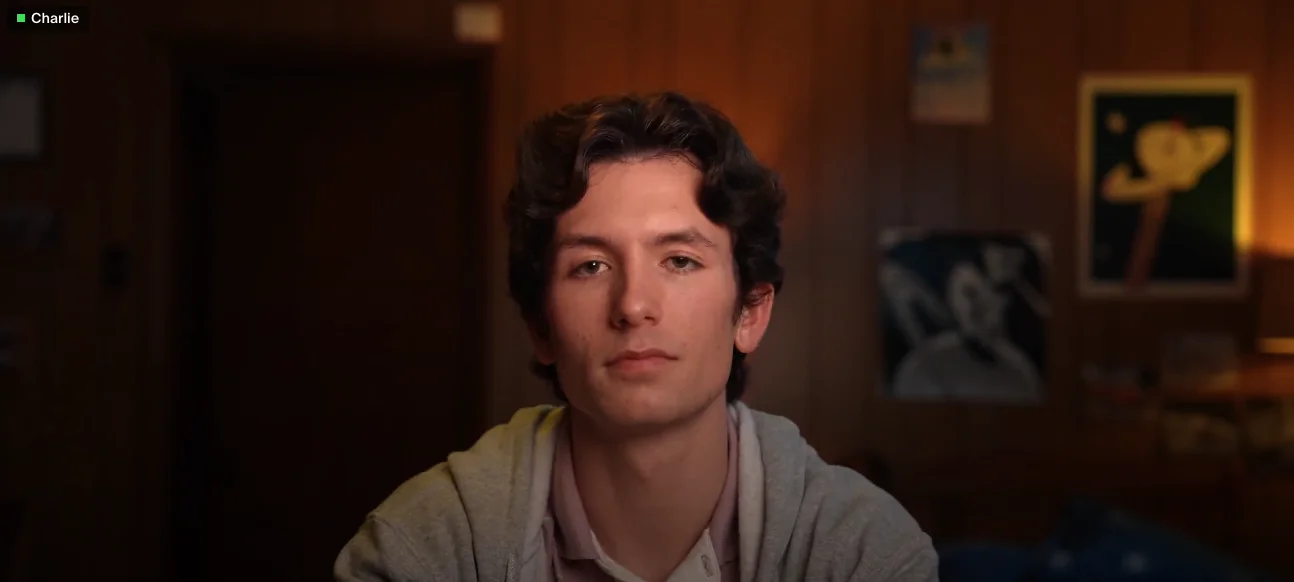
Around that core sit the pieces that make it a real platform rather than a demo: a knowledge base you attach so the agent knows your material, tools it can call, guardrails to keep it on-topic, and stock or custom “replicas” for the face. You build an agent by describing it to a no-code assistant or by wiring the API, which tells you who it is for: product and engineering teams, not solo creators.
The caveats are equally real. Tavus was still in beta when we tested it in July 2026, and our first call failed to connect and worked on a retry.
It is narrow, the wrong tool for a simple talking-head video, and priced by conversational minutes with pay-as-you-go overage, so costs are harder to predict than a flat plan. Its pricing page also showed more than one version of the developer tiers when we checked in November 2026, so confirm the minutes and the monthly fee at signup rather than trusting a figure quoted anywhere else, this page included. But real-time conversation is its whole product, where D-ID’s Agents and DeepBrain’s Interactive Avatar are side offerings, and it is the one we tested and would pick for that job. It scores 4.0, a Power Tool.
See the full Tavus review for the hands-on details, or the Tavus pricing guide for how the minutes are billed.
4. Colossyan — best for interactive training

Colossyan is the tool to look at when Synthesia is close but you need learners to do more than watch. We have not tested it; this section draws on its own pricing and product pages. It is built for corporate L&D, with the same slide-based editor and PowerPoint import, but its standout is interactivity: it bakes quizzes and branching scenarios into the video, so a learner can answer a question and the module responds. For onboarding, compliance, and sales enablement where retention matters, that is a genuine edge.
It covers the enterprise basics well: 300+ stock avatars on every plan, 120+ language variants, and instant custom avatars included on any plan. Pricing was restructured in 2026. Starter is now free, with 20 minutes a month on its NEO engine and 10 interactive videos. Professional is $59 a month on yearly billing, with 30 minutes, 15 interactive videos and watermark removal, plus $30 a month for each extra editor. Enterprise is a sales conversation, with unlimited minutes.
The interactivity is the real differentiator. Letting a learner answer mid-video and branch on their choice turns a passive compliance clip into something closer to a scenario simulation, a real retention upgrade for onboarding and enablement.
The limitation is that it is a specialist. Its pitch is interactivity rather than avatar realism, and outside interactive training there is little reason to choose it over Synthesia. But if your training genuinely needs the learner to click and decide, it is the best pick here.
| Colossyan | Starter | Professional |
|---|---|---|
| Price | Free | $59/mo (yearly billing) |
| Minutes (NEO engine) | 20 a month | 30 a month |
| Interactive videos | 10 a month | 15 a month |
| Watermark removal | Not listed | Included |
| Extra editors | N/A | $30/mo each |
- Pick it if: your training needs quizzes or branching, and you want to start free.
- Skip it if: you make marketing or social video, where HeyGen’s realism matters more.
5. D-ID — best for talking photos
D-ID solves a narrower problem than the video leaders, and solves it well: it animates a single still photo into a talking presenter. Feed it a headshot and a script or voiceover, and it produces a talking-head clip from that one image, which is perfect for personalized outreach where each recipient sees a familiar face. We have not tested D-ID; this section draws on its own product pages and FAQ.
Its second strength is developer reach. D-ID leans API-first, so teams can generate talking-photo videos programmatically at scale, and it has expanded into real-time “Agents” for conversational use. Pricing runs on separate Studio and API tracks, starting with a free trial. D-ID’s own FAQ says Trial and Lite videos carry a watermark, full-screen on the trial, and that unused minutes do not roll over. Its pricing page does not print plan prices in the page text, so check the live page before you budget.
That photo-first approach fits use cases the studio tools handle awkwardly: a personalized greeting built from a real customer’s photo, or developers spinning up talking heads for thousands of users through the API.
The trade-off is scope. D-ID does not try to be the full studio that Synthesia or HeyGen is, and a single photo gives the model less to work from than video, so expect an “animated photo” rather than a performing presenter. But if your job is turning portraits into talking videos, or building talking avatars into a product through an API, it is the specialist that fits.
| D-ID at a glance | Detail |
|---|---|
| Input | One photo plus a script or voiceover |
| Pricing tracks | Studio (web app) and API, separately |
| Trial | Free, with a full-screen watermark |
| Minutes | Renew monthly, unused minutes expire |
| Beyond video | Real-time conversational “Agents” |
- Pick it if: you start from photos, or you need talking heads generated through an API.
- Skip it if: you need a full video editor with scenes, templates and a library of presenters.
6. Vidnoz — best free option

Vidnoz earns its place on one axis: on paper, it has one of the most generous free plans here. We have not tested it; this section draws on its pricing page as of November 4, 2026. Where HeyGen and Synthesia gate downloads behind a paid plan, Vidnoz gives you daily free credits (a current promotion advertises 60 a day), access to more than 1,800 avatars and 890 voices, and videos up to three minutes on the free tier, so you can actually make and use something without paying. Free exports carry a watermark and cap at 720p, but that is a fair trade for a working free tool.
Beyond the free plan, it is a broad, budget-minded video generator aimed at creators and small teams producing a lot of video cheaply. It also advertises a large template library, 3,200+ video templates on every plan, which matters if you would rather fill in a layout than design scenes. Paid plans list 1,900+ avatars, 2,660+ voices and one-click translation across 135 languages, remove the watermark, export at 1080p and allow videos up to 60 minutes.
Per its pricing page, free exports can be downloaded, which would make the free tier genuinely useful rather than a locked demo, unlike the bigger names’ free plans that let you watch a video but not keep it. For anyone testing whether avatar video fits their workflow at all, that is the whole difference.
The honest caveat is that Vidnoz is built for price, not polish. It does not claim the enterprise governance of Synthesia, and the daily-credit model nudges you toward a paid plan as soon as you produce at any volume. But if cost is the constraint and you can live with a watermark, it is the best place to start without a credit card.
| Vidnoz | Free | Paid (Starter, Business) |
|---|---|---|
| Video length | Up to 3 minutes | Up to 60 minutes |
| Export | 720p, watermarked | 1080p, no watermark |
| Avatars | 1,800+ | 1,900+ |
| Voices | 890 | 2,660+ |
| Templates | 3,200+ | 3,200+ |
- Pick it if: you need to make real videos at zero cost, or you want templates to start from.
- Skip it if: realism is the point of the video, or you need enterprise governance.
7. ElevenLabs — best for voice-first creators
ElevenLabs came at avatars from the opposite direction to everyone else here. It built the voices first, and its new Avatars feature puts a face on them. If you already narrate with an ElevenLabs voice, especially a clone of your own, this is the shortest path to a talking-head video in that same voice.
The workflow is image-led. You upload several reference images of the same person or character from different angles, name the avatar, and reuse it across videos, with “styles” for different outfits, backgrounds or lighting. Avatars can be people, characters or animals, and text to speech is built into the avatar prompt, so the voice and the video are generated in one step. ElevenLabs picks the lip-sync model for you, and its Flows tool has an Avatar node for producing videos in batches.
| ElevenLabs Avatars | What the vendor page says |
|---|---|
| How you create one | Several reference images from different angles |
| Voices | Any ElevenLabs voice, including your cloned voice |
| Plans | All paid plans, from Starter at $6 a month |
| Billing | Shared credits under Image & Video pricing |
| API | Not at launch, “planned for a future release” |
It is new, and it shows in the gaps. There is no API yet, avatars are not on the free plan, and the cost per video depends on which model and resolution you pick, so it is hard to price up front. ElevenLabs itself warns that single-image results may be inconsistent. We have not tested it, so it carries no Alley Rating, and it does not replace HeyGen for realism or Synthesia for governance.
Where it wins is the voice. ElevenLabs’ voices and cloning are its core product, while voice is HeyGen’s weak link, so for narrators, educators and channels whose identity is their voice, it fits the job better than tools that bolt voices onto an avatar. Our ElevenLabs review covers the voice side in depth, and the ElevenLabs pricing guide explains the credits.
- Pick it if: your voice, or a cloned voice, is the core of your content.
- Skip it if: you need an API today, or a free plan to experiment on.
8. AI Studios by DeepBrain — best for long videos on a flat plan

AI Studios, from DeepBrain AI, is a tool many avatar shortlists include and ours had left out. It earns its place on pricing shape. Where Synthesia meters minutes and HeyGen meters credits, the Personal plan is $24 a month with videos up to 30 minutes each and no monthly cap on the number of videos, according to its pricing page.
That makes it the practical pick for long-form work: explainers, course modules, internal updates and news-style briefings that run well past the few minutes an entry plan elsewhere covers. Personal also includes 120 minutes of AI dubbing a month, three custom video avatars and photo avatars, and Team at $55 per seat a month stretches videos to 60 minutes.
| AI Studios | Free | Personal | Team |
|---|---|---|---|
| Price | $0 | $24/mo | $55 per seat/mo |
| Video length | Up to 1 minute | Up to 30 minutes | Up to 60 minutes |
| Videos per month | 3 | No cap listed | No cap listed |
| Stock avatars | 40+ | 100+ | 155+ |
| Custom video avatars | 1 | 3 | 5 |
| AI dubbing | 1 minute | 120 minutes/mo | 240 minutes/mo |
The library is split in two: a smaller set of stock presenters, 100+ on Personal, and 2,000+ AI-generated avatars on every plan. Dubbing covers 73 languages and dialects, and voiceover 50+ on paid plans. DeepBrain also sells a separate Interactive Avatar product for real-time sessions, at $99 a month on its Standard plan, which puts it in Tavus territory too.
We have not tested AI Studios, so it carries no Alley Rating and we cannot vouch for its realism against HeyGen’s. Its stock lineup is smaller than HeyGen’s 700+, and the pricing page does not say whether the free plan’s videos carry a watermark. But if your videos are long and you want a predictable bill, the flat plan is a clear, predictable offer.
- Pick it if: you make long videos often and want one flat monthly price.
- Skip it if: avatar realism is the deciding factor, or you need enterprise governance on day one.
Which AI avatar generator should you choose?
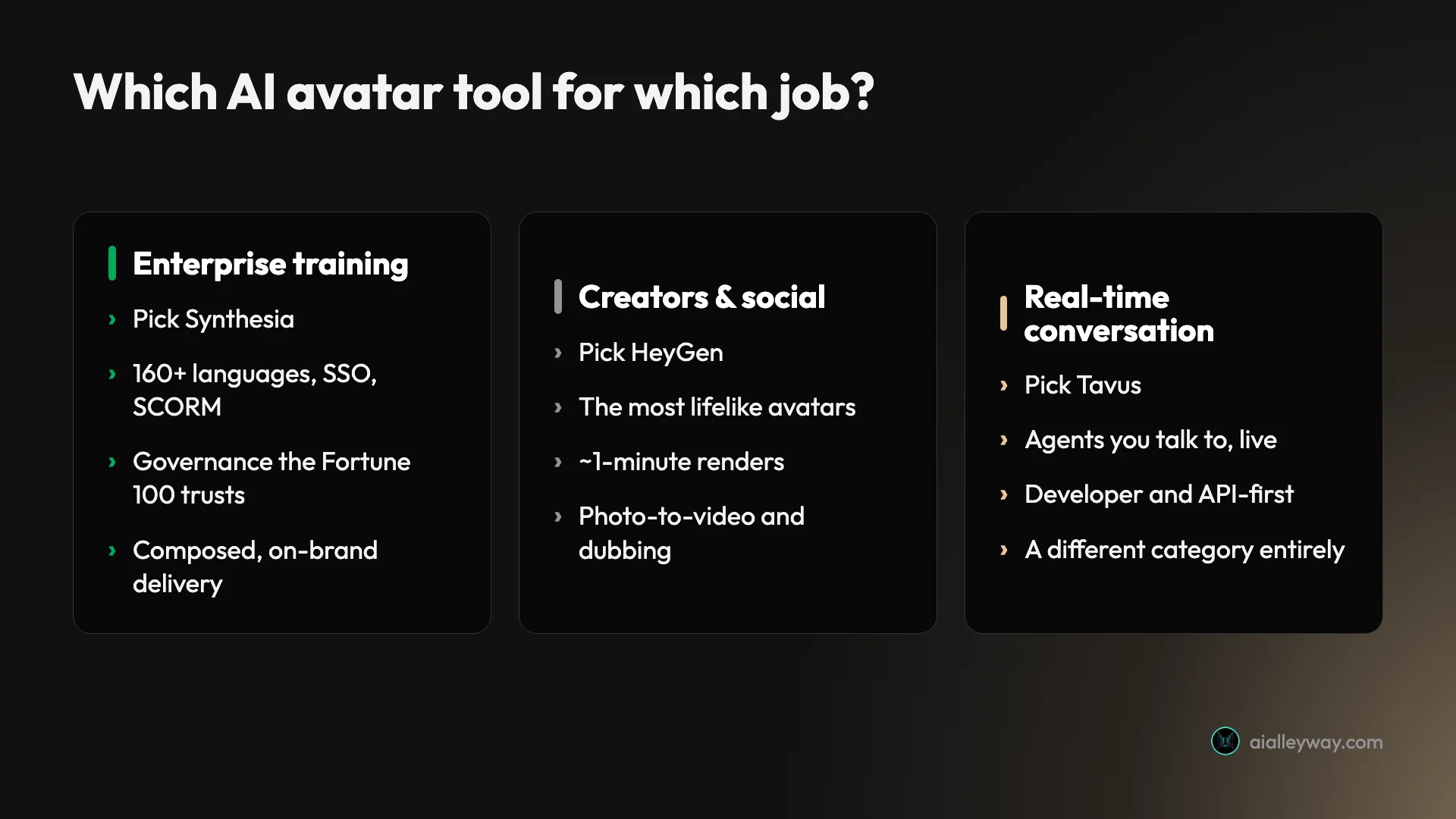
Choose by the job: Synthesia for company training video, HeyGen for creator content, Tavus for live conversation. If you are rolling out training or corporate video across a company, Synthesia is the safest choice: it was our top-rated tool at 4.6, and its SSO and SCORM export (on Enterprise), moderation and 140+ languages are what an IT team checks before approving anything. If you make social clips, ads or creator content, HeyGen gave the most lifelike avatars in our tests and rendered in about a minute.
If users need to talk to the avatar live, Tavus is the tool here built first and foremost for real-time conversation. For interactive training with quizzes and branching, look at Colossyan; for talking photos or an API, D-ID; for zero budget, Vidnoz; for voice-led content, ElevenLabs; and for long videos on one flat price, AI Studios. If none of these fit, our HeyGen alternatives and Synthesia alternatives guides go wider.
Use this as a shortcut.
- Standardizing training or corporate video across a company? Pick Synthesia for its governance and languages, or Colossyan if the training needs to be interactive.
- Making social clips, ads, or creator content? Pick HeyGen for the most lifelike avatar and the fastest render in our tests.
- Building a product where users talk to an AI in real time? Pick Tavus, built first and foremost for live conversation.
- Turning existing photos into talking videos, or generating them via an API? Pick D-ID.
- On a tight or zero budget? Pick Vidnoz for its downloadable free tier, per its pricing page.
- Your voice is the product? Pick ElevenLabs, and pair its avatar with your cloned voice.
- Making long videos every week? Pick AI Studios for its flat plan and 30-minute videos.
How do you make an AI avatar from a photo?
If you want a custom presenter without filming yourself, start from a photo. It is the fastest route, and four of the tools here support it in different ways.
| Tool | Photo route | Worth knowing |
|---|---|---|
| D-ID | One headshot plus a script or voiceover | Built for this; “animated photo” rather than a performer |
| HeyGen | Photo avatars from one front-facing image | Up to 3 on the free plan, unlimited on paid plans |
| Synthesia | Personal avatar from one high-quality photo | Live on-camera consent recording required |
| ElevenLabs | Several reference images from different angles | Single images may give inconsistent results |
The trade-off is motion. A model that only saw one still has to invent how the face moves, so photo avatars look stiffer than avatars trained on a short video, and it shows most on long scripts. Use a photo for speed or for personalized outreach, and record a short video when the avatar will front long or important content.
What to check before you pay
Spec sheets compare avatar counts. These are the things that decide whether the video is usable.
- Lip-sync on your own script. Run a paragraph with names, numbers and a fast sentence through the free plan. That is where mouths drift.
- What the free plan lets you keep. Confirm you can download before you build a workflow on it.
- Templates and layouts. If you would rather fill in a layout than design scenes, a library like Vidnoz’s 3,200+ templates beats a blank canvas.
- Backgrounds. Check whether you can place the avatar over your own background or brand colors on the plan you are buying, not just in the demo.
- Consent rules for custom avatars. Synthesia, for example, requires a live consent recording, and some tools reserve custom avatars for paid plans.
The one mistake to avoid is picking on realism alone. HeyGen’s avatars were the most lifelike in our tests, but if you are shipping localized compliance training, Synthesia’s governance matters more than a slightly more expressive face, and if you need a live conversation, no amount of realism helps a tool that only plays back scripts.
So what is the best AI avatar generator?
There is no best AI avatar generator, only the best one for your job, and for most buyers that is Synthesia for enterprise video or HeyGen for creator content. Both back up a free plan good enough to judge quality before you pay, even if neither lets you download the result, so the safest move is to test your top two on the same script and let the output decide.
Prices in this guide were last checked against each vendor’s page on November 4, 2026; these tools reprice often, so confirm before you buy. If you are choosing between the two front-runners, our hands-on Synthesia review and HeyGen review go deeper, and the HeyGen vs Synthesia comparison settles it axis by axis.
Frequently asked questions
What is the best AI avatar generator?
Synthesia is our top pick overall, rated 4.6 in our hands-on review, because it does the highest-stakes job best: corporate training video at scale, with moderation, 140+ languages, and SSO and SCORM export on Enterprise. For creators and social content, HeyGen (4.3) is the better choice, with the most lifelike avatars we tested and renders in about a minute.
The rest depends on the job. Tavus (4.0) is built for real-time conversation rather than scripted playback. Colossyan suits interactive training, D-ID turns photos into talking heads, Vidnoz has one of the most generous free tiers on paper, ElevenLabs suits creators whose voice is the product, and AI Studios offers 30-minute videos on a $24 flat plan. Prices were checked against each vendor's page on November 4, 2026.
What is the best free AI avatar generator?
On paper, Vidnoz has one of the most generous free tiers here as of November 4, 2026, with daily free credits (a current promotion advertises 60 a day), access to more than 1,800 avatars, and videos up to three minutes, and its pricing page says free exports download with a watermark at 720p. We have not tested Vidnoz ourselves.
The bigger names have free plans too, but they are previews rather than working tools. HeyGen gives three watermarked videos a month capped at one minute, and Synthesia gives ten watermarked minutes a month; in our July 2026 tests neither let us download the result. Colossyan's free Starter plan is the newest option, with 20 minutes a month and 10 interactive videos. Use the leaders' free plans to judge quality, then expect to pay to keep anything.
Which AI avatar generator is the most realistic?
HeyGen, in our hands-on testing. Its Avatar IV and V engines gave the most lifelike delivery of the tools we tried, with natural gestures, blinking and micro-movements convincing enough to pass at a glance, and it held a 4.8 rating on G2 across 1,975 reviews when we checked on November 4, 2026.
Synthesia came a close second with a cleaner, more composed style that suits corporate video, and Tavus produced a strikingly realistic real-time face in a live conversation. We did not test Colossyan, D-ID, Vidnoz, ElevenLabs or AI Studios, so we cannot rank their realism. For a scripted talking head that looks human at a glance, HeyGen is the one to beat among the tools we tested.
Which AI avatar tool is best for corporate training?
Synthesia is the default choice, built for training and trusted by 90% of the Fortune 100 by its own count, with content moderation, 140+ languages, and SCORM export and SSO on Enterprise. Colossyan is the strongest alternative, and it edges ahead specifically for interactive training, since it builds quizzes and branching scenarios into the video.
Both use a slide-based editor that mirrors PowerPoint, so a training team can import an existing deck rather than rebuild it. If you need standard training video at scale, pick Synthesia; if you need learners to click and make choices, look at Colossyan.
Can I create an AI avatar of myself?
Yes. Most of these tools build a custom avatar (sometimes called a digital twin or personal avatar) from a short recording or a photo. Synthesia accepts a single high-quality photo for the quickest result, or a short video for more natural motion. HeyGen's free plan includes one custom video avatar and up to three photo avatars, and ElevenLabs builds one from several reference images of the same person.
Consent controls vary. Synthesia requires a live on-camera consent recording that cannot be skipped or uploaded later, and the person in it must match the avatar and be at least 18. Check each tool's likeness policy before cloning yourself, and never clone anyone else without their permission.
Is HeyGen or Synthesia better?
HeyGen is better for creators and Synthesia is better for companies. In our July 2026 tests HeyGen made the more lifelike avatar and rendered a nine-second clip in about a minute, against four to five minutes on Synthesia, which suits social and marketing work. Synthesia, rated 4.6 to HeyGen's 4.3, is built for enterprise, with moderation, 140+ languages, SSO and SCORM export on Enterprise and a slide-based editor for training.
On price, Synthesia's Starter is $19 a month ($14 billed yearly) and HeyGen's Creator is $29 ($24 yearly), as listed on November 4, 2026, and both meter usage in credits. Neither free plan let us download our test clip. Our full HeyGen vs Synthesia comparison breaks it down axis by axis.
Can I make an AI avatar from a photo?
Yes, and it is the fastest way to get a custom presenter. D-ID was built for it: one headshot plus a script becomes a talking-head clip. HeyGen's photo avatars turn a single front-facing image into a talking character, with up to three on the free plan and unlimited on paid plans, and Synthesia lets you upload one high-quality photo to create a personal avatar.
A photo avatar moves less naturally than one trained on video, because the model has to invent motion it never saw. ElevenLabs says outright that single-image results may be inconsistent and asks for several angles. Use a photo for speed and a short video recording when the avatar will front long or important content.
Can I use AI avatar videos commercially?
On a paid plan, usually yes, but read the vendor's terms for the plan you buy, because free tiers are where vendors restrict use and add watermarks. The bigger legal risk is likeness, not licensing: only build a custom avatar of yourself or of someone who has given clear permission. Synthesia enforces this with a live on-camera consent recording.
Stock avatars come under the platform's own licence, so the question there is simply what your plan's terms allow. Telling viewers that a presenter is AI-generated is good practice, and some rules require it: the EU AI Act, for example, includes transparency duties for AI-generated video that depicts real-looking people. Check the rules where you publish.
Keep reading
HeyGen alternatives: the best one depends on why you left
Leaving HeyGen? The best HeyGen alternative isn't one tool: Synthesia (4.6 on G2) for training, Creatify for ads, Tavus for real-time, plus 3 more by job.
Synthesia pricing: what the minutes really cost
Synthesia starts at $14/mo billed yearly ($19 monthly), but you pay in credits, and Starter buys about 22 minutes of video a month. Here's the math.
Synthesia review: the enterprise standard, at a price
I made a real avatar video on Synthesia's free plan. The output is enterprise-clean, but you can't download it and the minutes run out fast. Who should pay.
Synthesia alternatives: cheaper, or more lifelike?
Leaving Synthesia over the price or the stiff avatars? HeyGen (4.8 on G2) is more lifelike and cheaper, plus 5 more picks sorted by why you're switching.